
Why your emails go to spam, and the fixes in the order that matters
Most emails land in spam for one of five reasons: missing authentication, a weak sending reputation, a dirty list, risky content or low engagement. Check them in that order, because the first two decide whether the rest even counts.
· 5 min read · 1.2K views · by the Cortex Digital Hub team
Add your sending domain and get the exact DKIM, MAIL FROM and DMARC records, with a live green or red check for each one. No monthly plan · live DNS checks
Check your domain records → → Opens Sending setup · runs in your browser
If you are asking why are my emails going to spam, the answer is almost always one of five things, and they matter in this order: the receiving server cannot verify that the email is really from you (SPF, DKIM and DMARC), your domain has a weak or damaged reputation, your list holds dead or unwilling addresses, the email itself looks risky, or recipients ignore or report what you send. Fix authentication first. Until that passes, no amount of subject-line polishing will move you to the inbox.
Why are my emails going to spam? The five causes in order
Gmail, Yahoo and Outlook score every message they receive. The scoring is not public, but the signals they describe in their sender guidelines fall into five groups.
| Order | Cause | Typical symptom | First fix |
|---|---|---|---|
| 1 | Authentication missing or failing | "via amazonses.com" next to your name, DMARC fail in headers | Publish SPF, DKIM and DMARC |
| 2 | Weak or damaged reputation | New domain, sudden volume jump, all mail in spam at once | Slow down, send to engaged people first |
| 3 | Poor list quality | Hard bounces above 2%, complaints from people who don't remember you | Clean the list, suppress bounces |
| 4 | Risky content or links | Only some campaigns land in spam | Fix image-only layouts, shorteners, broken HTML |
| 5 | Low engagement | Inbox placement slowly drifting down over weeks | Stop mailing people who never open |
The order matters because each layer sits on the one above it. A well-written email from an unauthenticated domain still goes to spam. A fully authenticated domain mailing a bought list still collects complaints.
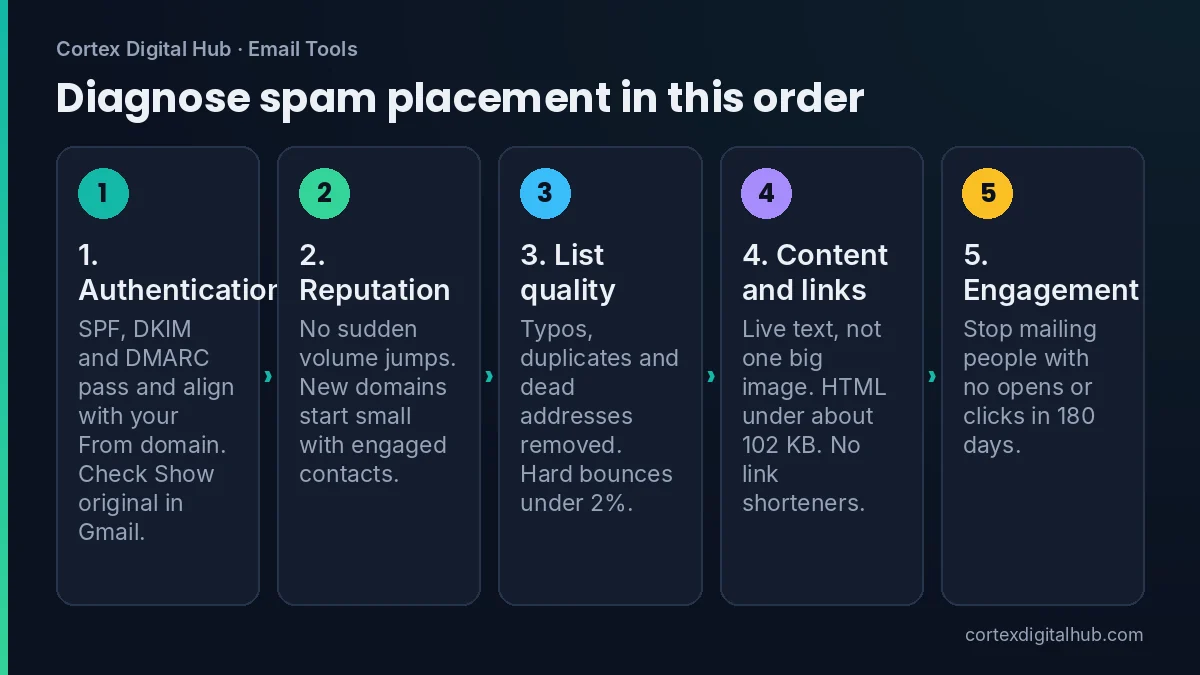 Work from the top: a failure higher up hides everything below it.
1. Authentication: prove the email is yours
Three DNS records do this job. SPF lists which servers may send for your domain. DKIM adds a signature that the receiver checks against a public key in your DNS. DMARC tells the receiver what to do when neither check passes for the domain in your From address.
A typical set for a domain sending through Amazon SES in Mumbai looks like this (DKIM uses three CNAME records; one is shown):
bounce.yourdomain.com.             MX     10 feedback-smtp.ap-south-1.amazonses.com.
bounce.yourdomain.com.             TXT    "v=spf1 include:amazonses.com ~all"
abc123._domainkey.yourdomain.com.  CNAME  abc123.dkim.amazonses.com.
_dmarc.yourdomain.com.             TXT    "v=DMARC1; p=none; rua=mailto:[email protected]"
Since February 2024, Gmail and Yahoo have required every sender to pass SPF or DKIM, and anyone sending around 5,000 or more messages a day to Gmail needs both, plus a DMARC record. Microsoft applied similar rules to Outlook.com and Hotmail from May 2025. These rules have been enforced more strictly since, so check each provider's sender guidelines page for the current detail.
The Sending setup page gives you the exact records for your domain and shows a green or red check for each once DNS has updated. If you send through SES, the Amazon SES setup guide covers each step.
Three common traps:
- Two SPF records on one domain. Only one is allowed; merge them.
- Sending "from" a Gmail or Yahoo address through a bulk tool. You cannot authenticate a domain you don't own, so this fails DMARC.
- DKIM signed with the provider's domain instead of yours. DKIM passes but does not align with your From address, so DMARC still fails.
2. Reputation: the history behind your domain
Once a receiver knows the mail is yours, it asks whether your past mail was wanted. A new domain has no history, so a first send of 20,000 emails looks exactly like a spammer testing a fresh domain. Reputation builds from consistent volume, low complaints, low bounces and recipients who open, reply or rescue you from spam.
A reputation problem usually shows as everything going to spam at once, not just one campaign, or as providers deferring your mail with 4xx codes. The fix is slow and boring: cut volume, send only to recent, engaged contacts for a couple of weeks, then ramp up again. On a shared IP, your provider's IP reputation also counts, which is one reason the choice of service matters. The email providers comparison shows how each one handles it.
3. List quality: who you are sending to
Bad addresses hurt twice. Hard bounces tell receivers you don't look after your list, and long-abandoned addresses can be turned into spam traps. A typical lead list from website forms and property portals in India carries typos such as gmial.com, rediffmal.com and .con endings, plus duplicates and throwaway addresses.
Run the list through the Email List Cleaner before any large send. It fixes common domain typos and removes duplicates, invalid and throwaway addresses in your browser, without uploading the file. The free cleaning does not confirm that each mailbox exists; the optional paid mailbox check does, and either way read your bounce report afterwards. A working rule: keep hard bounces under 2% of a send and investigate anything above it.
Consent matters as much. People who never asked for your email report it, and spam reports are the signal providers weigh most heavily. Gmail asks senders to keep their reported spam rate below 0.3%, and ideally below 0.1%, which is one report per 1,000 emails delivered.
4. Content and links
Content rarely sends a well-authenticated, well-liked sender to spam, but it can tip a borderline one. Check for:
- An email that is one large image with no live text. Mix image sections with real HTML text.
- Heavy HTML. Gmail clips messages over about 102 KB, which can hide your footer and unsubscribe link.
- Link shorteners and links to unrelated domains. Use your own domain where you can.
- Large attachments. Link to the brochure instead, after shrinking it with the PDF compressor.
- No unsubscribe link or postal address in the footer.
The Email Composer turns a campaign creative into image strips plus live text, real buttons and a compliant footer, and lets you send up to 15 free test emails a day to yourself, so you can see where each version lands. Shrink heavy creatives first with the image compressor.
5. Engagement over time
Gmail in particular learns from what each recipient does. Opens, replies and "Not spam" clicks help. Deleting without reading and reporting spam hurt. Keep mailing people who have not opened anything in six months and your placement for everyone slowly slides.
Segment by activity. Send regular campaigns to people who engaged in the last 90 to 180 days, and send the rest one short "still interested?" email before you stop mailing them.
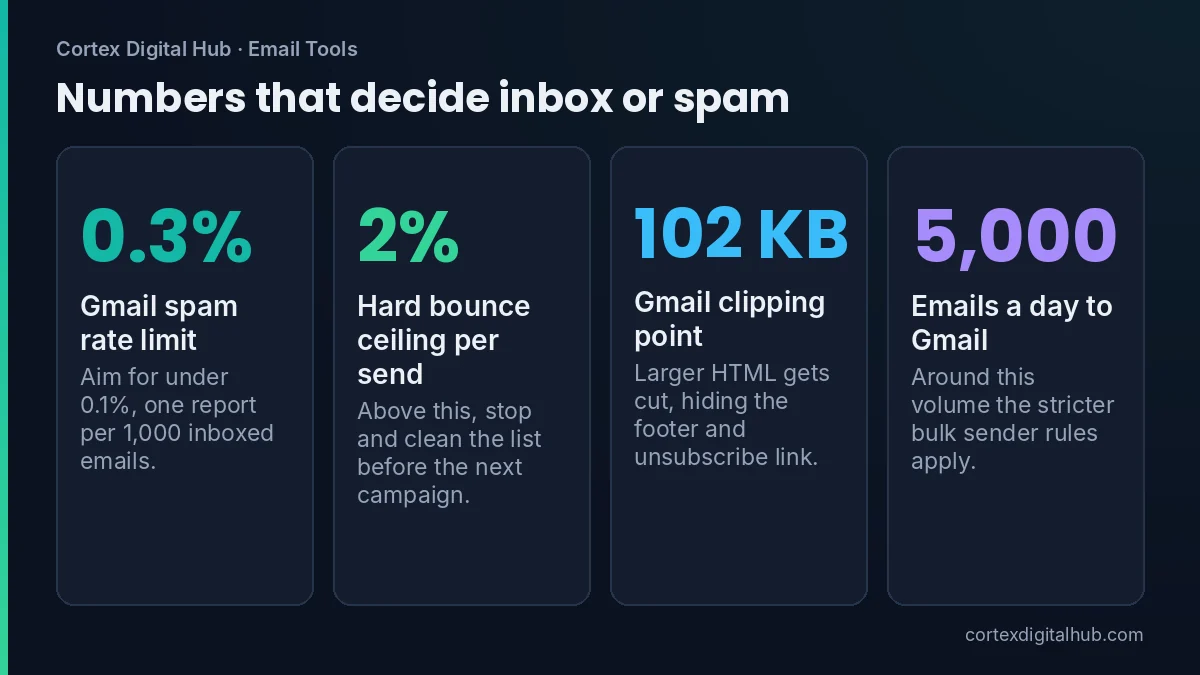 The numbers worth memorising. Provider rules can change, so check their sender pages.
Diagnose your own spam problem in ten minutes
Stop at the first step that fails and fix it before moving on.
- Send a test to a Gmail address, open it, choose Show original and confirm SPF, DKIM and DMARC say PASS.
- In the same view, check that the DKIM domain (
d=) matches your From domain. - Look at your last campaign: hard bounce rate and complaint rate.
- Ask whether the problem hits all mail or one campaign. All mail points to authentication or reputation; one campaign points to content or list.
- Check which providers are affected. Gmail only, Outlook only, or everyone tells you which rules to read first.
Frequently asked questions
Why are my emails going to spam when my content is fine?
Content is rarely the main cause. Check authentication first: open your email in Gmail, choose Show original and look for PASS next to SPF, DKIM and DMARC. If those pass, look at your domain's sending history and how many people on your list actually open your mail.
Why do my emails go to spam only in Gmail?
Gmail weighs engagement and spam reports heavily and applies its sender rules strictly. A spam rate above 0.3% or a missing DMARC record often shows up at Gmail before anywhere else. Register your domain in Google Postmaster Tools to see what Gmail sees.
Can a new domain send without going to spam?
Yes, if it is authenticated and you start small. Send to your most engaged contacts first, at low volume, and raise it over two to four weeks. A first send of thousands of emails from a brand-new domain usually lands in spam.
Do spam words like FREE or OFFER send emails to spam?
Not on their own. Modern filters look at who sent the email and how recipients react far more than at individual words. Misleading subject lines still hurt, though, because they drive spam reports.
Will a dedicated IP stop my emails going to spam?
Only if you send enough volume to keep it warm, usually tens of thousands of emails a week. For smaller senders a good shared IP from a reputable provider is often safer, because a cold dedicated IP has no history at all.
How long does it take to get out of the spam folder?
After fixing authentication, results can change within days. Repairing a damaged reputation usually takes two to six weeks of steady, low-complaint sending to engaged recipients. There is no switch that resets it instantly.
Does asking people to mark my email as not spam help?
It helps a little for those recipients, and their actions feed into your reputation. It is not a fix for missing authentication or a poor list, so treat it as a final nudge, not the main plan.