
Gmail and Yahoo bulk sender rules: the checklist for 5,000+ emails a day
If you send around 5,000 or more emails a day to Gmail, you need SPF and DKIM, a DMARC record aligned with your From address, one-click unsubscribe and a spam rate under 0.3%. Here is each rule, the records behind it and what happens if you miss one.
· 5 min read · 654 views · by the Cortex Digital Hub team
Add your domain to see the exact DKIM, MAIL FROM and DMARC records Gmail expects, each with a live pass or fail check. No monthly plan · live DNS checks
Get your DKIM and DMARC records → → Opens Sending setup · runs in your browser
Gmail bulk sender requirements apply to anyone who sends around 5,000 or more messages a day to personal Gmail accounts. You need SPF and DKIM both passing, a DMARC record (p=none is the minimum) that aligns with the domain in your From address, one-click unsubscribe on marketing mail that you honour within two days, a user-reported spam rate below 0.3%, valid reverse DNS and TLS. Yahoo announced the same set in February 2024. As of 2026 Gmail enforces these rules by rejecting non-compliant mail, not just filtering it.
Gmail bulk sender requirements at a glance
Some rules apply to every sender. The bulk tier adds more on top.
| Requirement | All senders | Bulk senders (5,000+/day) |
|---|---|---|
| SPF or DKIM passing | Required | Both SPF and DKIM |
| DMARC record | Recommended | Required, p=none minimum, aligned |
| Forward and reverse DNS (PTR) | Required | Required |
| TLS for transmission | Required | Required |
| Spam rate in Postmaster Tools | Below 0.3% | Below 0.3%, aim for 0.1% |
| One-click unsubscribe | Recommended | Required on marketing mail |
| Messages formatted to RFC 5322 | Required | Required |
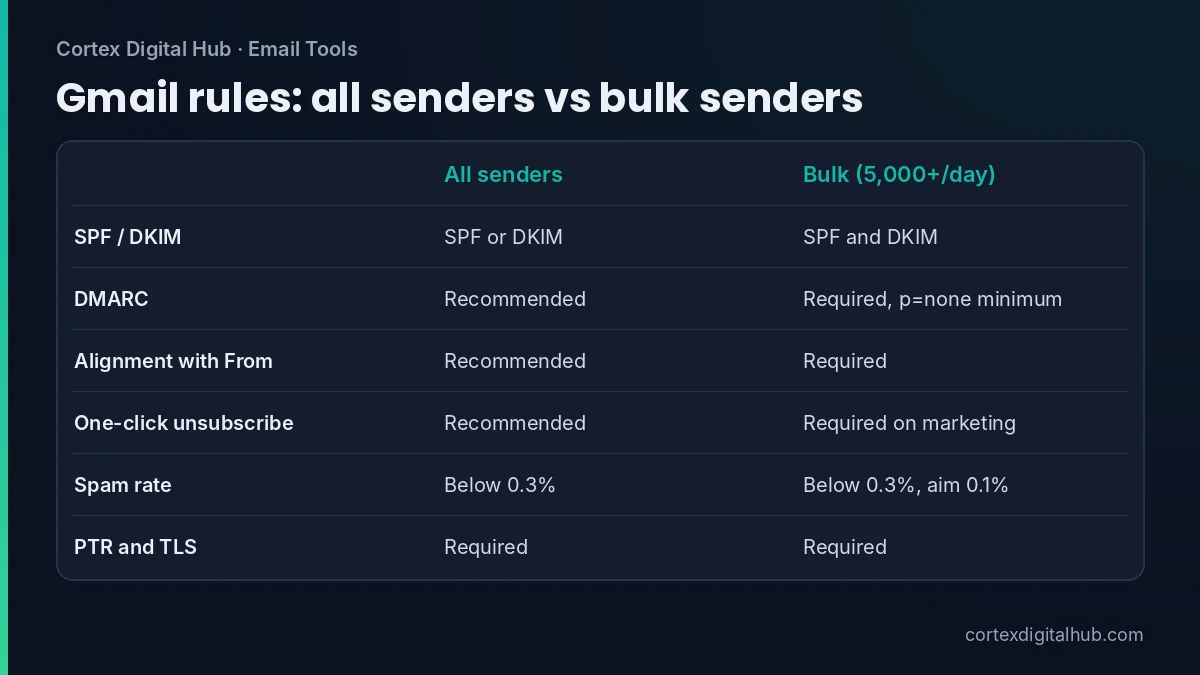 The bulk tier turns "or" into "and", and adds DMARC and one-click unsubscribe.
Who counts as a bulk sender
Google's line is close to 5,000 messages to personal Gmail accounts in 24 hours. Three details catch people out:
- It counts by primary domain. Mail from news.yourdomain.com and yourdomain.com is added together.
- It is permanent. Hit 5,000 once, say on a launch day, and you are treated as a bulk sender afterwards even if volume drops.
- It counts Gmail recipients only, and on most Indian consumer lists gmail.com is the largest single domain by far. Count yours: if 5,000 of a 7,000-contact list are Gmail, one campaign crosses the line on its own.
If you are anywhere near the number, simply meet the bulk rules. They are good practice at any size.
Authentication: SPF, DKIM and aligned DMARC
SPF says which servers may send for your domain. DKIM signs each message. DMARC ties them to the address people see. For a background on each, read what an SPF record is, how DKIM works and what DMARC does.
The word that matters is aligned. DMARC passes only when SPF or DKIM passes for the same domain as your From address (or a subdomain of it, under relaxed alignment). If you send as [email protected] but your provider signs DKIM as d=provider-mail.net, DKIM passes and DMARC still fails.
A minimal compliant set for yourdomain.com sending through Amazon SES:
abc123._domainkey.yourdomain.com.  CNAME  abc123.dkim.amazonses.com.   (one of three)
bounce.yourdomain.com.             MX     10 feedback-smtp.ap-south-1.amazonses.com.
bounce.yourdomain.com.             TXT    "v=spf1 include:amazonses.com ~all"
_dmarc.yourdomain.com.             TXT    "v=DMARC1; p=none; rua=mailto:[email protected]"
The custom MAIL FROM (bounce.yourdomain.com) is what makes SPF align; without it SPF passes for amazonses.com, not for you. Sending setup generates these exact records for your domain and checks them live, and the Amazon SES setup guide shows where each one goes.
One-click unsubscribe, honoured in two days
Marketing and subscribed mail must carry two headers defined in RFC 8058:
List-Unsubscribe: <https://yourdomain.com/u/8f3a2c>, <mailto:[email protected]>
List-Unsubscribe-Post: List-Unsubscribe=One-Click
Gmail then shows an Unsubscribe link beside your sender name. When someone taps it, Gmail sends a POST to your URL and you must stop mailing that address within two days. No login, no "are you sure" page. You still need a visible unsubscribe link in the footer as well; the Email Composer adds a compliant footer with your address and unsubscribe link to every email it builds.
Keep the spam rate under 0.3%
This is the rule that most often hurts senders who are otherwise compliant. Gmail measures the share of your inboxed mail that recipients report as spam. Below 0.1% is healthy. Between 0.1% and 0.3% you are in a warning zone. At 0.3% and above you lose eligibility for help from Google if delivery breaks.
On 10,000 delivered emails, 0.3% is just 30 reports. Old leads who forgot they enquired, purchased lists and sending too often are the usual causes. Clean the list with the Email List Cleaner before a big send, and stop mailing contacts who have not engaged in six months. The full diagnosis order is in why emails go to spam.
Infrastructure: PTR, TLS and formatting
If you use a provider such as Amazon SES, SendGrid, Mailgun, Postmark or Brevo, they handle the sending IP's reverse DNS (PTR) and TLS for you. You only need to worry about these if you run your own mail server. Two content rules still apply to everyone: don't put @gmail.com in your From address when sending through another service, and send well-formed messages with one From header and a valid Message-ID. The email providers comparison covers which services handle what.
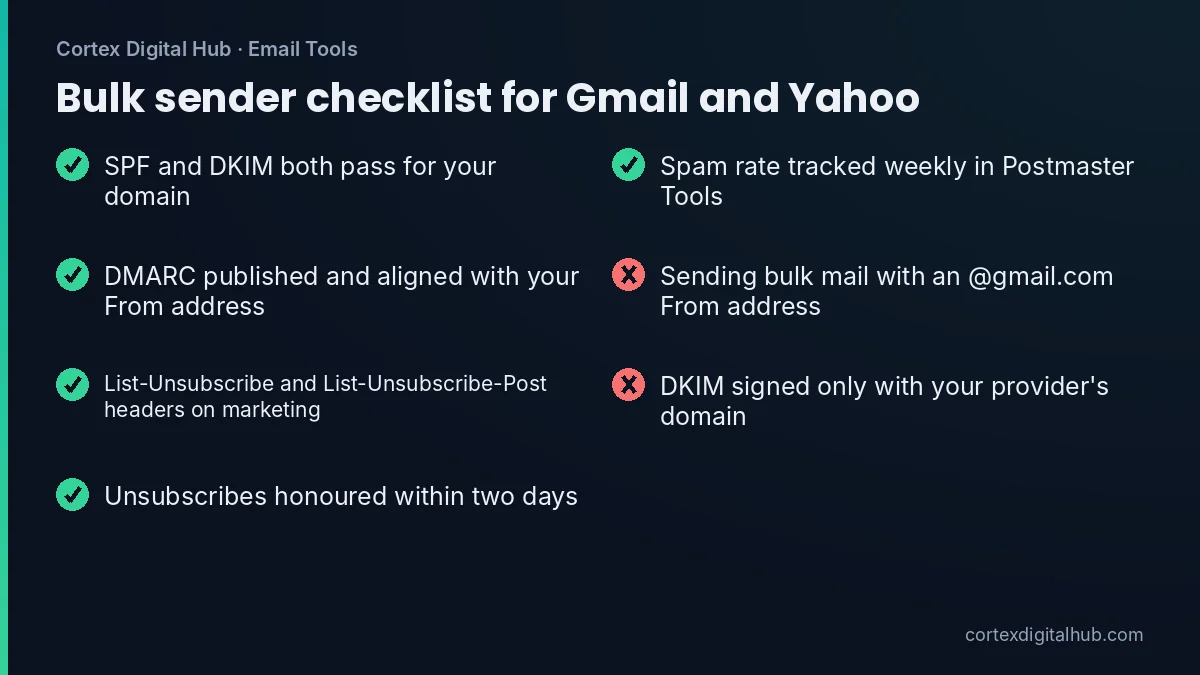 Seven checks to tick before your next campaign to Gmail and Yahoo.
How Yahoo's version differs
Yahoo published its rules alongside Google's, and the substance is the same: authenticate with SPF and DKIM, publish DMARC, support one-click unsubscribe and honour it within two days, and keep complaints low. Two practical differences:
- Yahoo does not publish a fixed volume threshold. It says the stricter rules are for bulk senders, without a number, so the safe reading is that they apply to anyone sending marketing in volume.
- Yahoo runs a Complaint Feedback Loop that sends you a copy of each complaint, so you can remove that exact address. Gmail does not tell you who complained; it only shows a rate in Postmaster Tools. Sign up for Yahoo's loop through its Sender Hub if your provider has not already done so for you.
Yahoo also runs AOL mailboxes, so the same rules cover aol.com addresses on your list. Check Yahoo's Sender Hub for the current wording, as with Gmail.
What happens if you miss a rule
From February 2024 the rules were phased in with warnings and partial filtering. From November 2025 Gmail began rejecting a growing share of non-compliant mail, with temporary 4.7.x deferrals and permanent 5.7.x bounces that name the missing requirement. Microsoft applied similar rules to Outlook.com, Hotmail and Live.com senders above 5,000 a day from May 2025, rejecting with 550 5.7.515. Rules and enforcement keep evolving, so check Google's Email sender guidelines and Yahoo's Sender Hub for the current wording.
Your compliance check for this week
- Send a test to Gmail, choose Show original, confirm SPF, DKIM and DMARC all say PASS.
- Confirm the DKIM
d=domain matches your From domain. - Publish a DMARC record with a
ruaaddress if you have none. - Confirm marketing mail carries both List-Unsubscribe headers.
- Register in Google Postmaster Tools and read your spam rate weekly.
- Remove anyone who has not opened or clicked in six months.
Frequently asked questions
What counts as a bulk sender for Gmail?
Google defines a bulk sender as one that has sent close to 5,000 or more messages to personal Gmail accounts within 24 hours. Mail from the same primary domain counts together, including subdomains. Once you reach that level, Google treats you as a bulk sender from then on.
Do the Gmail rules apply to Google Workspace recipients?
The 5,000 count is about personal Gmail accounts (gmail.com and googlemail.com). Workspace domains have their own admin settings, but authentication and a low spam rate help everywhere, so set them up regardless.
Is DMARC p=none enough for Gmail?
Yes, for the bulk sender rules a DMARC record with p=none meets the minimum, as long as SPF or DKIM passes and aligns with your From domain. A stricter policy protects your domain from spoofing, but it is not required by these rules.
Do transactional emails need one-click unsubscribe?
No. Gmail's one-click requirement is for marketing and subscribed messages. Password resets, OTPs, booking confirmations and receipts are exempt, though they still need SPF, DKIM and DMARC.
What spam rate does Gmail allow?
Gmail asks senders to stay below 0.3% user-reported spam and recommends staying under 0.1%. Rates at or above 0.3% make you ineligible for mitigation if you have delivery problems. Track it in Google Postmaster Tools.
What happens if I don't meet the requirements?
Gmail started rejecting a growing share of non-compliant mail from November 2025, with temporary 4.7.x deferrals and permanent 5.7.x rejections. Before that, many messages went to spam instead. Either way, mail stops reaching inboxes.
Does Yahoo have the same rules as Gmail?
Very close. Yahoo announced the same set at the same time: SPF and DKIM, DMARC, one-click unsubscribe honoured within two days and a low spam rate. Yahoo does not publish an exact volume threshold, so treat the rules as applying to you if you send marketing at any real scale.
Get your DKIM and DMARC records → →