
DMARC explained: p=none, quarantine and reject without breaking your mail
A DMARC policy tells receivers what to do with mail that fails SPF and DKIM alignment for your domain: nothing, spam folder or reject. Here is the record tag by tag, how alignment works and a safe path from p=none to p=reject.
· 5 min read · 930 views · by the Cortex Digital Hub team
Add your domain to see the DMARC record that matches your setup, next to your DKIM and MAIL FROM records, each with a live check. Live DNS checks · bring your own Amazon SES or API key
Generate your DMARC record → → Opens Sending setup · runs in your browser
A DMARC policy is the instruction you publish for mail that claims to come from your domain but fails authentication. It lives in a TXT record at _dmarc.yourdomain.com, and its p= value says what receivers should do: none (deliver normally and send you reports), quarantine (put it in spam) or reject (refuse it). A message passes DMARC when SPF or DKIM passes for a domain that matches the visible From address. Start at p=none, read the reports, fix every legitimate sender, then move to quarantine and finally reject.
That order matters. Jumping straight to reject is the classic way companies stop their own invoices from arriving.
What a DMARC policy actually protects
SPF and DKIM each prove that some domain authorised a message. Neither checks that it is the domain in your From line. A fraudster can send from their own domain with perfect SPF and DKIM while showing [email protected] to the reader.
DMARC closes that gap by asking for alignment: the SPF domain (from the Return-Path) or the DKIM signing domain (d=) must match the From domain. If neither aligned check passes, your policy applies. It is also what Gmail and Yahoo now expect from bulk senders, alongside SPF and DKIM. If your mail is already struggling, start with why emails go to spam.
The DMARC record, tag by tag
A sensible first record:
Name: _dmarc    Type: TXT
v=DMARC1; p=none; rua=mailto:[email protected]; fo=1
| Tag | Example | What it does |
|---|---|---|
v |
DMARC1 |
Version. Must come first. |
p |
none / quarantine / reject |
Policy for your domain |
sp |
reject |
Policy for subdomains (inherits p if absent) |
rua |
mailto:[email protected] |
Where daily aggregate reports go |
ruf |
mailto:... |
Failure reports; few big receivers send them |
adkim / aspf |
r or s |
Relaxed or strict alignment (relaxed is default) |
fo |
1 |
When to send failure reports |
Publish one DMARC record only. Two records on _dmarc make receivers ignore both.
The standard itself was updated in 2026: RFC 9989 replaces RFC 7489, drops the pct tag in favour of a t= testing flag and changes how the organisational domain is found. Existing records keep working, but skip pct in new rollouts. Check the RFC Editor site for the current text.
Alignment: where most setups fail
Alignment is why "SPF pass, DKIM pass, DMARC fail" happens. Two examples:
- You send through Amazon SES with default settings. SPF passes for
amazonses.com, not your domain. If you have not enabled DKIM for your own domain, DMARC fails. - A CRM signs with
d=crmvendor.com. DKIM passes, but for the wrong domain.
The fix is DKIM for your own domain in every sending tool (see the DKIM guide), and where possible a custom bounce domain so SPF aligns too (the SPF record guide explains why SPF only covers the Return-Path). In relaxed mode, bounce.yourdomain.com aligns with yourdomain.com.
p=none, quarantine and reject: what each DMARC policy does
| Policy | Failing mail goes to | Protects your brand? | Risk to your own mail |
|---|---|---|---|
p=none |
Inbox as normal, reported to you | No | None |
p=quarantine |
Spam or junk folder | Partly | Misconfigured senders land in spam |
p=reject |
Refused at the server | Yes | Misconfigured senders bounce |
Receivers treat your policy as a strong request, not a law. Gmail may still put suspicious mail in spam under p=none, and some receivers apply local rules on top.
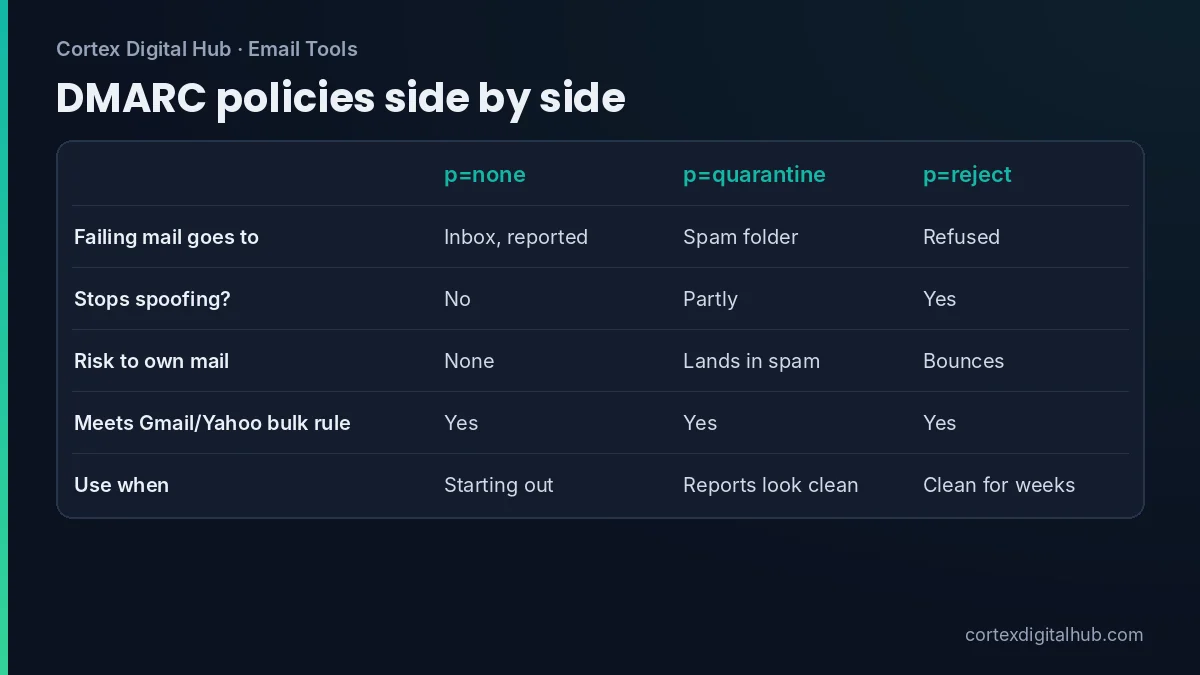 Each step up protects more and forgives less.
A safe DMARC rollout path
A realistic plan for a mid-sized Indian business with Google Workspace, a marketing sender and a CRM:
- Week 0. Publish
p=nonewith aruaaddress. List every tool that sends as your domain. - Weeks 1 to 4. Read the aggregate reports. Each source IP is either yours (fix its DKIM or SPF) or not yours (spoofing, ignore).
- Week 5. When legitimate mail passes consistently, move to
p=quarantine. If you want a gentler step, addt=y, which asks receivers to treat it as a test, though support for this new tag will take time to spread. - Weeks 6 to 9. Watch for complaints from staff and customers about missing mail.
- Week 10 onward. Move to
p=reject, and setsp=rejectif you never send from subdomains.
Lower the TTL on the record to 300 seconds during the rollout, so you can roll back quickly if something breaks.
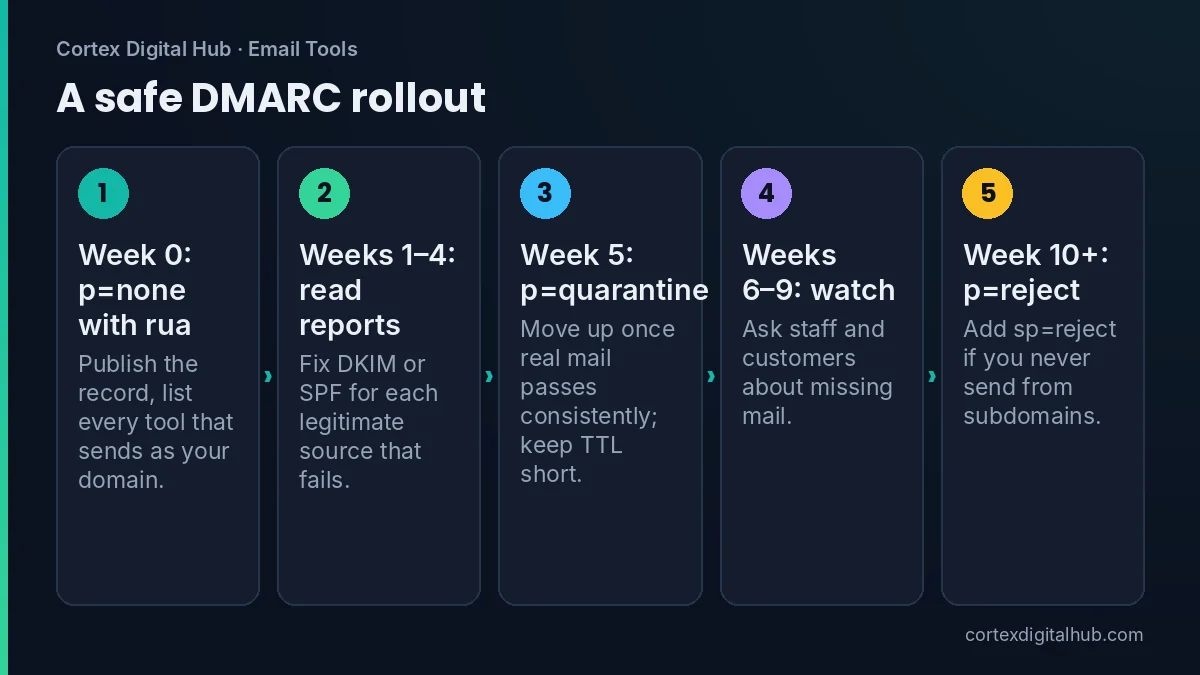 Move up one step only when the reports for the previous step look clean.
Domains that never send email
Spoofers love domains that have no DMARC record at all, including the spare domains companies buy and park: the .in version of a .com, an old project name, a campaign microsite. If a domain never sends mail, you can go straight to the strictest setup without any rollout, because there is no legitimate mail to break:
@        TXT  v=spf1 -all
_dmarc   TXT  v=DMARC1; p=reject; sp=reject
The SPF record says no server may send for it, and the DMARC record asks receivers to reject anything that tries. Add both to every parked domain on the same day you set up your main one. It takes two minutes per domain and removes an easy target for fake "booking confirmation" or "payment pending" emails using your brand.
Subdomains follow the main domain's policy unless you set sp=. If your main domain is still at p=none but you never send from subdomains, sp=reject closes that gap early.
Reading what comes back
Aggregate reports arrive as zipped XML attachments, usually once a day from each large receiver, listing source IPs, message counts and SPF and DKIM results. Use a separate mailbox or alias for rua; a busy domain can receive dozens a day.
You are looking for one thing: a legitimate source that fails. Common culprits in India are the website contact form sending through the host's server, an accounting tool sending invoices, and an old bulk-mail account someone forgot. Each needs DKIM enabled for your domain, or must stop sending as your domain.
Sending setup shows your DKIM, MAIL FROM and DMARC records together, so you can confirm the platform you send campaigns from is aligned before you tighten anything. If you use Amazon SES, the SES setup guide covers the custom MAIL FROM step.
Before you move past p=none
- Every sending tool signs with DKIM for your domain.
- Reports show no legitimate source failing for at least two weeks.
- Staff know whom to tell if a customer says mail is missing.
- The
ruamailbox is monitored, not forgotten. - The record TTL is short enough to roll back fast.
- You have sent a test from the Email Composer and seen
dmarc=passin the headers.
This is general information about email standards; check each receiver's current sender guidelines before major changes. The email tools hub collects the setup steps in one place.
Frequently asked questions
What is a DMARC policy?
It is the p= value in your DMARC record. It tells receiving servers what to do with mail that claims to be from your domain but fails both aligned SPF and aligned DKIM: none (deliver and report), quarantine (spam folder) or reject (refuse it).
Is p=none enough for Gmail and Yahoo?
For their bulk-sender rules, yes: as of 2026 they require a DMARC record with at least p=none, aligned with your From domain. But p=none gives no protection against spoofing, so treat it as a starting point.
Where do I add a DMARC record?
As a TXT record on the name _dmarc under your domain, for example _dmarc.yourdomain.com. In most DNS panels you type _dmarc in the host field and the panel adds the domain.
Will p=reject block my own emails?
It will block any of your own mail that fails alignment, which is why you move there only after reports show every legitimate sender passing. Do the rollout in steps and watch reports at each stage.
What is the difference between p and sp in DMARC?
p= sets the policy for your main domain. sp= sets it for subdomains. If sp is missing, subdomains inherit p. You might set sp=reject early if you never send from subdomains.
What does pct do, and is it still valid?
pct= applied the policy to only a percentage of failing mail. The updated DMARC standard published in 2026 (RFC 9989) drops pct in favour of a t= testing flag, though receivers are expected to keep tolerating old records for some time. Avoid relying on pct for new rollouts.
How long should I stay on p=none?
Long enough to see at least two to four weeks of aggregate reports with every real sender passing. For a small business with one or two senders, that may be a month. Larger organisations with many tools often take three months or more.
Generate your DMARC record → →