
Email deliverability checklist: 25 checks before every campaign
Twenty-five checks in five groups, DNS, list, content, links and sending, that catch the problems behind most spam-folder placements. Print it, run it before each send, and fix the first item that fails.
· 5 min read · 1.3K views · by the Cortex Digital Hub team
Build the campaign with live text, real buttons, UTM-tagged links and a compliant footer, then send yourself test emails to tick the content and link checks. Free · up to 15 test emails a day
Build and test your email → → Opens Email Composer · runs in your browser
An email deliverability checklist is the short routine you run before every send to catch what pushes campaigns into spam. The 25 checks below are grouped in the order that matters: DNS and authentication first, then the list, the content, the links and finally how you send. Run them top to bottom and fix the first failure before moving on, because a problem higher up hides everything below it. If you only have two minutes, the short version at the end covers the five checks that cause most trouble.
How to use this email deliverability checklist
Print it or copy it into your campaign brief. The DNS checks change rarely, so tick them monthly and whenever you add a sending service. The other four groups change with every campaign.
Give one person ownership of the list. In a small marketing team, the person who builds the email is often not the person who pulled the contacts from the CRM, and problems fall in the gap between them. A shared sheet with 25 rows, a tick column and the campaign name at the top is enough. When a campaign underperforms, the ticked sheet also tells you which checks were skipped, which is usually faster than guessing. Where a check has a number, that number is a working threshold, not an official one; mailbox providers do not publish their filters, and their sender rules can change, so verify current figures on their sender guideline pages.
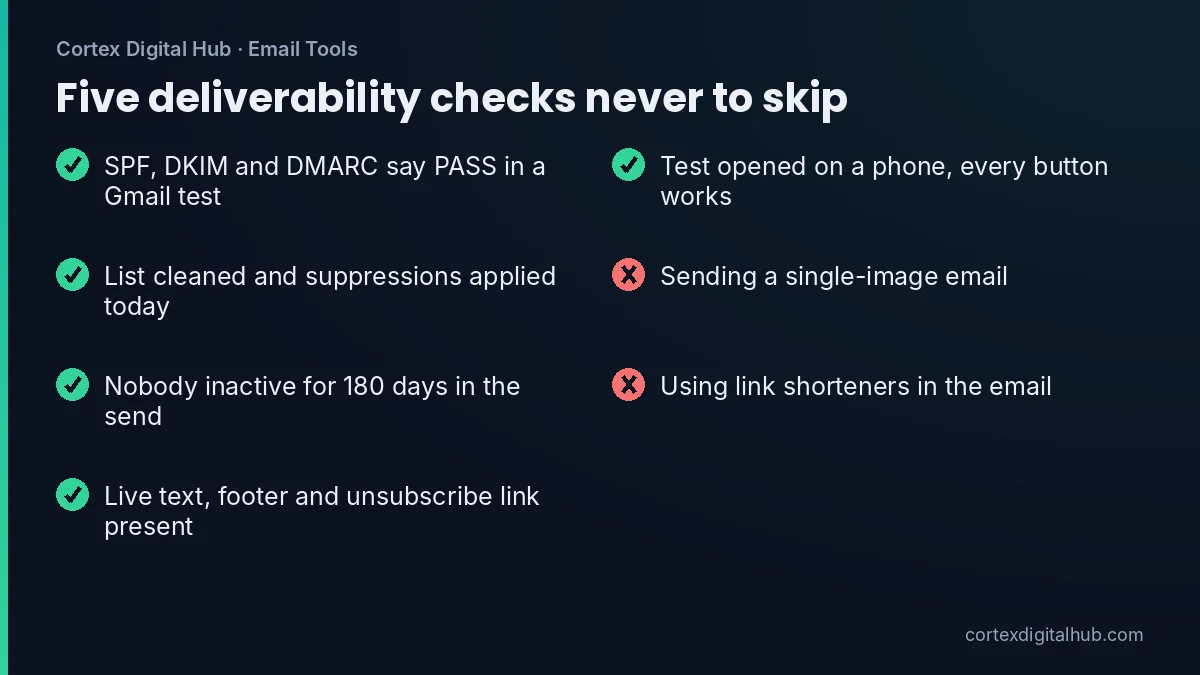 If time is short, these five checks prevent most spam placements.
DNS and authentication (checks 1–5)
- SPF has exactly one record per domain and includes your sending service. Background: what an SPF record is.
- DKIM signs with your own domain (
d=yourdomain.com), not the provider's. See how DKIM works. - DMARC is published at
_dmarc.yourdomain.comwith at leastp=noneand aruaaddress for reports. See what DMARC does. - Alignment: a Gmail "Show original" on a test email says PASS for SPF, DKIM and DMARC.
- Custom MAIL FROM such as
bounce.yourdomain.comis set up, so SPF aligns too.
Sending setup lists these records for your domain with live green or red checks, which covers checks 1, 2, 3 and 5 in one view.
List quality (checks 6–10)
- Consent: every address asked for your email, through a form, an enquiry or a purchase. No bought or scraped lists.
- Cleaned: typos (gmial.com, rediffmal.com, .con), duplicates, invalid and throwaway addresses removed. The Email List Cleaner does this in your browser.
- Suppressed: past hard bounces, unsubscribes and complainers are excluded, including from imported CSVs. More in hard bounce vs soft bounce.
- Recent: contacts with no opens or clicks in 180 days are excluded or sent a separate re-permission email.
- Volume: this send is no more than about double your recent daily volume. If it is bigger, follow an email warm-up ramp first.
List problems are the hardest to spot by looking at the email itself, because the email can be perfect and still go to the wrong people. A typical example: a sales team uploads three years of expo and portal leads for a new launch, the list has never been mailed, and the first campaign bounces at 6% and draws complaints from people who no longer remember enquiring. Checks 6, 9 and 10 exist to stop exactly that.
Content (checks 11–15)
- Live text: the email is not a single image. Mix image sections with real HTML text, as covered in image-only emails.
- Size: HTML is well under 102 KB so Gmail does not clip it, and images are compressed. The image compressor helps.
- Width: the layout is about 600–640 px wide and reads on a phone; see email template width.
- Footer: your postal address, a clear unsubscribe link and the reason the person is receiving this.
- Subject and preheader: honest, specific and matched to the body. Misleading subjects drive spam reports faster than any word filter.
The Email Composer builds emails from a creative as image strips plus live text and real buttons, with a compliant footer added for you, which covers checks 11, 13 and 14.
Links and tracking (checks 16–20)
- No shorteners: no bit.ly-style links. Use full URLs on your own domain where possible.
- Matching text: link text that shows a URL points to that same URL.
- UTM tags on every link so campaign clicks show up correctly in analytics.
- Buttons are real HTML buttons, not just images, so they work with images off.
- Every link works, including the WhatsApp and Call buttons, on a phone as well as a desktop.
Sending (checks 21–25)
- From name and address are consistent with past campaigns and the address can receive replies.
- One-click unsubscribe headers are present on marketing mail and honoured within two days, as the Gmail and Yahoo bulk sender rules require.
- Tests sent to at least one Gmail and one Outlook address, opened on a phone and on a desktop.
- Timing avoids sending the whole list at once if it is large. Spread big sends over an hour or more.
- Monitoring is ready: you know where you will see bounces, complaints and, for Gmail, Postmaster Tools figures after the send.
Check the results within an hour of sending, not the next morning. Hard bounces and early complaints arrive fast, and if they are high you can still stop the rest of a staggered send before it does more damage.
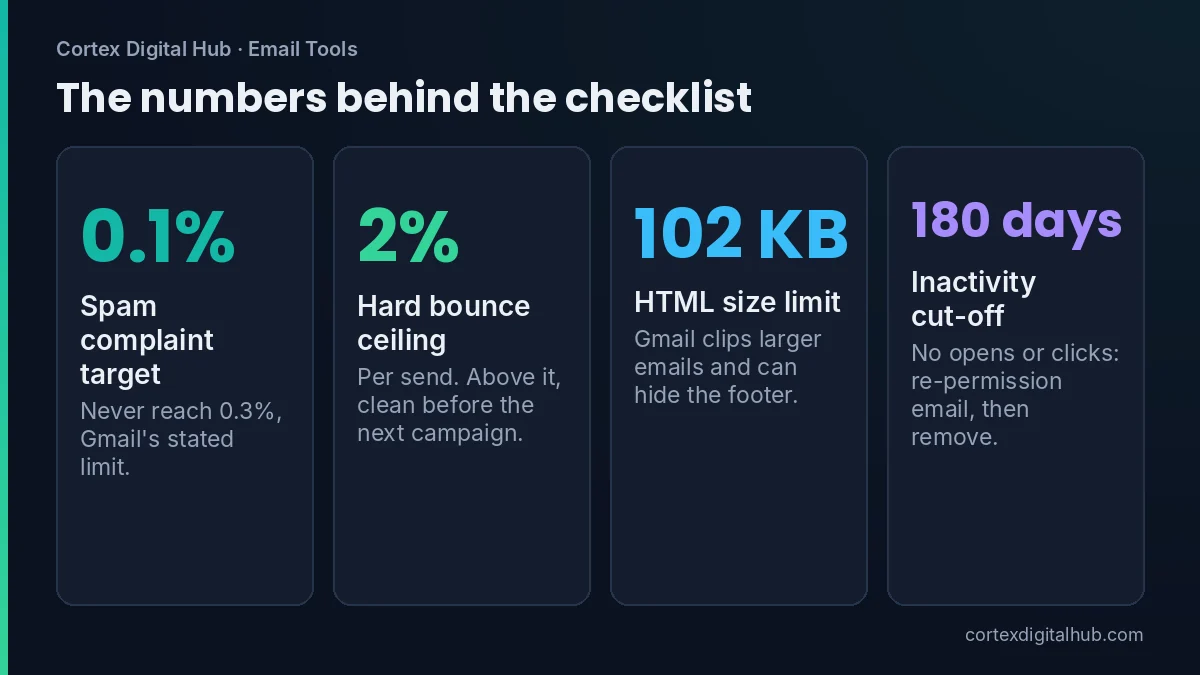 The thresholds behind the checklist. Treat them as working limits, not guarantees.
The numbers behind the checks
| Check | Working threshold | Why |
|---|---|---|
| Spam complaint rate | Under 0.1%, never 0.3% | Gmail's stated limits |
| Hard bounce rate | Under 2% per send | Signals a maintained list |
| HTML size | Under about 102 KB | Gmail clips above this |
| Inactivity cut-off | 180 days without a click or open | Engagement drives placement |
| Volume jump | No more than about 2× recent days | Sudden spikes look like spam |
The two-minute version before you hit send
- Gmail "Show original" says PASS three times.
- The list was cleaned and suppressions applied today.
- Nobody in the send has been inactive for six months.
- The email has live text, a footer and an unsubscribe link.
- You opened a test on your own phone and every button worked.
If one of these fails, stop and fix it. A delayed campaign costs a day; a damaged sending reputation can cost weeks.
Frequently asked questions
What is an email deliverability checklist?
It is a list of checks you run before sending a campaign to make sure the email is authenticated, goes to valid and willing recipients, and is built and sent in ways mailbox providers trust. It catches problems before they show up as spam placement.
Which deliverability check matters most?
Authentication. If SPF, DKIM and DMARC do not pass and align with your From domain, nothing else on the list will save the campaign. After that, list quality and complaint rate matter most.
How often should I run the checklist?
Run the list, content, links and sending checks before every campaign. The DNS checks can be monthly, and again whenever you change provider, add a sending service or edit DNS.
What is a good inbox placement rate?
There is no universal number, because it depends on your audience and how it is measured. Watch your own trend instead: bounces under 2%, complaints under 0.1% and clicks steady from one campaign to the next.
Do I need to test every email in Gmail and Outlook?
For anything sent to more than a few hundred people, yes. Gmail and Outlook render and filter differently, and classic Outlook for Windows uses a Word-based engine that breaks some layouts. A personal Gmail and an Outlook.com test address cover most of it.
How big should an email be?
Keep the HTML well under 102 KB so Gmail does not clip it, and keep total image weight modest, ideally a few hundred KB, so the email opens quickly on mobile data.
Does adding UTM tags hurt deliverability?
No. UTM parameters on your own domain's links are normal and safe. What hurts is link shorteners, redirects through unknown domains and links whose visible text shows a different domain from the real destination.