
AI video for furniture marketing: room sets and fabric close-ups from photos
AI video for furniture marketing turns a catalogue photo into a room-set clip, a fabric close-up or a Reel-ready hero shot. Here are the prompts, the scale and colour honesty rules, and the cost per clip in rupees.
· 5 min read · 1.3K views · by the Cortex Digital Hub team
Upload a sofa, bed or dining set photo, describe one slow camera move, and get a catalogue clip without a photo shoot. From ₹24 a clip · no watermark · runs in your browser
Animate a furniture photo → → Opens AI Video Generator · runs in your browser
AI video for furniture marketing starts with the photo you already have. Upload a catalogue shot of a sofa, bed or dining set to the AI Video Generator, describe one slow camera move, and get a 5-second clip for Reels, WhatsApp catalogues or ads. The skill is in keeping scale, colour and construction honest. Prices below are as of October 2026.
What can AI video do for a furniture store?
Furniture is hard to film. It is big, it needs styling and light, and a small store may not have a studio. AI video covers three jobs well:
- Hero movement: a slow push-in or orbit around a single piece.
- Fabric and finish close-ups: bouclé, leather grain, teak veneer, brass legs.
- Room-set mood: the piece in a lived-in setting, with curtains moving and soft light.
It does not replace real photos of the product. Customers still need accurate dimensions, colour swatches and finish details. Use the clip to attract attention, and the photos and text to close the sale.
How do you animate a sofa or bed photo?
Use the cleanest photo you have: front or three-quarter angle, soft even light, plain background. If the background is messy, clean it first with the free Remove background tool.
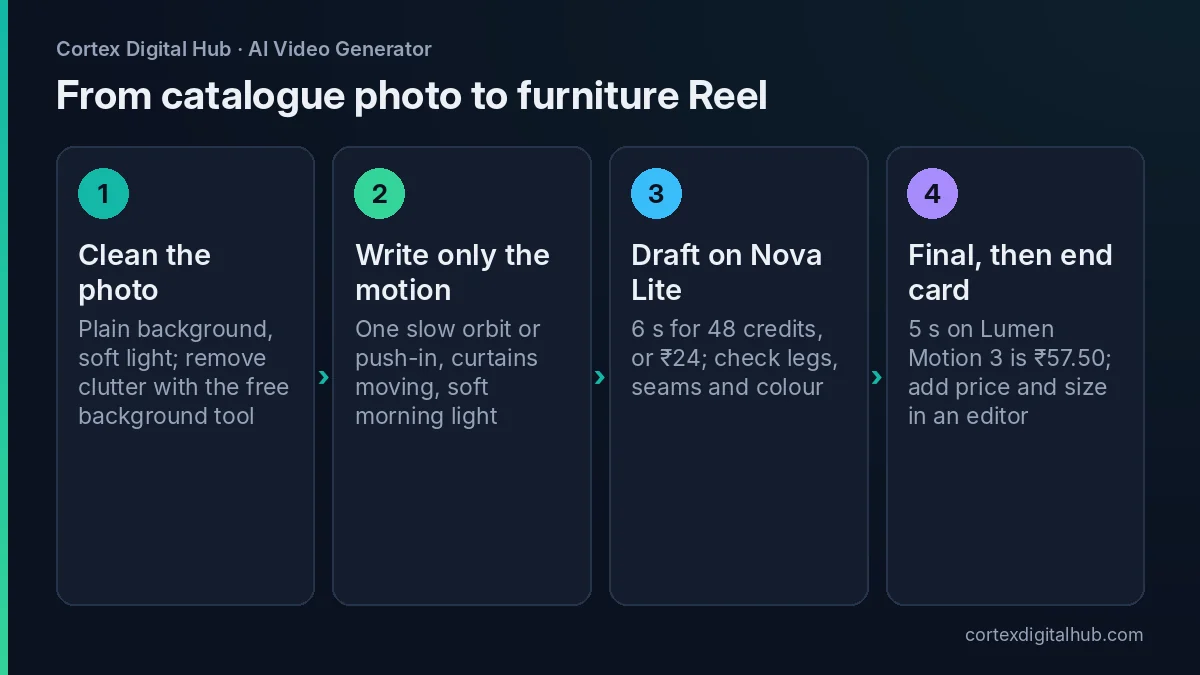 Clean photo, one slow move, a cheap draft and a check against the real product.
Upload it as the first frame and write only the motion:
Slow orbit to the right around a grey three-seater sofa with walnut legs in a bright Delhi living room, curtains moving gently, soft morning light, shallow depth of field
For consistency, upload 2 to 4 photos of the same piece from different angles and tag them with @. The post on AI product video from one photo covers the product basics, and the guide to animating a photo with AI explains choosing a start frame.
How do you keep scale and colour honest?
This is where furniture ads can go wrong. A model can make a sofa feel larger, a room feel deeper or a finish look glossier than it is. Customers then arrive at the showroom and feel misled.
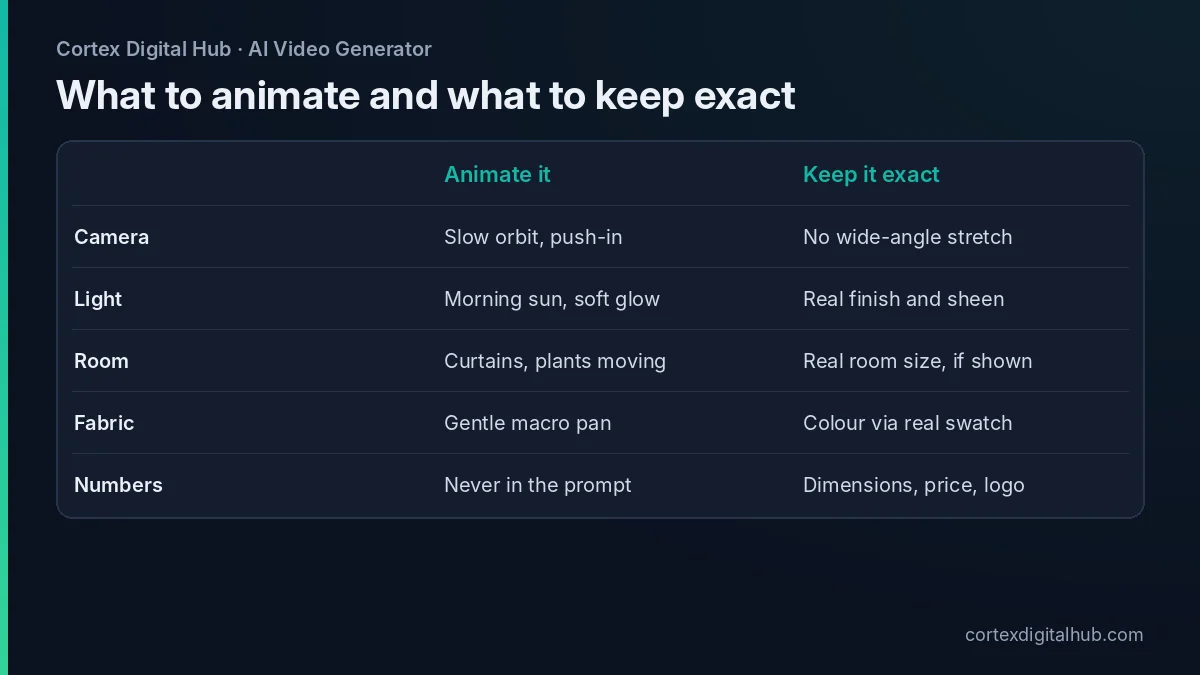 Animate light and camera; keep size, colour and construction exact.
Habits that help:
- Put real dimensions on a text card at the end of the clip.
- Include an object of known size, such as a standard door or a 1-litre bottle, if it fits the shot.
- Add "wide-angle distortion, exaggerated size" to the Avoid field.
- Show the real fabric swatch next to the clip, because screens change colour.
- Compare every frame with the physical product before you post.
Marketplace listings have their own picture rules; as of 2026, check each marketplace's help page, and see product photo requirements for Amazon, Flipkart and Meesho.
How do you shoot fabric and finish close-ups?
Close-ups hide the model's weak spots, because there is less structure to get wrong. Upload a sharp macro photo of the swatch and describe a tiny movement.
- Bouclé:
Slow macro pan across cream bouclé fabric, soft window light, shallow depth of field - Leather:
Slow tilt along tan leather armrest with visible grain and stitching, warm side light - Wood:
Slow dolly along walnut dining table edge, grain catching sunlight, dust motes drifting - Metal:
Brass chair leg with a soft highlight sliding along it, dark background
Nova 2K gives the sharpest single frame. Draft on Nova Lite first. For slightly more variety, add a gentle breeze through a curtain, but not so much that the fabric seems to change.
Which furniture categories suit AI video best?
Not every product animates equally well. Start with the ones that have simple shapes and a strong material story.
| Category | Why it works | Watch out for |
|---|---|---|
| Sofas and armchairs | Soft light and fabric read well | Cushion shapes shifting |
| Dining tables | Wood grain and styling close-ups | Chair counts changing |
| Beds | Linen and headboard texture | Bedding folds drifting |
| Wardrobes | Slow push-in on door finish | Handles and panel lines |
| Outdoor and cane | Light and shadow patterns | Weave pattern repeating oddly |
Items with many small parts, such as modular shelving or a dining set of six chairs, are riskier. Animate one chair or a close-up of the joinery instead, and keep the full set in a still photo.
What about festival and season promotions?
Furniture sells in waves: Diwali, Dhanteras, wedding season, new-home moves. A short seasonal clip lets a small store join in without a new shoot. Take your sofa photo and ask for warm lamp light, a brass diya on the side table and marigold garlands in the background, with the sofa itself unchanged. Keep religious items plain and respectful.
For a "new home" offer, animate a plain living room photo with soft evening light and let the offer text sit in your editor. Say a Jaipur store runs a Dhanteras week: one hero clip per category, five categories, five clips of 5 seconds each on Lumen Motion 3 Standard, which is 575 credits or ₹287.50. Post one a day, then reuse the same clips in WhatsApp status, where the guide to AI video for WhatsApp status and business gives timing ideas.
What does a furniture catalogue cost?
Say a store in Pune animates ten bestsellers.
| Plan | Model | Credits | Cost |
|---|---|---|---|
| 10 drafts, 6 s each | Nova Lite | 480 | ₹240 |
| 10 finals, 5 s each | Lumen Motion 3 Standard | 1,150 | ₹575 |
| 3 sharp hero clips, 5 s | Nova 2K | 525 | ₹262.50 |
Ten finals on Lumen Motion 3 Standard are ₹575, and each clip is ₹57.50. Spend more only on the two or three bestsellers that carry paid ads. The post on which AI video model to choose helps you decide where to spend.
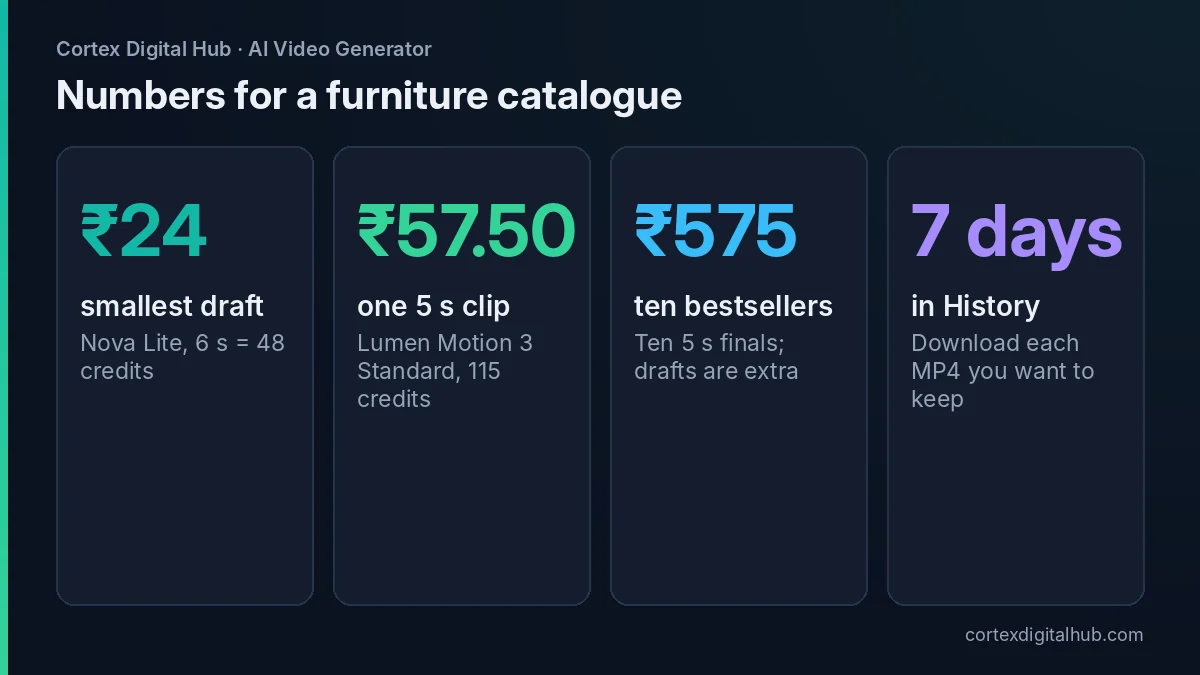 A ten-product catalogue costs about ₹575 in finals, with drafts extra.
How do you turn clips into catalogue Reels?
A simple template works for every product: 3 seconds of hero move, 3 seconds of fabric close-up, then an end card with the name, price and dimensions.
Create the end card in any editor so the numbers are correct. Set the shape to 9:16 with the free Video resizer or the Resize video to 1080x1920 tool, and see the guide to resizing video for Instagram Reels. Shrink for WhatsApp groups with the guide to compressing video for WhatsApp. Press the 🔊 button to switch sound off if you plan to add a track. For posting ideas, see AI videos for Instagram Reels and YouTube Shorts.
Key takeaways
- AI video for furniture marketing works for hero moves, fabric close-ups and room-set mood.
- Start from a clean catalogue photo and describe only the motion.
- Keep scale, colour and construction honest with real dimensions and swatches.
- Use 2 to 4 reference images to hold the design steady across clips.
- Ten 5-second finals cost about ₹575 on Lumen Motion 3 Standard.
- Add prices and logos in an editor, not in the prompt.
Frequently asked questions
Can I use AI video to market furniture?
Yes. Upload a clean product or room-set photo, describe one slow camera move, and generate a 5-second clip. Use it for Reels, WhatsApp catalogues and ads, and show real dimensions and finishes in the caption.
Will the sofa look different in the AI video?
It can drift: legs, seams, cushions or colour may change slightly. Check each clip against the real product, keep the move slow, and use reference images from several angles to hold the design steady.
How do I keep furniture scale honest in AI video?
Do not let the clip make a piece look larger than it is. Put real dimensions on a text card, include an object of known size such as a standard door, and avoid wide-angle distortion in the prompt.
Can I make a room set from a product photo?
You can describe a room around your product, but the model invents the room. For accuracy, photograph the real piece, then use the video as a mood visual and label it as an illustration.
How do I show fabric texture in a video?
Use a macro prompt: 'slow macro pan across grey bouclé fabric, soft window light'. Upload a sharp fabric photo as the first frame. Then show the real swatch alongside, since colour can shift on screens.
How much does a furniture catalogue video cost?
Ten 5-second clips on Lumen Motion 3 Standard cost 1,150 credits, or ₹575. Ten 6-second Nova Lite drafts cost 480 credits, or ₹240. Prices are as of October 2026.
What size should a furniture Reel be?
Use 9:16 at 1080 by 1920 for Reels and Stories. The free Video resizer and the Resize video to 1080x1920 tool can set the shape, and the compressor reduces the size for WhatsApp.
Can I add my store name and prices?
Add them in an editor, not in the prompt. Generated text is unreliable, and prices must be exact. Overlay the logo, the model name, the dimensions and the price on the finished clip.
Should I tell customers the video is AI-generated?
A short note such as 'illustrative visual' is a good habit, and some platforms ask for labels. As of 2026, check each platform's help page and keep the real product photos available.