
Alt text in emails: what to write when images are blocked
Alt text in email is the line a reader sees, or hears, when an image does not load. Write it to carry the image's message in a few words, style it so it looks deliberate, and leave it empty only for pure decoration.
· 5 min read · 650 views · by the Cortex Digital Hub team
Build the email from your creative, then give each image strip a short alt text that says what the picture would have told the reader. Free · runs in your browser
Add alt text to your strips → → Opens Email Composer · runs in your browser
Alt text in email is the short description inside an image's alt attribute. When images are blocked, still loading or read by a screen reader, that text stands in for the picture. Good alt text says what the image tells the reader in a few words, such as "3 BHK homes from ₹1.2 crore, Kokapet", not "banner1.jpg". Logos get the brand name, buttons get the action, and pure decoration gets an empty alt="".
When alt text in email actually shows
Most people never see your alt text, which is why it is usually an afterthought. But it appears more often than you might think:
- Classic Outlook for Windows frequently blocks external images until the reader clicks "Download pictures".
- Corporate mail gateways in IT parks, banks and government offices may hold images back.
- Slow mobile data means images load late; alt text fills the gap for a few seconds.
- Screen readers such as TalkBack on Android and VoiceOver on iPhone read alt text aloud, every time.
- Readers who switched images off to save data or to stop tracking.
If your email leans on images, as many property and retail campaigns do, alt text is the difference between a readable message and a page of grey boxes. We covered the wider risk in image-only emails.
What to write for each type of image
The rule is to describe the job the image does, not its appearance in detail.
| Image type | Weak alt text | Better alt text |
|---|---|---|
| Hero render with offer | "banner" | "3 BHK homes from ₹1.2 crore, Kokapet" |
| Logo | "logo.png" | "Asha Homes" |
| Image button | "click here" | "Book a site visit" |
| Product or room photo | "image" | "Clubhouse pool at sunset" |
| Event banner | "Diwali" | "Diwali open house, 1–3 November" |
| Icon next to text | "phone icon" | "" (empty, text already says it) |
| Spacer or divider | (missing) | "" (empty) |
Notice the pattern. If the image contains words that matter, the alt text repeats them. If it is a photo, the alt text names what is shown in a phrase. If the text beside it already says the same thing, the alt is empty so screen readers do not repeat themselves.
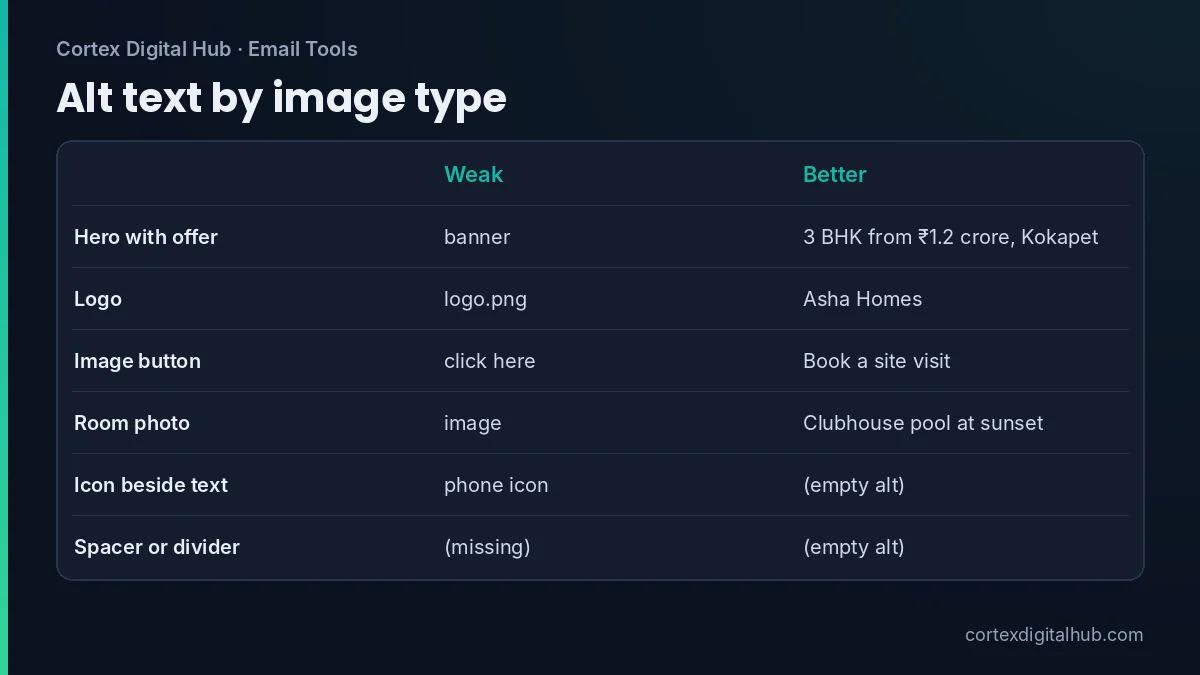 Describe the job of the image; repeat its words if it has any; leave decoration empty.
Keep it short and front-load the important words
Alt text lives inside the image's box when it is blocked. A 600 × 200 strip has room for a line or two, and some clients cut the rest off. So:
- Aim for roughly 3 to 12 words, and stay under about 100 characters.
- Put the key detail first: "₹50,000 off till 30 November" beats "Special festive offer with a discount of ₹50,000".
- Do not start with "Image of" or "Picture of". Screen readers already announce that it is an image.
- Avoid stuffing in keywords, emojis or ALL CAPS. They read badly aloud and look spammy.
If the strip carries a paragraph of text, the real fix is to move that paragraph into live HTML text and keep the alt short. Alt text is a backup, not a container for your whole message.
Style the alt text so a blocked email still looks designed
Many email apps apply the image tag's inline styles to the alt text when the picture does not load. That means you can make a blocked hero look like a deliberate headline instead of small grey type:
<img src="https://cdn.example.com/hero.jpg" width="600" height="300"
     alt="3 BHK homes from ₹1.2 crore, Kokapet"
     style="display:block; width:100%; height:auto; background:#0e2c2c;
            color:#ffffff; font-family:Arial, sans-serif; font-size:22px;
            line-height:28px; text-align:center;">
- A background colour on the image fills the empty box with your brand colour.
- Colour, font and size apply to the alt text in clients that support it, including Gmail on the web and most Outlook versions.
- Width and height attributes keep the box the right size, so the layout does not collapse.
Support is uneven across apps, and some ignore these styles entirely, so treat styling as an improvement, not a guarantee. Check with images switched off in Gmail and classic Outlook before a big send.
Alt text and accessibility
For a blind or low-vision reader, alt text is not a fallback; it is the email. A few habits make a large difference:
- Every
imghas analtattribute, even if it is empty. Missing alt makes some screen readers read the file name or URL aloud. - Linked images describe the destination. A logo that links home says "Asha Homes"; a hero that links to booking says what the link does.
- Avoid duplicates. If a strip says "Book a site visit" and a coded button below it says the same, give the strip a descriptive alt or an empty one.
- Keep reading order sensible. Images and text in the code should follow the visual order, which sliced layouts do naturally.
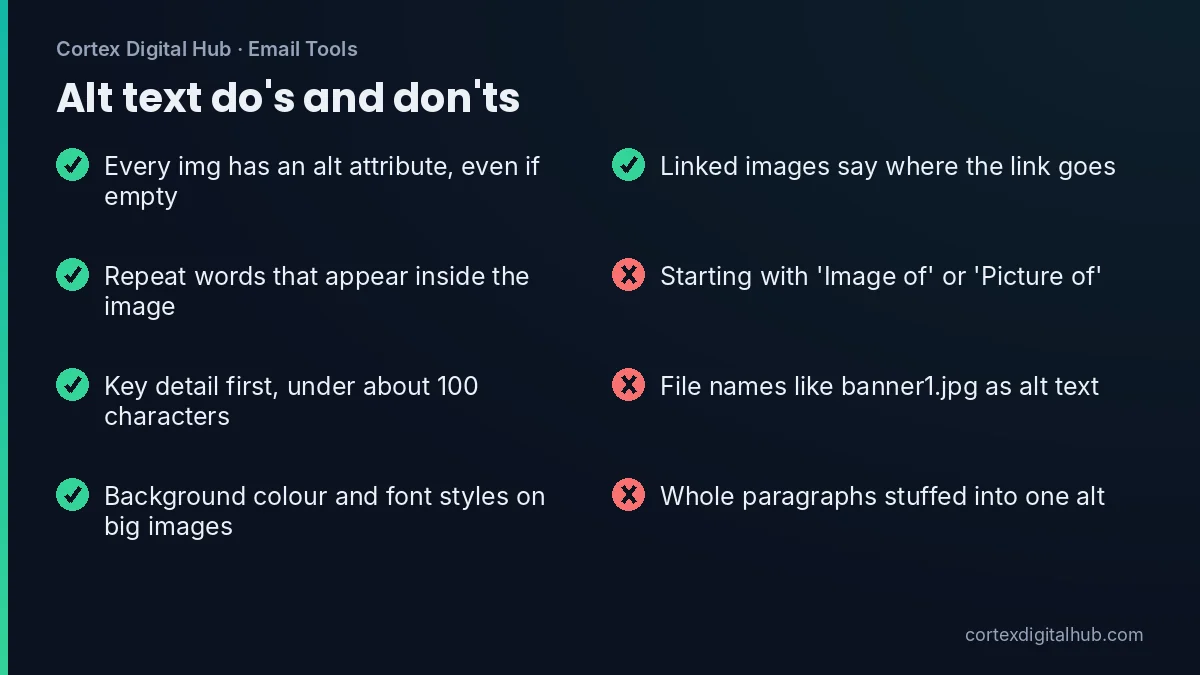 A quick pass with this list catches most alt text mistakes before you send.
These habits also help with spam filtering slightly, and with how the email appears in the inbox preview, though they matter most for people. The preview line itself is better controlled with preheader text, and a strong subject line still does the heavy lifting on opens.
A worked example
Asha Rao runs marketing for a small developer and sends a launch email built from a 1080 × 1350 creative cut into four strips. Here is her alt text, top to bottom:
- Logo strip:
alt="Asha Homes" - Hero render:
alt="Asha Meadows: 3 and 4 BHK villas, Shankarpally" - Amenities collage:
alt="Clubhouse, pool and 2-acre central park" - Map strip:
alt="15 minutes from the Outer Ring Road"
The price, possession date and phone number are live text below the hero, and the "Book a site visit" button is coded HTML. With images off, the email still tells the reader what, where and what to do.
Your alt text checklist
- Open your last campaign with images disabled and read only what remains.
- Give every meaningful image a short description of its job; give decoration
alt="". - Repeat any words that appear inside an image in its alt text.
- Add a background colour and font styles to large images so blocked boxes look intentional.
- Move long text out of images into live HTML; the image compressor keeps the remaining strips light.
- Send yourself a test and listen to it with TalkBack or VoiceOver once.
The Email Composer lets you set alt text on each strip while keeping headlines and buttons live, and you can send up to 15 free tests a day to check it with images on and off. If the design starts from a wide artwork, size it first with the guide on email template width.
Frequently asked questions
What is alt text in an email?
It is the text in an image's alt attribute. Email apps show it in place of the picture when images are blocked or slow to load, and screen readers read it aloud. It should say what the image communicates, briefly.
How long should email alt text be?
Short: usually under about 100 characters, often 3 to 12 words. Some clients cut long alt text off at the edge of the image box, so put the important words first.
Should every image in an email have alt text?
Every image should have an alt attribute. Meaningful images get a description; spacers, dividers and decorative flourishes get an empty one, alt="", so screen readers skip them instead of reading the file name.
Can I style alt text in an email?
Yes, in many clients. Font, size and colour set in the img tag's style are applied to the alt text when the image is missing. Gmail on the web and Outlook show it fairly well; support varies across apps, so test.
What alt text should I use for a logo?
Use the brand name, for example alt="Asha Homes". Do not write "logo" or the file name. If the logo links to your website, the brand name also tells screen reader users where the link goes.
Is alt text good for SEO in email?
No. Emails are not indexed by search engines the way web pages are. Write alt text for the reader and for accessibility, not for keywords; stuffing it with offers can look spammy.
Does alt text help with spam filters?
Only a little. It adds some readable text, but it does not replace live body copy. An email made of images with good alt text is still close to an image-only email in a filter's eyes.
Add alt text to your strips → →