
Email subject line length: how many characters show on a phone
Most phones show roughly 30 to 45 characters of a subject line before cutting it off. Put the reason to open in the first 30, let the preheader carry the detail, and check it on your own phone before you send.
· 5 min read · 1.3K views · by the Cortex Digital Hub team
Write the subject and preheader, then send yourself a free test email and read it in your phone's inbox before the real send. Free · up to 15 test emails a day to yourself
Test your subject line → → Opens Email Composer · runs in your browser
The email subject line length that matters is what fits before the inbox cuts it off. On most phones that is roughly 30 to 45 characters; on desktop Gmail and Outlook it is longer, around 60 to 90 including the preview text. Write subject lines of 30 to 50 characters, put the reason to open in the first 30, and let the preheader carry the rest. Then send a test to your own phone and look.
Why characters, not words, decide what shows
Inboxes cut by width, not by word count. A row of wide letters such as "MW" takes more space than "il", so two subject lines with the same character count can end at different points. Three things eat into your space:
- Emoji. Each one takes about the width of two letters.
- Capitals. "SITE VISIT THIS SATURDAY" is wider than the same words in sentence case, as well as harder to read.
- Indic scripts. Hindi, Telugu and Tamil conjuncts are wide. A subject that looks short in your editor can run off a 6-inch screen.
So treat any character count as a guide. The only reliable test is your reader's actual screen, which in India is most often an Android phone with the Gmail app.
Email subject line length on phones and desktops
These are approximate figures from common devices at default text size, at the time of writing. They move with screen width, font size settings, app updates and the length of your sender name.
| Where it is read | Roughly visible | What else shares the space |
|---|---|---|
| Gmail app, Android, portrait | 30–40 characters | Sender name above, preheader below |
| iPhone Mail, portrait | 35–45 characters | Sender above, two lines of preview below |
| Phone lock-screen notification | 30–45 characters | Varies by phone and app |
| Gmail in a desktop browser | 60–90 characters with preheader | Subject and preheader share one line |
| Classic Outlook for Windows | 40–60 characters | Depends on reading pane width |
The pattern is clear. Your first 30 characters are seen by everyone. Characters 30 to 60 are seen by desktop readers and some phones. Anything after 60 is only read by people who already opened the email.
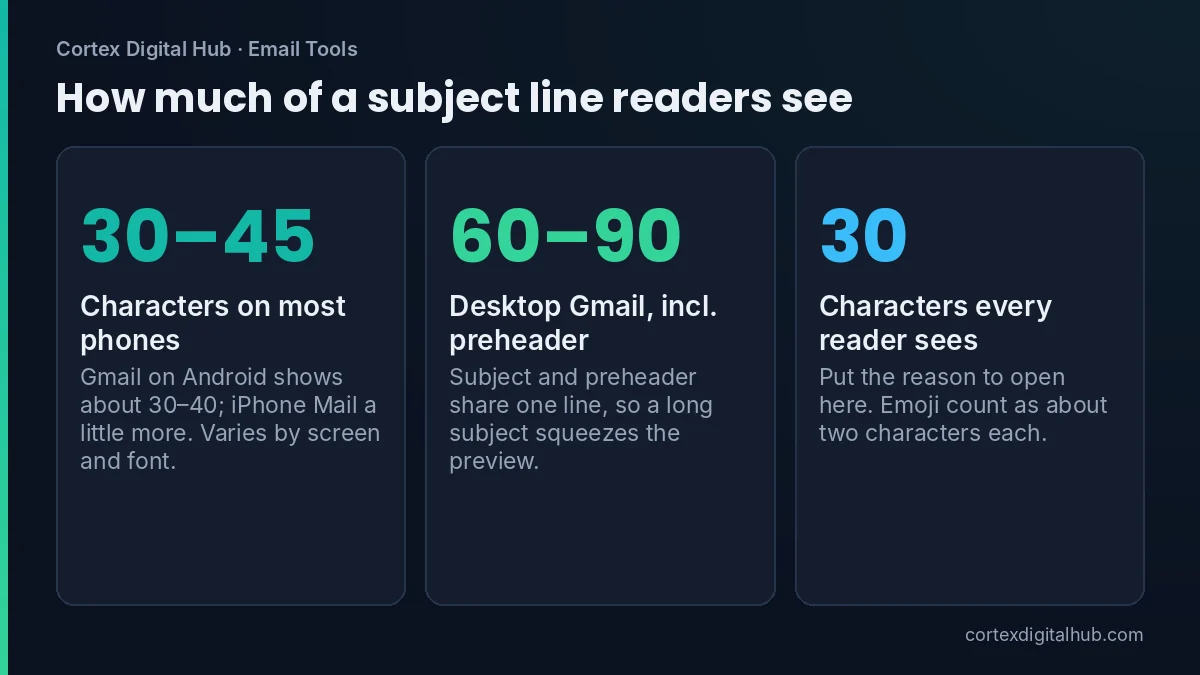 The first 30 characters are the only ones every reader sees.
Put the reason to open in the first 30 characters
Front-loading means the noun the reader cares about comes first, and the polite words come later or not at all. Here is a Hyderabad developer's launch email, before and after:
- Before: "Greetings from Kestrel Homes! We are delighted to announce the launch of 3 BHK homes in Kokapet" (95 characters). A phone shows "Greetings from Kestrel Homes! We are de…". Nothing useful survives.
- After: "3 BHK launch in Kokapet: prices inside" (38 characters). The whole line fits, and the reader knows what is in the email.
A few rules that do most of the work:
- Cut the opener. "Greetings", "Hi there", "Newsletter #14" and the company name waste the most visible space. The from name already says who you are.
- Lead with the specific thing. A place, a date, a price, a unit type: "Sat 10 am site visit", "₹82 lakh 2 BHK", "Price revision on 1 Dec".
- One idea per subject. "Launch + offer + webinar + festive wishes" never fits and never reads.
- Numbers early. Digits are compact and easy to scan, so "2 days left" beats "Only two days remaining".
- No false urgency. "URGENT" and "Re:" on a marketing email may lift opens once and raise complaints for months.
The same idea applies to a welcome email for a new lead. "Your Kokapet brochure is here" works because it answers the question the person just asked on your form. See welcome email for new leads for the full sequence.
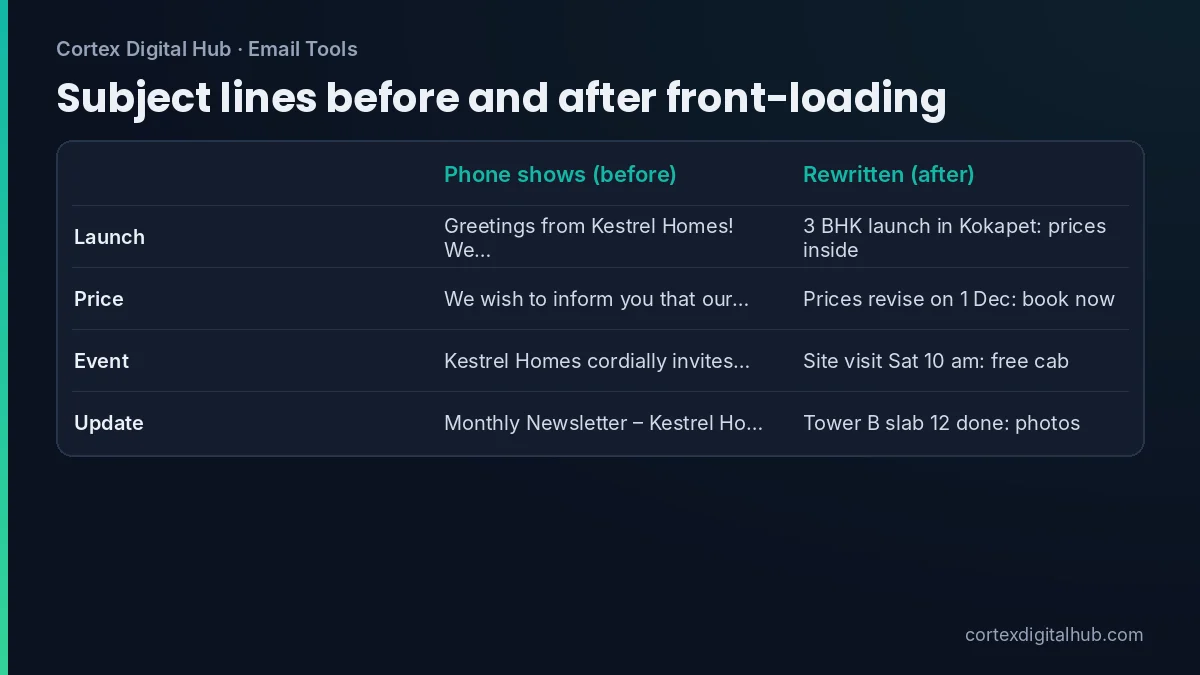 Same message, rewritten so the useful words survive the cut-off.
How the preheader works with the subject line
On phones the preheader, or preview text, sits directly under the subject. On desktop Gmail it continues on the same line after it. Read the two as one sentence: the subject makes the promise, the preheader adds the detail.
- Subject: "3 BHK launch in Kokapet: prices inside"
- Preheader: "Floor plans, launch price list and weekend site visit slots, all in one email."
If you leave the preheader empty, the inbox fills it with the first text it finds in your email. That is often "View in browser", an image's alt text or "Dear customer". An email built only from images, with no live text, makes this worse, which is one more reason to avoid image-only emails.
The Email Composer has a separate preheader field and shows the subject and preview together, so you can see whether they read as one line before you send.
Does subject line length change open rates?
Less than you might think. Published studies disagree, and in most of them length matters less than clarity, relevance and whether the reader recognises the sender. A precise 60-character subject usually beats a vague 25-character one.
Two cautions when you test it yourself:
- Opens are inflated. Apple Mail Privacy Protection loads images on Apple's servers, so many "opens" are not people. Judge subject lines by clicks, replies and site visit bookings, not opens alone.
- Small lists lie. On a list of 2,000, a 2-point difference in clicks can be noise. Repeat a test before you change your house style.
Length does not trigger spam filters on its own. What gets you filtered is a subject that misleads, because readers who feel tricked hit "Report spam", and Gmail and Yahoo expect complaints below 0.3%. If you are new to this, read why emails go to spam and the Gmail and Yahoo bulk sender requirements.
Mistakes that waste the visible characters
- Brackets and tags first, such as "[Newsletter] [Dec]". Put them in the from name or drop them.
- Long project names. "Kestrel Homes Phase II Tower C Premium Residences" uses up the whole line. Use the short name buyers actually say.
- Copy-pasted subject from WhatsApp. A broadcast message often opens with a greeting and emoji. Rewrite it for the inbox.
- Same subject every month. "Monthly update" teaches readers to skip. Name the one thing that changed this month, such as "Tower B slab 12 done".
For more on writing for property buyers, see real estate email marketing.
What to do before your next send
- Write the subject. Count characters and check that the first 30 make sense alone.
- Write a preheader of 40 to 90 characters that finishes the thought.
- Remove the company name, greeting and any capitals you would not use in speech.
- Send a test to yourself and read it on an Android phone and, if you can, an iPhone.
- Clean the list before the real send with the free email list cleaner, so a good subject is not wasted on bounces.
- Check that your domain is authenticated in sending setup, so the email reaches the inbox where the subject can do its job.
Frequently asked questions
What is the best email subject line length?
Aim for 30 to 50 characters, with the point inside the first 30. That fits most phone inboxes without a cut and still reads fully on desktop. Shorter is fine if it is clear; longer is fine if the first 30 characters already work alone.
How many characters of a subject line does Gmail show on mobile?
On a typical Android phone in portrait, the Gmail app shows roughly 30 to 40 characters on one line. A larger screen, a smaller system font size or a short sender name gives you a few more. Check on your own phone, because there is no fixed number.
Do emoji count as one character in a subject line?
On screen an emoji takes about the width of two letters, and many counters count it as two. Budget two characters for each emoji when you work out what will fit before the cut-off.
Does a long subject line go to spam?
Length alone is not a spam signal. What hurts is a subject that misleads, shouts in capitals or does not match the email, because that drives complaints, and complaints decide whether you reach the inbox.
Should I put the company name in the subject line?
Usually not. The sender name already shows above the subject on phones, so repeating it wastes the most visible characters. Use a clear from name such as 'Asha at Kestrel Homes' and spend the subject on the reason to open.
How long can a subject line technically be?
The email standard allows very long header lines, and most sending services accept well over 100 characters. Inboxes simply cut what does not fit, so anything past about 60 characters is only read by people who open the email.
Do Hindi or Telugu subject lines fit fewer characters?
Often, yes. Indic scripts combine letters into wider shapes, so a subject that looks short in your editor can run off the edge on a phone. Write it, then test on an Android phone, where most Indian readers will see it.