
Image-only emails: why one big picture lands in spam, and the fix
An email that is one large image with no real text gives spam filters nothing to read and shows a blank box when images are blocked. Slice the creative into strips and keep the headline, offer and buttons as live HTML text.
· 5 min read · 1.2K views · by the Cortex Digital Hub team
Upload the campaign creative and the composer splits it into seamless strips, then adds live text, real buttons and a compliant footer. Free · runs in your browser
Turn a creative into an email → → Opens Email Composer · runs in your browser
The image only email spam problem is simple: a message that is one big picture with a link gives spam filters almost nothing to read, looks like a tactic spammers use, and shows a blank frame wherever images are blocked. The fix is not a magic ratio. Slice the creative into strips, move the headline, offer, dates and button into live HTML text, add alt text, and keep the total weight sensible. That keeps the design and gives filters and readers real words.
Why filters distrust image only email: the spam pattern
Spam filters score many signals: your authentication, your domain and IP reputation, how recipients react, and the content. Content is the weakest of these on its own, but an email that is a single JPG with one link sits close to a pattern that spammers used for years to hide words like loan offers and fake prices from text scanners.
Modern filters can run image recognition, so hiding text in a picture is no longer a clever trick. What remains is the suspicion. A message with no readable text, a large image, a tracking link and a sender with little history looks like the bulk junk mailbox providers fight every day.
If your domain is new or your authentication is incomplete, this content signal can tip the balance. Our guide to why emails go to spam shows how content combines with reputation, and the Gmail and Yahoo bulk sender requirements list the basics that must be in place first.
What readers see when images are blocked
Image blocking is less common than ten years ago, but it has not gone away:
- Classic Outlook for Windows often asks the reader to click before downloading external pictures, especially for senders not in their safe list.
- Corporate gateways at banks, IT companies and government offices may strip or hold external images.
- Readers on slow mobile data sometimes switch images off.
- Gmail and Apple Mail usually load images by default, through a proxy.
In the blocked cases, an image-only email becomes an empty rectangle with a subject line. A Hyderabad developer sending a launch offer to 20,000 leads may find that a slice of the office-heavy audience saw nothing at all.
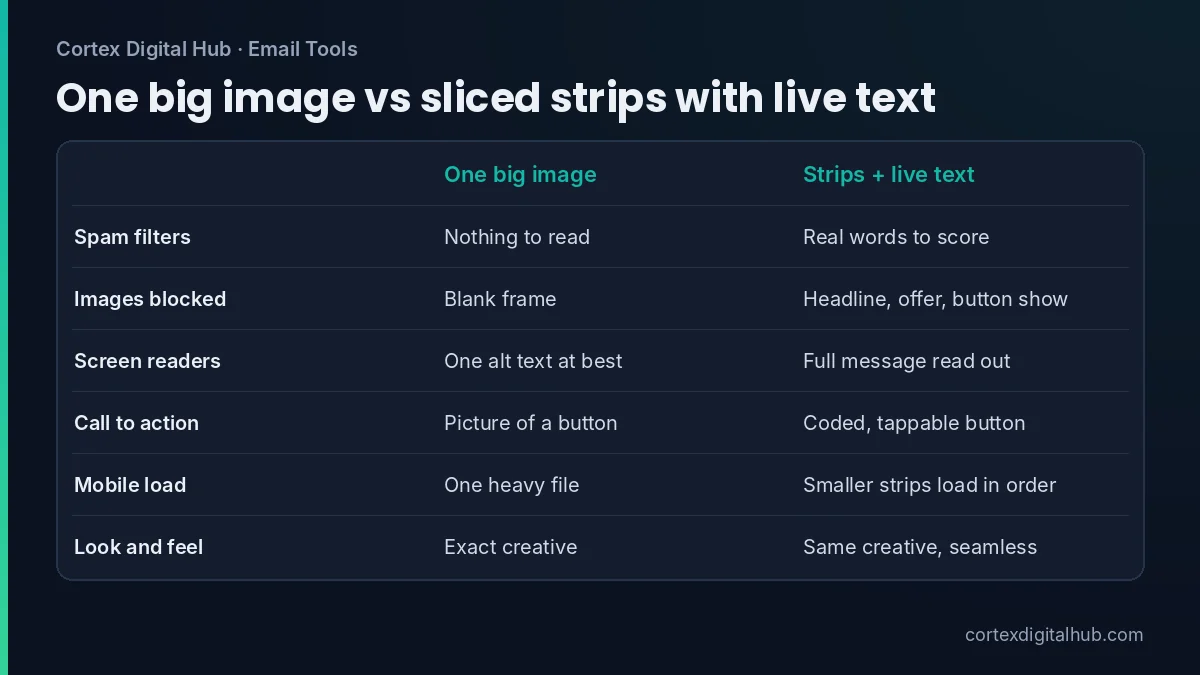 The same creative, two builds: only the sliced version still says something when images fail.
The fix: strips plus live HTML text
The approach that works keeps the look of your creative and changes how it is built:
- Keep the visual parts as images. Photography, renders, the logo and background textures stay as pictures.
- Cut the creative into horizontal strips at natural breaks, so each image is smaller and the layout can hold text between them. The strips sit flush, so the reader still sees one continuous design.
- Rebuild the words as live text. The headline, the price or offer, the location, the possession date, the phone number and terms go into HTML text in your brand colours.
- Use a real button, a coded table cell with a link, not a picture of a button.
- Add alt text to each strip that says what the image shows or what it would have said.
- Add a proper footer with your address and an unsubscribe link in text.
Done this way, a 1080 × 1350 creative becomes three or four strips and two or three blocks of text, and it reads the same in Gmail with images, in Outlook without them, and through a screen reader.
How much text is enough?
Forget the old 60:40 or 80:20 ratio. No major mailbox provider publishes such a number. A better test is practical: turn images off and read the email. Can a reader still tell who sent it, what the offer is and what to do next? If yes, you have enough live text.
| Element | Image or text? | Why |
|---|---|---|
| Hero photo or render | Image | It is a picture; describe it in alt text |
| Headline and offer | Live text | Filters and blocked inboxes need to read it |
| Price, dates, location | Live text | Searchable, copyable, always visible |
| Call to action | Coded button | Clickable without images, larger tap area |
| Logo | Image with alt text | Alt text shows the brand name if blocked |
| Footer and unsubscribe | Live text | Legal and provider requirement |
A few sentences of real copy, perhaps 50 to 150 words, plus a text headline and a text button is a common, healthy shape for a promotional email. Keep each strip compressed so the whole message loads fast on mobile data; the image compressor brings most strips well under 200 KB.
Regional-language campaigns are where teams most often fall back on one big image, because the designer has the Telugu or Hindi lettering ready in the artwork. Live text in Indian scripts renders well in Gmail, Apple Mail and current Outlook versions using the phone's or computer's own fonts. Put at least the headline and call to action in live text in the same language, and keep the stylised lettering as an image strip with alt text.
Other habits that keep image-heavy emails out of spam
Images are rarely the only cause. Check these at the same time:
- Authenticate. SPF, DKIM and DMARC must pass and align with your From domain.
- Clean the list. Hard bounces and typo domains damage your reputation faster than any design choice. Run the file through the email list cleaner before a big send; our post on email domain typos shows the common ones.
- Watch the width and weight. A 600 px layout with compressed images, as covered in email template width, loads quickly and avoids sideways scrolling.
- Keep links honest. Link text that matches the destination, one main domain, and no URL shorteners in bulk campaigns.
- Send a plain sentence or two near the top. It also becomes the inbox preview line instead of "View in browser".
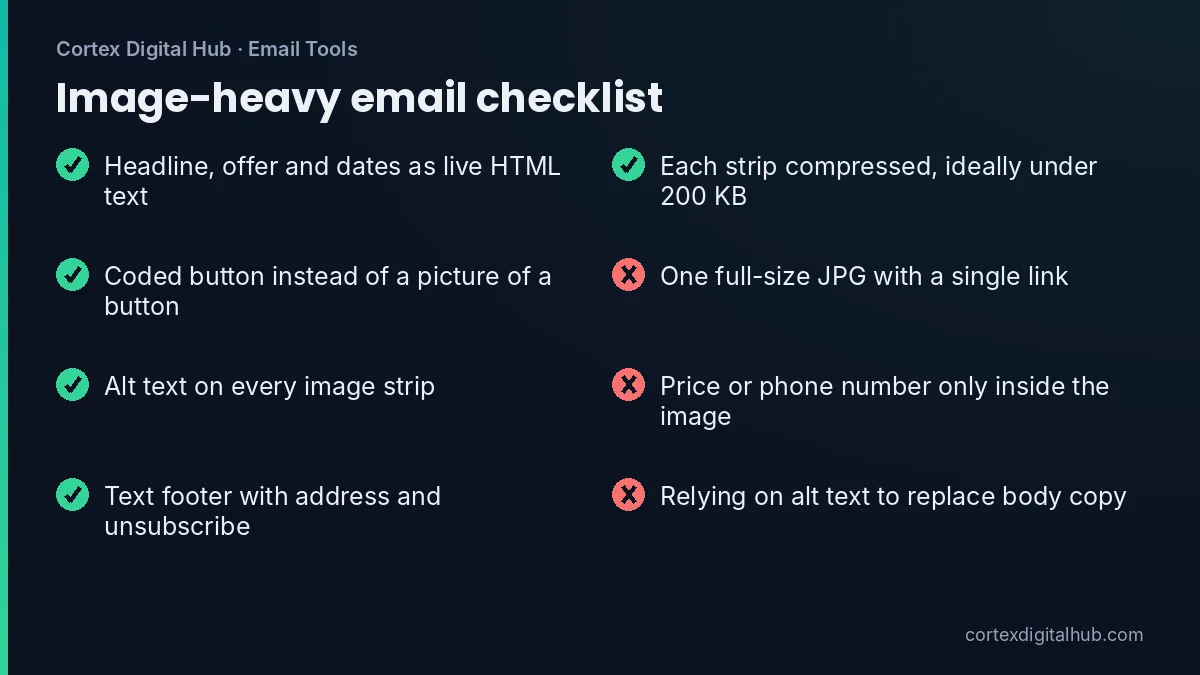 If the email still makes sense with images switched off, you are most of the way there.
Before your next send
Use this as a decision rule. If the creative contains words that matter, those words must also exist as text. If it contains a button, that button must be coded. If it is only a picture, give it alt text and keep it compressed.
- Open your last campaign with images disabled and note what disappeared.
- Rebuild the headline, offer and call to action as live text.
- Slice the remaining creative into strips that sit flush.
- Add alt text and a text footer with address and unsubscribe.
- Send a test to Gmail and classic Outlook and compare.
The Email Composer does the slicing, live text, real buttons and footer in one place, and lets you send up to 15 free test emails a day to yourself to check the result.
Frequently asked questions
Do image-only emails go to spam?
Often, yes, though not always. A single image with almost no text is a pattern spammers have used for years to hide words from filters, so many filters treat it with suspicion. Combined with a new domain or weak authentication, it is a common reason for the spam folder.
What is a good text-to-image ratio for email?
There is no official ratio, and the old 60:40 rule is a rule of thumb, not something Gmail publishes. Aim for a few real sentences of live text, a text headline and a text button alongside your images. Enough text that the email makes sense with images switched off is the practical test.
Why does my email show a blank box in Outlook?
Classic Outlook for Windows and many corporate setups block external images until the reader clicks to download them. If the whole email is one image, the reader sees an empty frame and perhaps a security notice, and usually deletes it.
Is it okay to put text inside the image?
Small decorative text inside a picture is fine. The headline, price or offer, dates, phone number and call to action should be live HTML text so filters, screen readers and image-blocked inboxes can all read them.
Does adding alt text fix an image-only email?
It helps people when images are blocked, and it helps screen readers, but it does not turn an image into body text for filtering. Use alt text as well as live text, not instead of it.
Will slicing an image into pieces get past spam filters?
Slicing alone does not help; ten pictures with no text are still an image-only email. The value comes from replacing the text-heavy parts of the creative with live HTML and keeping only the visual parts as images.
Does Gmail block images?
Gmail shows images by default through its own image proxy, so Gmail readers usually see them. Image blocking matters most in classic Outlook, some corporate gateways and readers who have switched images off to save data.
Turn a creative into an email → →