
Preheader text: the second subject line most senders waste
Preheader text is the preview line inboxes show under or beside the subject. Write 40 to 90 characters that finish the subject's thought, hide it in the HTML, and add filler so the body copy does not leak in after it.
· 5 min read · 993 views · by the Cortex Digital Hub team
Fill the preheader field, check the inbox preview beside your subject, and send a free test to your phone to see exactly what shows. Free · up to 15 test emails a day to yourself
Write your preheader → → Opens Email Composer · runs in your browser
Preheader text is the preview line an inbox shows next to or under your subject. It is the second thing a reader sees, and most senders leave it to chance, so the inbox fills it with "View in browser" or "Dear customer". Write 40 to 90 characters that finish the subject's thought, place them in a hidden line at the top of your HTML, and follow them with invisible filler so nothing else leaks into the preview.
What preheader text is and where it shows
Every inbox builds the preview from the start of your email's text. If the first text in the HTML is a hidden sentence written for the purpose, that is what shows. If it is a "View in browser" link, the alt text of your logo or an unsubscribe line, that is what shows instead.
Where and how much shows, roughly, at the time of writing:
| Inbox | Where the preview sits | Roughly visible |
|---|---|---|
| Gmail app on Android | One line under the subject | 35–50 characters |
| iPhone Mail | Two lines under the subject | 80–110 characters |
| Gmail in a desktop browser | Same line, after the subject | What the subject leaves, often 40–70 |
| New Outlook and Outlook mobile | One line under the subject | 40–60 characters |
| Classic Outlook for Windows | Optional preview, off by default in some setups | Varies |
These numbers vary with screen size, font settings and app version. The safe plan is 40 to 90 characters with the important words first.
How to write preheader text that earns the open
Treat the subject and preheader as one sentence split in two. The subject makes the promise; the preheader adds the detail that makes the promise believable.
- Subject: "Site visits open this Saturday"
- Preheader: "Walk the 3 BHK show flat, 10 am to 6 pm. Free cab from Gachibowli on request."
Good preheaders usually do one of these:
- Add a specific. A date, a time, a price band, a location.
- Answer the obvious question. "What is in it for me?" or "How long will this take?"
- Lower the effort. "Reply with a time that suits you" or "One tap to call."
- Continue the story. Subject "We missed you at the site", preheader "Here are the photos, and two new slots next week."
Avoid repeating the subject, because then the second line adds nothing. Avoid "Click here to read more", which wastes space on something the reader already knows.
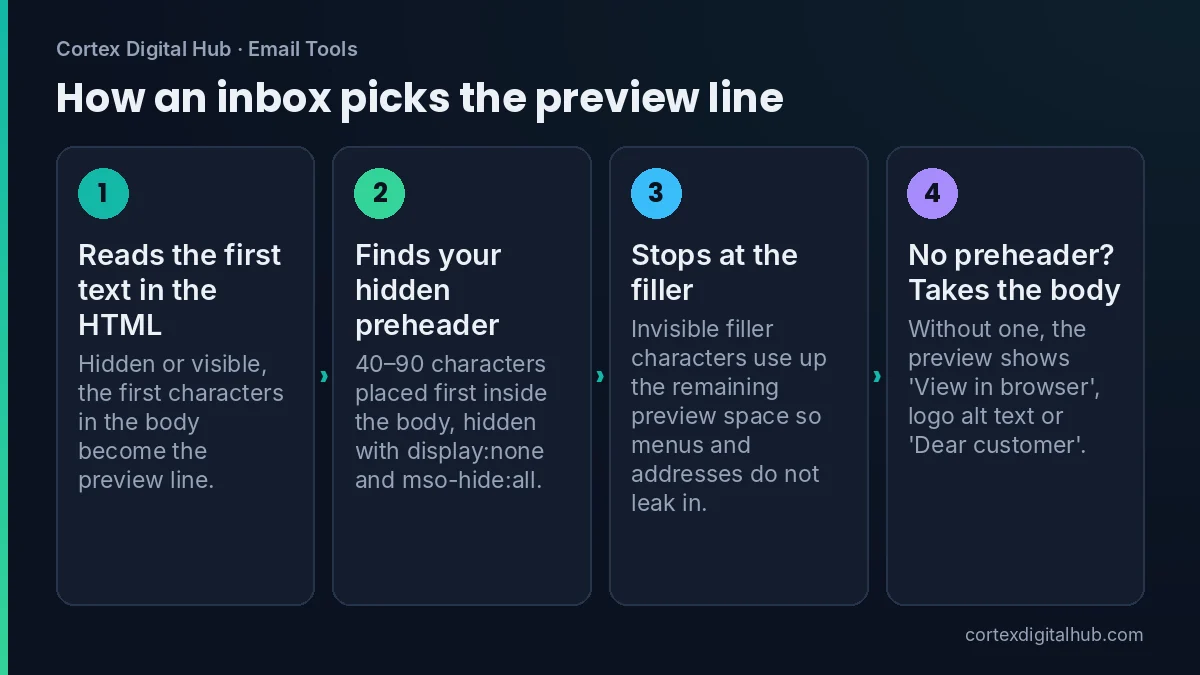 If you do not set a preheader, the inbox takes the first text it finds.
Lines that should never appear as your preview
This is where most senders lose the second line. If any of these appear in your test inbox, fix the order of your HTML or add a hidden preheader:
- "View this email in your browser" or "Having trouble viewing this email?"
- "Dear Customer," or "Dear {first_name}," with a broken merge tag
- "logo" or "header image", which is alt text from your top image
- Your postal address or "Unsubscribe", which means the email has almost no live text
- A copy of the subject line
A "view in browser" link is useful in some emails, but put it after the preheader in the code, or move it to the footer. If your email is built only from images, the preview often shows nothing helpful at all, which is one of several reasons to avoid image-only emails.
Hidden preheader HTML with filler
Place this as the first thing inside <body>, before your header table. The first block is the preheader; the second is filler that occupies the rest of the preview space.
<div style="display:none; font-size:1px; line-height:1px; max-height:0; max-width:0;
opacity:0; overflow:hidden; mso-hide:all; color:#ffffff;">
Walk the 3 BHK show flat, 10 am to 6 pm. Free cab from Gachibowli on request.
</div>
<div style="display:none; max-height:0; overflow:hidden; mso-hide:all;">
͏‌ ͏‌ ͏‌ ͏‌
<!-- repeat the group 60 to 90 times -->
</div>
What each part does:
display:none,max-height:0andopacity:0hide the line in the opened email across most clients.mso-hide:allhides it in classic Outlook, which ignores some of the other styles.- The filler characters are invisible but count as text, so the inbox stops there instead of pulling in your menu or first paragraph.
Do not overdo the filler. A few hundred characters is plenty, and every byte adds to the HTML size that Gmail counts towards its clipping limit of about 102 KB.
The Email Composer adds the hidden preheader and filler for you. Type the line in the preheader field, and it warns you if the text is too short or too long for most inboxes.
Testing preheader text before a send
Code that looks right in your editor can still show the wrong line in the inbox. Test on the real thing:
- Send a test to a Gmail address and open the Gmail app on an Android phone.
- If you can, check an iPhone too, which shows a longer preview.
- Look at the line under the subject. Is it your preheader? Does it end cleanly?
- Open the email and confirm the preheader is not visible at the top.
- Check the plain-text version too. Some clients use it for the preview.
When you are sending a welcome email the moment a lead fills a form, the preheader is especially valuable: the person is looking at the inbox right then. See welcome email for new leads for examples, and email subject line length for how much of the subject they will see.
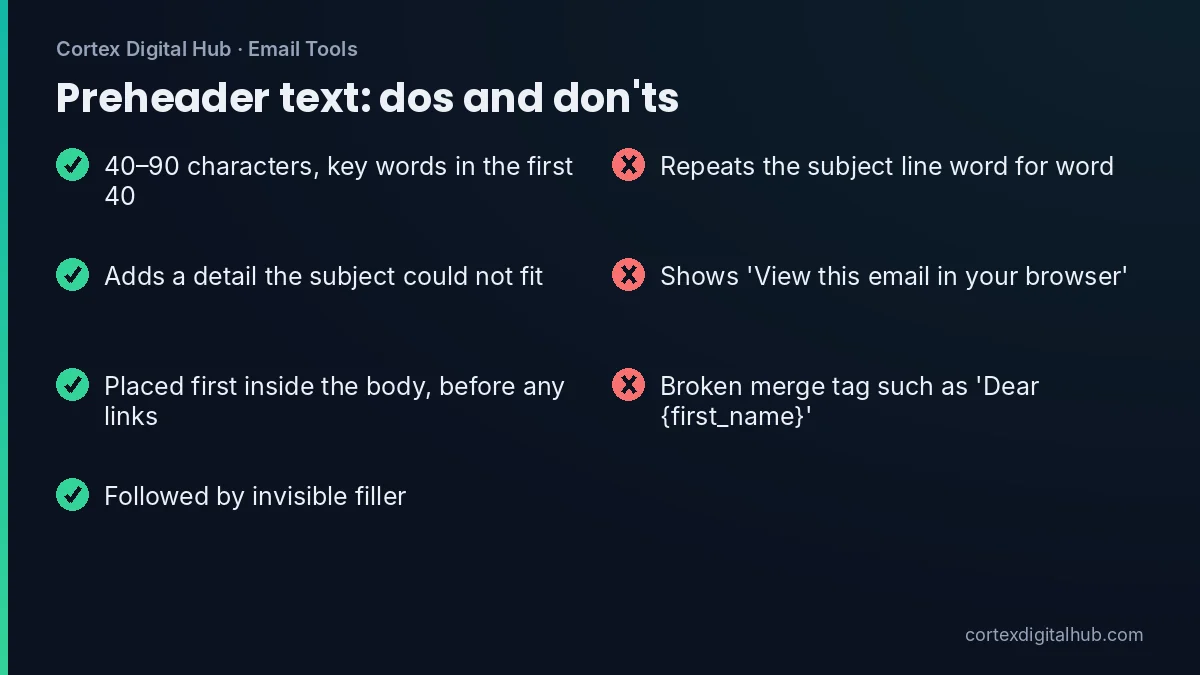 Five quick checks for the preview line before each send.
Does preheader text help deliverability?
Not directly. Filters judge your domain's reputation, authentication and how readers react, not the preview line. Indirectly it helps: a clear preview means more of the right people open and fewer people report spam because they did not recognise the email. Gmail and Yahoo expect complaint rates below 0.3%, and every confused reader counts against you. See why emails go to spam for the bigger picture.
Two things matter more than any preview line. Your list should be clean, which the free email list cleaner helps with, and your domain should pass SPF, DKIM and DMARC, which sending setup checks for you.
A preheader checklist for every campaign
- 40 to 90 characters, most important words in the first 40.
- Adds something the subject does not say.
- Placed first inside the body, before any "view in browser" link.
- Followed by invisible filler so body text does not leak in.
- No broken merge tags. Use a fallback such as
{{first_name|there}}. - Checked in a real phone inbox before the send.
Frequently asked questions
What is preheader text in an email?
It is the short preview that inboxes show next to or below the subject line. You set it with a hidden line at the very top of the HTML. If you do not, the inbox shows the first text it finds in the email instead.
How long should preheader text be?
Write 40 to 90 characters and make the first 40 count. Phones usually show one or two lines, desktop Gmail shows whatever space the subject leaves. Anything past about 100 characters is rarely seen.
Why is my preheader showing 'View in browser'?
Because that link is the first text in your email and you have no preheader set, or the preheader is placed after it. Put the hidden preheader as the first element inside the body, before any header links.
Is hidden preheader text bad for spam filters?
A short hidden preview line is standard practice and is not a problem on its own. Hiding large blocks of keyword text is a different matter and can look manipulative. Keep the hidden part to the preheader and its filler.
Should the preheader repeat the subject line?
No. Repeating wastes the second line. Use the preheader to add a detail the subject could not fit: a date, a price, a location or what the reader gets by opening.
Do all email clients show preheader text?
Gmail, Apple Mail, Yahoo, Outlook on phones and the newer Outlook apps show a preview. Classic Outlook for Windows can show a short preview if the user turns it on. Plan for it to be seen, but make the subject work alone.
What is preheader filler and why use it?
Filler is a run of invisible characters placed after the preheader. It takes up the remaining preview space so the inbox does not pull in your body text, such as a menu or address, straight after your preview line.