
A Diwali video for family far away, made from one photo of your own people
Not going home this Diwali? Turn an old family photo, or one your parents send you, into a few seconds of diyas lighting up around the people you miss, and send it to the family group before the puja.
· 6 min read · 1.1K views · by the Cortex Digital Hub team
Pick a family idea, add the photo of your people as the first frame, and check the credit total before you press Generate. ₹24 draft or ₹85 for 5 seconds · no watermark · free account
Make one for home → → Opens Diwali Video Generator · runs in your browser
You are in Bengaluru, or Dubai, or Toronto, and this year you are not going home for Diwali. The leave did not come through, the tickets cost what they cost, or the baby is too small to fly. At home, Papa's knees will not take a long journey either. So on Diwali evening the family will be in two places, and the family WhatsApp group will fill with forwards: a stock diya, a fireworks GIF, a smiling family nobody has met.
A Diwali video for family far away can be something else. Take one photo of your own people, the ones you are missing, and turn it into a few seconds of diyas lighting up around them, marigold petals falling, lamp light on Maa's face. Send it to the group before the puja. Below is how, on your phone, in about ten minutes.
Why the forwarded greeting feels so empty
Nobody minds a forward. But nobody stops on one either. It has been sent to forty groups before yours, and the family in it is no one's family. When you are the one far away, it can feel worse than silence: proof that Diwali is going on without you, in a picture that has nothing to do with you.
A video call fixes some of that. You see the rangoli, you hear the crackers, someone holds the phone up to the diyas. But the call ends, the network drops when the whole colony is online, and the time zones rarely line up. A short video of your own people, sent to the family group, stays. Mausi forwards it to her group. Your father watches it four times and asks how you made it.
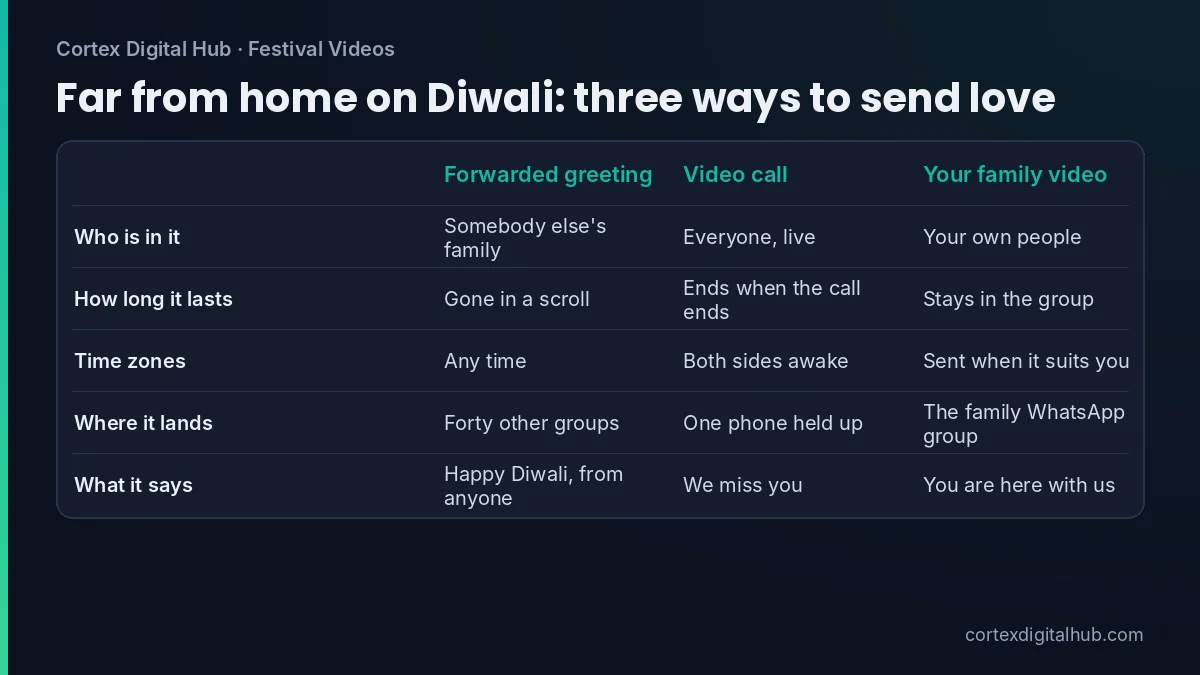 A forward is about nobody. A call ends. A clip of your own people stays in the group.
Finding the right family photo
You do not need a new photo. You need a clear one. There are three good places to look.
- Your own phone. Last Diwali, a cousin's wedding, the family on the sofa during your last visit. Use the original, not a copy saved from WhatsApp.
- An old print. The family photo in the album at home. Photograph it flat by a window in daylight, straight on, without flash, then crop the border in the free Photo Editor. The guide to animating an old photo covers this in more detail.
- A photo they send you. Ask your sister or your parents to take one this week, in the evening, with the diyas or fairy lights already up. Ask them to send it as a document in WhatsApp, so you get the full file.
An evening photo under warm light blends best with the lamp light the video adds. Faces should be fully visible and turned toward the camera; two to six people work better than a crowded group. If the photo is landscape and you want it to fill a phone screen, crop it to 9:16 in the Image Resizer first.
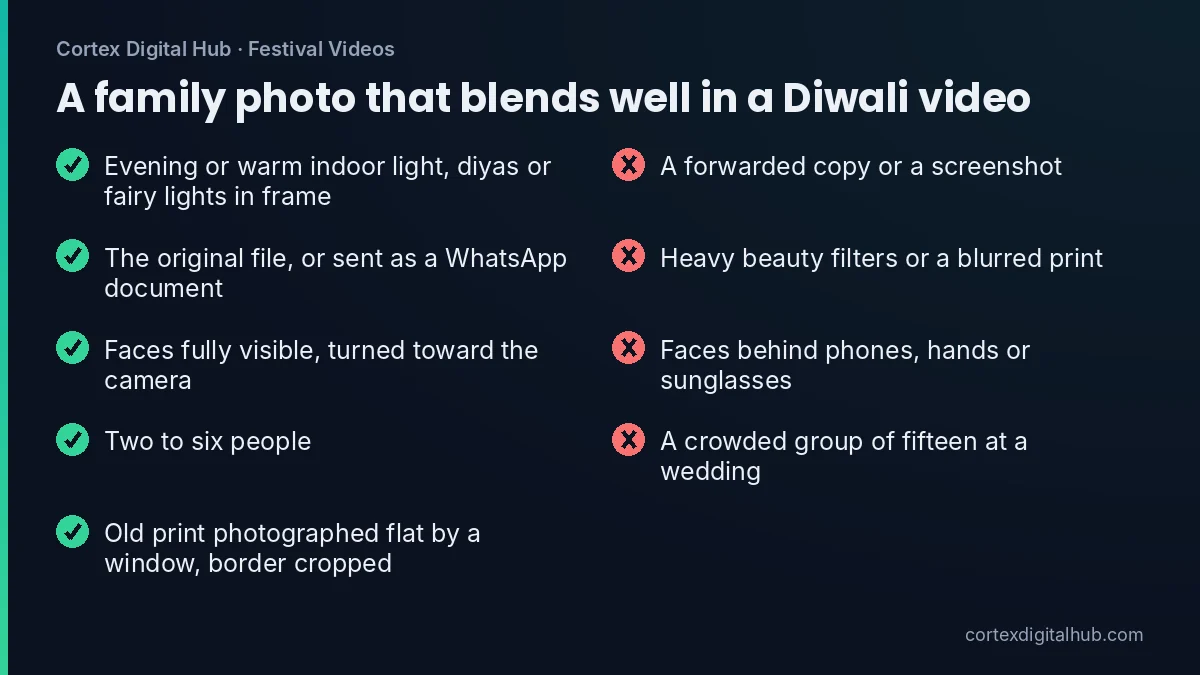 Sharp, warm and faces visible. Skip forwarded copies, beauty filters and big crowds.
If anyone in the photo might not like being animated, ask them first. It is their face going into the family group.
How to make a Diwali video for your family
- Open the Diwali video generator and pick an idea that fits your photo.
- Press Use this idea. The studio opens with the prompt already written.
- Add the family photo. It becomes the first frame, so the people and the room stay as they are.
- Change a detail if you like: "Maa" to "Nani", sitar to flute, the colours of the rangoli.
- Check the credit total on the Generate button, then press it. A 5-second clip is usually ready in two to four minutes.
- Download the MP4 from Your videos and send it.
For the full list of eight ideas and how each one behaves, see Diwali video with your photo.
Ideas that suit a family apart
Some ideas carry the feeling of distance better than others.
| Your photo | Idea | Why it works |
|---|---|---|
| Your parents together | Diyas light up around the family | The house you are missing, lit up |
| Maa, Papa or a grandparent alone | Lamp-lit portrait for Maa | Slow and quiet; a blink and a smile |
| The house you grew up in | Fireworks behind the home | Diwali night over your own roof |
| You and your sibling | Siblings, together again | For Bhai Dooj, when the tilak has to wait |
The lamp-lit portrait is the one that tends to make parents call you. Keep it simple.
Prompts to copy
These are the family prompts from the Diwali page, lightly adapted for a family apart. Keep the first line about faces.
For a parent or grandparent (open in the studio):
Keep the face exactly as in the photo, natural and unchanged. Warm lamp light rises slowly on the face, a row of diyas flickers in the soft-focus foreground, a few marigold petals float past, the person blinks and smiles gently, very slow push in, calm sitar music.
For both parents at home (open in the studio):
Keep the faces exactly as in the photo. Small clay diyas around the two of them light up one by one, their warm flames flickering, marigold petals drift down slowly, they smile softly, the camera pushes in very gently, golden evening glow, soft sitar music.
For the house you grew up in:
Keep the house exactly as in the photo. The sky behind the home deepens to night blue and fireworks burst softly in gold and red, a row of diyas glows along the boundary wall, slow steady push in, distant crackers and festive music.
Slow, small motion holds faces best. If a face drifts, generate again rather than adding more instructions.
Send it before the puja
Timing matters more than polish. A clip that arrives the morning after the puja is a nice thought; one that arrives in the afternoon, while Maa is drawing the rangoli, gets watched by everyone in the house.
This year Lakshmi Puja falls on 8 November, though the date varies a little by region and panchang. If you live several hours behind India, the puja happens while you are at work or asleep, so make the clip a day or two early. It waits under Your videos for 7 days.
When you send it:
- Post it in the family group, not just to your parents. Let the chachas and cousins see it too.
- Write the message yourself, in your own language: "Shubh Deepavali, Maa and Papa. Next year I will light the diyas with you." The video carries the feeling; the caption carries the words.
- If the file is too big to send, the Video Compressor shrinks it on your own phone.
Then call. The video does not replace the call. It gives everyone something to talk about when you do.
What it costs
You need a free account and credits. One credit is ₹0.50. A 5-second clip from your photo on the studio's default model is 170 credits (₹85); a 6-second quick draft is 48 credits (₹24). The Generate button shows the exact total first, and credits come back automatically if a clip fails. There is no subscription and no watermark, and your photo is used only to make your clip.
Watch the video
A Diwali video for two, and a rangoli that blooms · 0:21 · Watch on YouTube
Frequently asked questions
Can I make a Diwali video of my family if I am not with them?
Yes. All you need is one photo of them: an old family picture on your phone, a photo of a print, or a fresh one your parents send you. The photo becomes the first frame and the diyas, petals and lamp light are added around it.
Which photo should my parents send me?
A recent photo in the evening or under warm room light, both faces toward the camera and fully visible. Ask them to attach it as a document in WhatsApp rather than as a photo, so you get the original file and not a compressed copy.
Can I use an old printed family photo?
Yes, if it is clear. Photograph the print flat by a window in daylight, straight on and without flash, then crop away the border. Scratches and blur carry into the video, so pick the sharpest print you have.
Will my parents' faces look the same?
Each Diwali prompt asks the model to keep the faces exactly as in the photo, and the photo is the first frame. Gentle motion and a 5-second clip keep faces closest to the original. If a face drifts, generate again.
How much does it cost?
A 5-second clip from your photo on the studio's default model takes 170 credits, which is ₹85. A 6-second quick draft takes 48 credits, or ₹24. One credit is ₹0.50 and credits come back if a clip fails.
When should I send it?
Before the puja, not after. Lakshmi Puja is on 8 November this year, though dates vary a little by region. Make the clip a day or two early; it stays under Your videos for 7 days.
Can it include a message like Happy Diwali, Maa?
Keep names and messages out of the video itself, since video models still misspell words. Write the message in WhatsApp under the video, where it is always spelled right and in your own language.