
Diwali WhatsApp Status video: make one that is your own, in the right shape and size
A Diwali WhatsApp Status video that shows your own family or your own shop, not a forward everyone has already seen. Start from one photo, then get the 9:16 shape, the length and the file size right with free tools on your phone.
· 6 min read · 753 views · by the Cortex Digital Hub team
Pick an idea, add a portrait photo so the video comes out vertical, and generate. Trim, resize and compress afterwards for free. From ₹24 a draft · no watermark · faces kept as in the photo
Make your Diwali Status → → Opens Diwali video generator · runs in your browser
By nine in the morning on Diwali you have seen the same glittering diya animation five times, each with a different name typed at the bottom. Nobody minds, but nobody stops on it either. A Diwali WhatsApp Status video of your own people, your own balcony or your own shop counter is different: the people who see it know that doorway and those faces. This guide shows how to make one from a single photo, then get the three practical things right on your phone: the 9:16 shape, the length and the file size, all with free tools that run in your browser.
Why a forwarded Status feels like nobody's
A forward says "I remembered it was Diwali". Your own clip says "this is us, this year". The second needs no special skill, just one decent photo and ten quiet minutes, ideally on Dhanteras so you are not doing it between pujas. Diwali falls on 8 November this year in most of India (Lakshmi Puja dates vary a little by region and panchang), so the evening before is a good time to have it ready.
For a shop the gap is bigger. Every sweet shop in the lane posts a stock card on the same morning. A few seconds of your actual counter, with lamps lighting up along it, is the one customers recognise.
Start with one photo and the Diwali video generator
The Diwali video generator lists ready ideas: diyas lighting up around the family, a rangoli blooming at someone's feet, fireworks behind the home, a sweet shop counter in lamp light. Each one opens the studio with the prompt already written.
- Pick a portrait photo. With a photo, the studio's default model follows the photo's shape, so a vertical photo gives a vertical video. If yours is landscape, crop it to 9:16 in the free Photo Editor first; our guide to fixing Diwali night photos covers dark or orange shots.
- Choose an idea and press Use this idea.
- Add the photo. It becomes the first frame, so the faces stay the faces you know.
- Generate. It usually takes two to four minutes. You can leave the page; the video waits under Your videos for 7 days.
- Download the MP4 and finish it with the steps below.
A 5-second clip on the studio's default model is 170 credits (₹85), and a 6-second draft is 48 credits (₹24). You need a free account; the Generate button shows the total first, and credits come back if a clip fails.
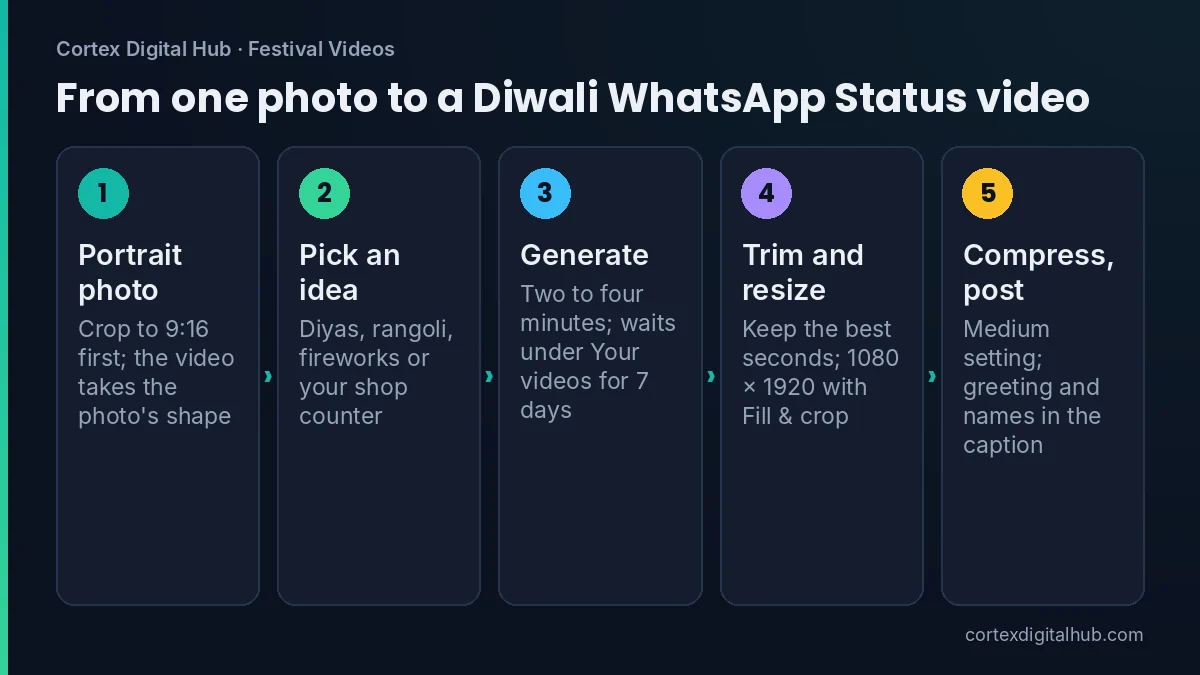 Photo, idea, generate, then trim, resize and compress on your phone.
The right shape: 9:16 and 1080 × 1920
Status fills a phone screen held upright, which is 9:16. A landscape clip shows up as a thin strip with black bands above and below, and the faces end up small.
If your clip is not vertical, open Resize video to 1080 × 1920. The Reels, Shorts and Status preset is already selected. Choose Fill & crop and say whether to keep the left, centre or right of the frame, so the family stays in view. Choose Pad if nothing may be cut and you are fine with bars. The full Video Resizer also has a smaller 720 × 1280 Status option for a lighter file.
Length and size for a Diwali WhatsApp Status video
WhatsApp's help page on creating a Status is the place to check the current length. We could not confirm one fixed number there, and the app has changed it over the years, so we will not quote one. A greeting of 5 to 10 seconds is short enough not to worry about it, and a short clip says one thing clearly.
What you can control is how tight the clip is. If the start has a beat of stillness, or you joined two clips and want the best part only, use Trim Video. Fast mode cuts without re-encoding, so quality stays the same, though the cut snaps to the nearest keyframe, usually within a second or two. Frame-exact re-encodes for a precise cut. You can also remove a section from the middle.
Size is the other half. WhatsApp re-compresses whatever you post, and a heavy file both uploads slowly on a crowded festival network and loses more in that second squeeze. The Video Compressor has Light, Medium and Strong settings, or a To a size mode where you type the target in MB. Medium is a good default for Status. It runs on your phone's own hardware encoder, so the video is not uploaded anywhere.
Trim, resize, compress: the order that works
| Step | Tool | What to set |
|---|---|---|
| 1. Trim | Trim Video | Keep the best few seconds; Fast mode if the cut points are not critical |
| 2. Resize | Resize video to 1080 × 1920 | Fill & crop, centre (or left or right to keep faces in frame) |
| 3. Compress | Video Compressor | Medium, or To a size if the file is still heavy |
| 4. Post | Greeting and names in the caption |
Trimming first means the later steps work on less video. Compress last, once, so the clip is not squeezed twice by you before WhatsApp squeezes it again.
On sound: the studio's default model makes sound with the picture, such as sitar, bells or crackers. WhatsApp's own blog says you can add music to a Status and pick up to 60 seconds of a song for a video. If you plan to add a family favourite there, turn sound off in the studio so the two do not clash.
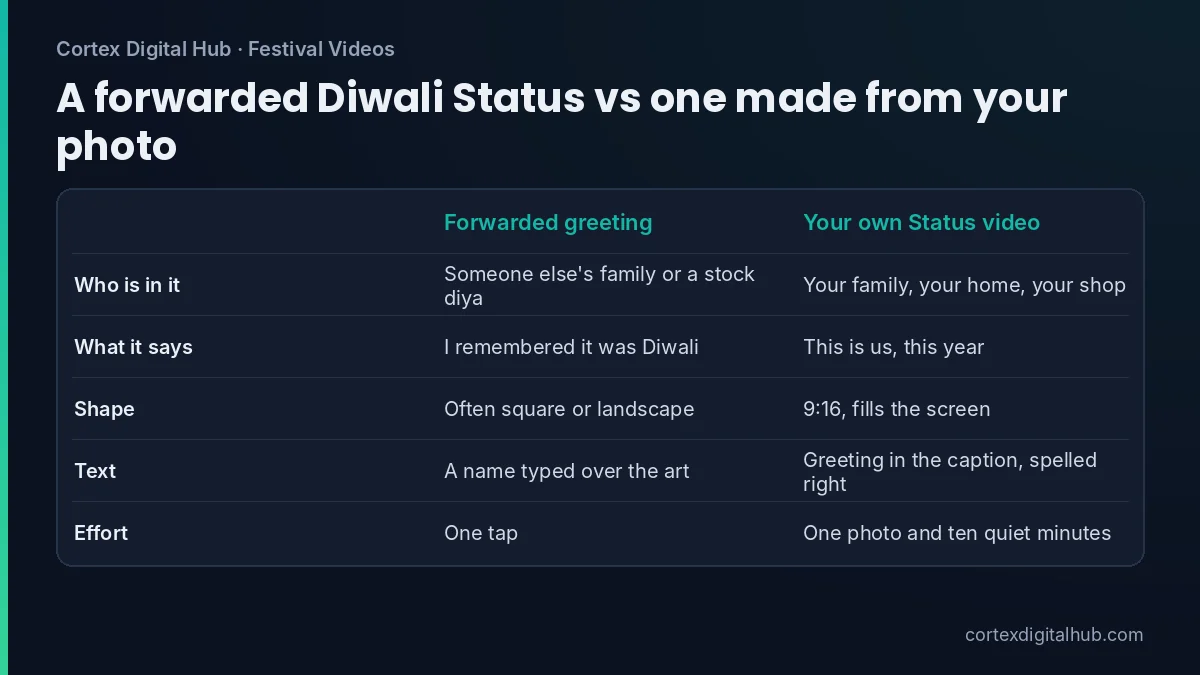 Same effort to post; very different to receive.
For shops: your Status is the shop window this week
Customers who saved your number see your Status before they see your board. A short clip of your own counter lit up with diyas tells them you are open, festive and nearby. Start from a clear photo of the shop front or counter, taken in the evening if you can, and use the sweet shop counter idea or the product among diyas idea. Jewellers have a Dhanteras counter idea on the same page.
Keep the offer itself (the discount, the dates, your number) in the caption. It is always spelled right there, and you can change it on Bhai Dooj without making a new video.
Prompts to copy
Paste one into the studio after adding your photo, and change any detail you like.
Keep the faces exactly as in the photo. Small clay diyas around the family light up one by one, marigold petals drift down slowly, everyone smiles softly, gentle push in, golden evening glow, soft sitar music.Keep the house and any people exactly as in the photo. The sky behind the home deepens to night blue and fireworks burst softly in gold and red, fairy lights on the balcony twinkle, slow steady push in.Keep the faces exactly as in the photo. Everyone holds sparklers that throw bright golden sparks, the light dances on their faces, they laugh, soft bokeh lights behind, gentle slow motion.Keep the shop and any people exactly as in the photo. Diyas along the counter light up one by one, marigold garlands sway at the entrance, the sweets glisten in warm light, slow push in, cheerful festive music.
Make it on Dhanteras, trim and compress it the same evening, and it is ready to post before the first forward arrives.
Watch the video
A Diwali video for two, and a rangoli that blooms · 0:21 · Watch on YouTube
Frequently asked questions
What size should a Diwali WhatsApp Status video be?
Vertical 9:16, which is 1080 × 1920 pixels at full HD. The Resize video to 1080 × 1920 tool converts a landscape or square clip with Fill & crop or Pad. A 720 × 1280 option is there too if you want a lighter file.
How long can a WhatsApp Status video be?
Check WhatsApp's own help page for the current limit. We could not confirm one fixed number there and the app has changed it before, so we do not quote one. A 5 or 10-second greeting is short enough not to worry about it.
How do I make my Diwali video vertical?
Start from a portrait photo. With a photo, the studio's default model follows the photo's shape, so crop it to 9:16 in the free Photo Editor before you generate. If the clip comes out landscape anyway, resize it to 1080 × 1920 afterwards.
Why does my Status video look blurry?
WhatsApp re-compresses what you post. A clean, moderately sized file at 1080 × 1920 or 720 × 1280 survives that better than a heavy 4K file. The Video Compressor's Light or Medium setting is usually enough.
Can I add a song to my Diwali Status?
Yes. WhatsApp's blog says you can add music to a Status and choose up to 60 seconds of the song for a video. If you plan to do that, turn sound off in the studio so the two do not clash.
Can I put Happy Diwali and my name in the video?
Keep longer text out of the prompt; video models still misspell words. Write the greeting and names as the Status caption, where they are always right.
How much does a Diwali Status video cost?
A 5-second clip on the studio's default model is 170 credits (₹85). A 6-second draft is 48 credits (₹24). Trimming, resizing and compressing are free and run on your device.
Can a shop use this for a Diwali offer?
Yes. The Diwali page has ideas for a sweet shop counter, a jewellery display and a product among diyas. Put the discount, dates and phone number in the caption, not in the video.