
What an SPF record is and how to write one that works
An SPF record is one TXT entry in your DNS that lists the servers allowed to send mail for your domain. Here is the syntax, when to end it with ~all or -all, and a working example for Google Workspace plus Amazon SES.
· 5 min read · 994 views · by the Cortex Digital Hub team
Add your domain and Sending setup shows the exact SPF, DKIM and DMARC records for your provider, with a live green or red check on each. Live DNS checks · bring your own Amazon SES or API key
Get your exact SPF records → → Opens Sending setup · runs in your browser
An SPF record is a single TXT record in your domain's DNS that lists which servers may send email using your domain as the bounce (Return-Path) address. When a message arrives, the receiving server looks up that record, compares the sending IP address against it and records pass, fail or softfail. A working record for a company that sends from Google Workspace looks like v=spf1 include:_spf.google.com ~all. You get one SPF record per domain name, it must stay under 10 DNS lookups, and it only protects the domain it sits on.
That last point is where most setups go wrong, so we will come back to it with a full example.
What an SPF record checks, and what it does not
SPF (Sender Policy Framework, RFC 7208) checks the envelope sender, the address servers use for bounces. You rarely see it. In a received message it appears as Return-Path: near the top of the headers.
It does not check the From address your reader sees. A spammer can pass SPF on their own domain while showing your name in the From line. That gap is why DMARC exists: it requires the SPF domain (or the DKIM domain) to match the visible From domain.
SPF also breaks on forwarding. When a Gmail user forwards your email to their office account, the forwarding server's IP is not in your record. DKIM survives forwarding, which is why you need both. If you are working out why mail lands in junk, the wider picture is in why emails go to spam.
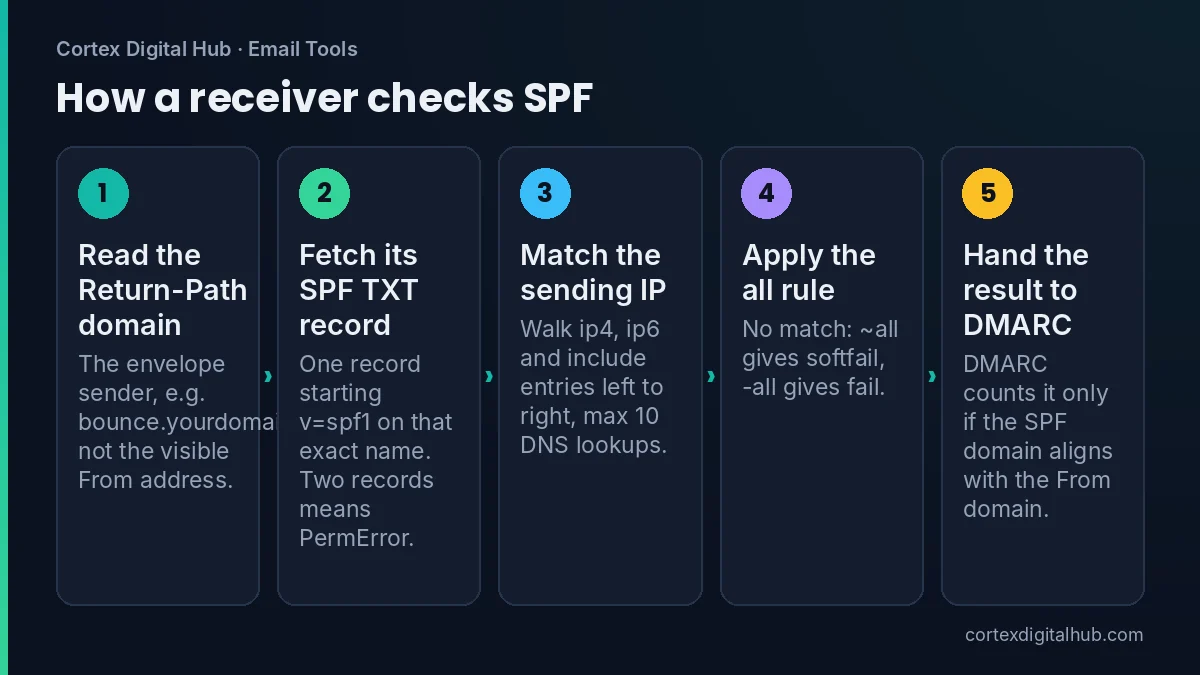 The receiver checks the Return-Path domain, not the From address your reader sees.
SPF record syntax, piece by piece
Every record starts with v=spf1, then lists mechanisms in order, then ends with an all rule. The receiver reads left to right and stops at the first match.
| Part | Example | What it means | Costs a DNS lookup? |
|---|---|---|---|
v=spf1 |
v=spf1 |
Version tag. Must be first. | No |
ip4 / ip6 |
ip4:203.0.113.25 |
This exact IP or range may send | No |
include |
include:_spf.google.com |
Also allow whatever that domain's SPF allows | Yes, plus any nested ones |
a |
a |
Allow the IP your domain's A record points to | Yes |
mx |
mx |
Allow your inbound mail servers to send | Yes |
~all |
~all |
Everything else: softfail | No |
-all |
-all |
Everything else: fail | No |
Avoid ptr (deprecated and slow) and +all (lets the whole internet send as you). Leave out a and mx unless your web server or inbound mail server really sends mail; many records carry them out of habit and waste two lookups.
The 10-lookup limit covers include, a, mx, ptr, exists and redirect, counted across nested includes. Go over it and SPF returns a permanent error. Google's include costs one lookup today, but some providers nest several, so count before you add.
~all or -all: which ending to use
The ending tells receivers what to do with mail from a server you did not list.
~all(softfail): "probably not us". Mail is usually accepted and scored.-all(fail): "definitely not us". Some receivers reject at the door.?all(neutral): "no opinion". Close to having no record at all.
Start with ~all. Most companies discover a forgotten sender in the first month: the website contact form, a billing tool, the CRM, an old newsletter account. A softfail gives you time to find them in DMARC reports without bouncing real invoices.
Once DMARC is enforcing (p=quarantine or p=reject), the choice matters less, because DMARC makes the final call using SPF and DKIM together. Many careful senders keep ~all permanently so a forwarded message that still carries a valid DKIM signature is not rejected on SPF alone.
One SPF record per domain name
You may publish exactly one TXT record starting with v=spf1 on a given name. Two records on the same name, say one added by your hosting company and one by your email service, produce a permanent error. Receivers then treat SPF as failed.
The fix is to merge: one v=spf1, every include and ip4 from both, one all at the end. Subdomains are separate names, so yourdomain.com and bounce.yourdomain.com can each have their own record without conflict.
Example SPF record for Google Workspace plus Amazon SES
Say a Pune training institute uses Google Workspace for staff mail and Amazon SES for admission emails. A common mistake is to stuff both into the root record. The correct layout depends on which domain appears in the Return-Path.
Staff mail from Workspace uses yourdomain.com as the Return-Path, so the root gets:
Name: @    Type: TXT
v=spf1 include:_spf.google.com ~all
SES, by default, uses its own amazonses.com bounce domain. SPF passes for Amazon's domain, but it does not match yours, so it does nothing for your DMARC. With a custom MAIL FROM subdomain set up in SES, the SES record goes on that subdomain:
Name: bounce    Type: MX
10 feedback-smtp.ap-south-1.amazonses.com

Name: bounce    Type: TXT
v=spf1 include:amazonses.com ~all
Use the region your SES account actually sends from; ap-south-1 is Mumbai. Adding include:amazonses.com to the root as well does no harm (it costs one lookup), but it is not what makes SES mail pass. The Amazon SES setup guide walks through the MAIL FROM step, and Sending setup generates these exact records for your domain and region, with a live check on each one.
If you send through another service, the include differs. The email providers comparison lists what each one needs.
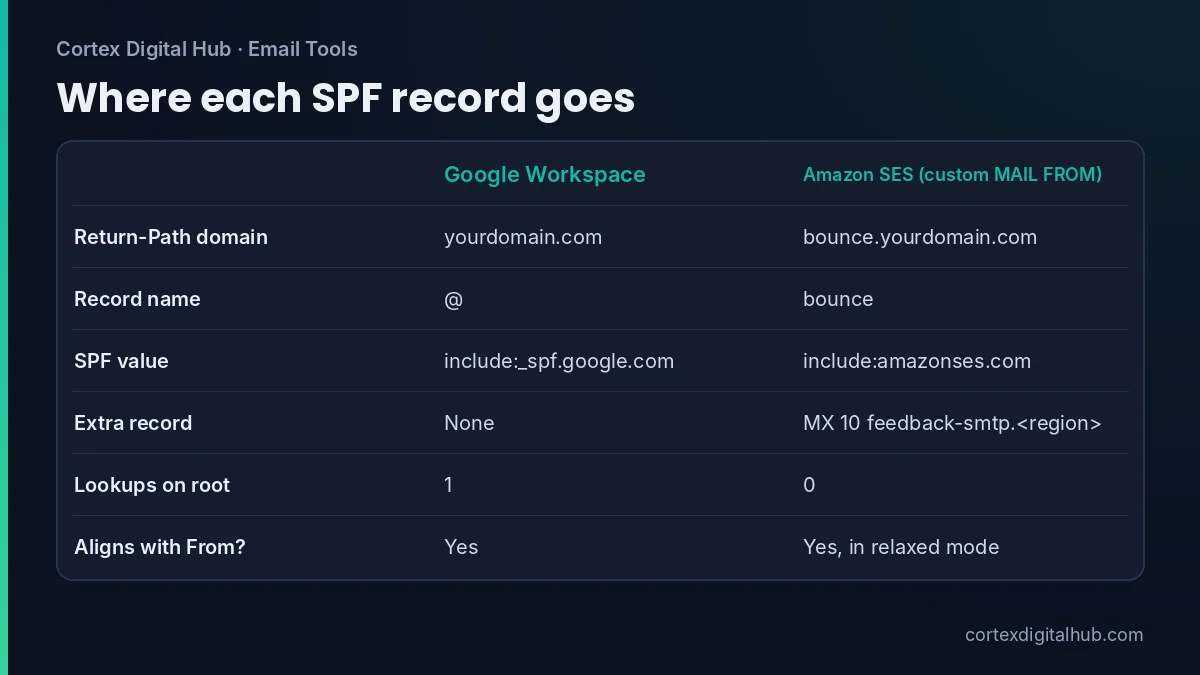 Workspace mail is checked on the root domain; SES mail with custom MAIL FROM is checked on the bounce subdomain.
Common SPF record mistakes
- Two
v=spf1records on the same name after switching providers. - The record pasted with curly quotes from a Word document or chat app.
- A space after the colon, as in
include: _spf.google.com. include:pointing at a website address, such asinclude:www.provider.com, instead of the provider's SPF domain.- Leftover includes for tools you cancelled years ago, each costing lookups.
- Old records of the SPF type (type 99) still sitting in the zone. They are obsolete; use TXT only.
-allset on day one, before every sender is known.
Check your SPF record today
- Look up the TXT records on your root domain and confirm there is only one starting with
v=spf1. - List every tool that sends as your domain: mailbox provider, marketing sender, CRM, billing, website forms.
- For each, find which domain appears in its Return-Path, and put that tool's include on that domain only.
- Count lookups and stay well under 10.
- End with
~alluntil DMARC reports show a clean month. - Send yourself a test from the Email Composer and confirm the headers show
spf=passfor your own domain.
SPF is the first of three records. The next one, DKIM, signs each message so it survives forwarding, and together with DMARC they cover what Gmail and Yahoo expect from anyone sending at volume, as of 2026. The email tools hub has everything in one place when you are ready to send.
Frequently asked questions
What is an SPF record in simple words?
It is a TXT record in your domain's DNS that lists the mail servers allowed to send email using your domain as the bounce address. Receiving servers compare the sending IP with that list and record a pass, fail or softfail.
Where do I add an SPF record?
In the DNS zone of the domain that appears in the Return-Path of your emails, usually at your registrar or DNS host such as GoDaddy, Hostinger, Cloudflare or BigRock. For the root domain, the host or name field is @. For a bounce subdomain, it is the subdomain name, such as bounce.
Should my SPF record end with ~all or -all?
Use ~all while you are still finding every service that sends for you, then consider -all once DMARC reports show nothing legitimate failing. With DMARC in place, most large mailbox providers treat the two very similarly, so ~all is a safe long-term choice.
Can I have two SPF records on one domain?
No. Two TXT records starting with v=spf1 on the same name make SPF return a permanent error, which counts as a fail for DMARC. Merge every include and ip4 entry into one record.
Does Amazon SES need include:amazonses.com in my root SPF record?
Only if your root domain is the MAIL FROM domain, which it normally is not. By default SES uses its own amazonses.com bounce domain. With a custom MAIL FROM subdomain, the SES SPF record goes on that subdomain, not the root.
Is SPF alone enough to stop spam folder problems?
No. Gmail and Yahoo expect bulk senders to have SPF, DKIM and DMARC together, plus a low complaint rate. SPF is one of three checks, and it breaks on forwarding, so DKIM matters at least as much.
How long does an SPF change take to work?
Usually minutes to an hour, depending on the TTL on the old record. Some resolvers cache longer, so allow up to 24 hours before deciding a change has failed.
Get your exact SPF records → →