
DKIM explained: the signature that proves an email is really yours
DKIM adds a cryptographic signature to every email you send, and receivers check it against a public key in your DNS. Here is how selectors work, TXT versus CNAME keys, why 2048-bit is the norm, and how Easy DKIM in Amazon SES does it for you.
· 5 min read · 1.3K views · by the Cortex Digital Hub team
Connect your sending provider, add your domain, and copy the exact DKIM records with a live check that turns green once they resolve. Live DNS checks · bring your own Amazon SES or API key
Get your DKIM records → → Opens Sending setup · runs in your browser
DKIM is a digital signature added to every email you send. Your sending server signs selected headers and the body with a private key; the receiving server fetches the matching public key from your DNS and checks the signature. If it verifies, the receiver knows two things: the message really came from a server authorised by your domain, and nobody changed it on the way. The public key is published at an address like selector._domainkey.yourdomain.com, either as a TXT record holding the key or as a CNAME pointing to a key your provider hosts.
Unlike SPF, DKIM survives forwarding, because the signature travels inside the message. That makes it the more reliable half of email authentication.
How DKIM works in plain words
Think of a sealed envelope with a wax stamp. Anyone can see the stamp; only you own the seal.
- Your provider holds a private key and signs each outgoing message.
- It adds a
DKIM-Signatureheader naming your domain (d=) and the selector (s=). - The receiver builds the DNS name
s._domainkey.dand fetches the public key. - It recalculates the hash of the signed headers and body and compares.
- Match means
dkim=pass. Any change to a signed part, or a missing key, means fail.
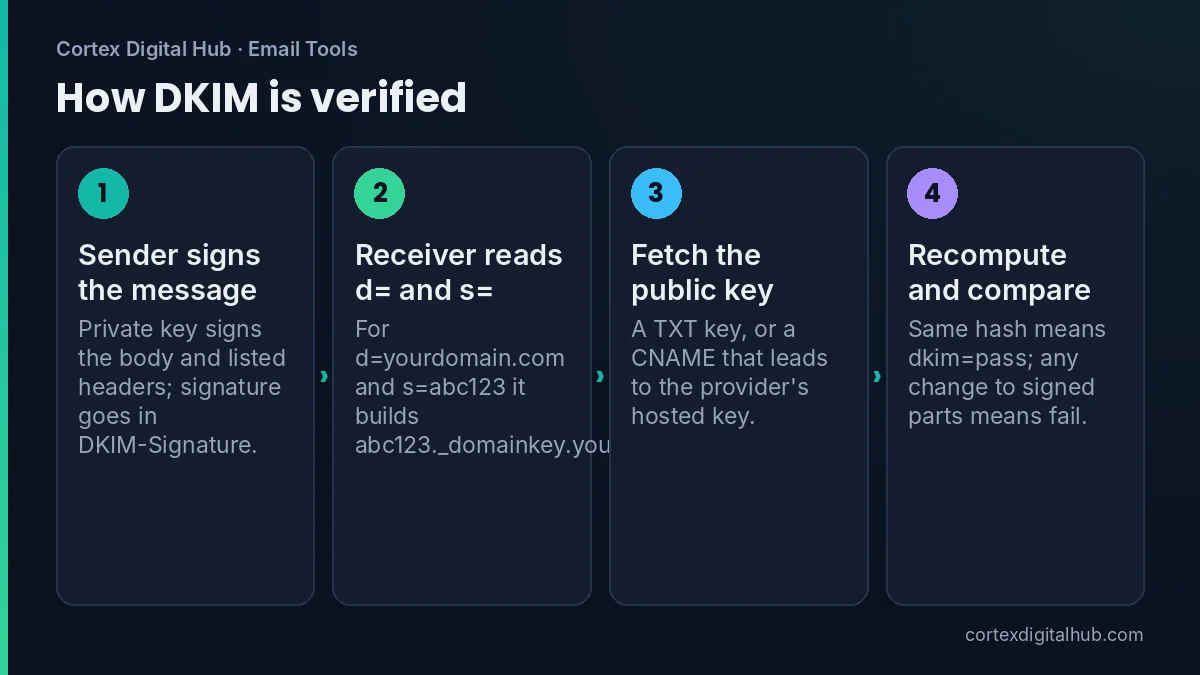 The receiver uses d= and s= from the signature to find your public key in DNS.
What a DKIM signature looks like
Open any email's full headers and you will find something like this (shortened):
DKIM-Signature: v=1; a=rsa-sha256; c=relaxed/relaxed;
  d=yourdomain.com; s=s2026; t=1764652200;
  h=from:to:subject:date:message-id;
  bh=47DEQpj8HBSa+/TImW+5JCeuQeRkm5NMpJWZG3hSuFU=;
  b=dzdVyOfAKCdLXdJOc9G2q8LoXSlEniSb...
| Tag | Meaning |
|---|---|
d= |
The signing domain. For DMARC, this should be your domain. |
s= |
The selector, which picks the public key. |
h= |
Which headers were signed. The From header is always included. |
bh= |
A hash of the body. |
b= |
The signature itself. |
c= |
How strictly whitespace changes are tolerated. relaxed is normal. |
The matching public key in DNS looks like v=DKIM1; k=rsa; p=MIIBIjANBgkqh... with a long base64 string after p=.
Selectors: many keys on one domain
A domain can have as many DKIM keys as it needs, one per selector. A Hyderabad builder might have:
google._domainkey.yourdomain.comfor staff mail from Google Workspace- three SES tokens such as
abc123._domainkey.yourdomain.comfor campaign mail s1._domainkey.yourdomain.comfor a CRM that sends follow-ups
None of them conflict. Selectors also make key rotation painless: publish a new selector, switch signing to it, and remove the old one after a few days. You never need to "merge" DKIM records the way you must merge SPF.
TXT or CNAME: two ways to publish a DKIM key
| TXT record | CNAME record | |
|---|---|---|
| What you publish | The public key itself | A pointer to a key the provider hosts |
| Who rotates keys | You, by editing DNS | The provider, without your help |
| Length problems | Possible with 2048-bit keys on old DNS panels | None, the value is short |
| Typical users | Google Workspace, Microsoft 365 self-managed, cPanel | Amazon SES, SendGrid, many marketing platforms |
Neither is more secure. Copy exactly what your provider shows. The most common error is the DNS panel adding your domain twice, giving s1._domainkey.yourdomain.com.yourdomain.com. If your panel adds the domain automatically, type only s1._domainkey.
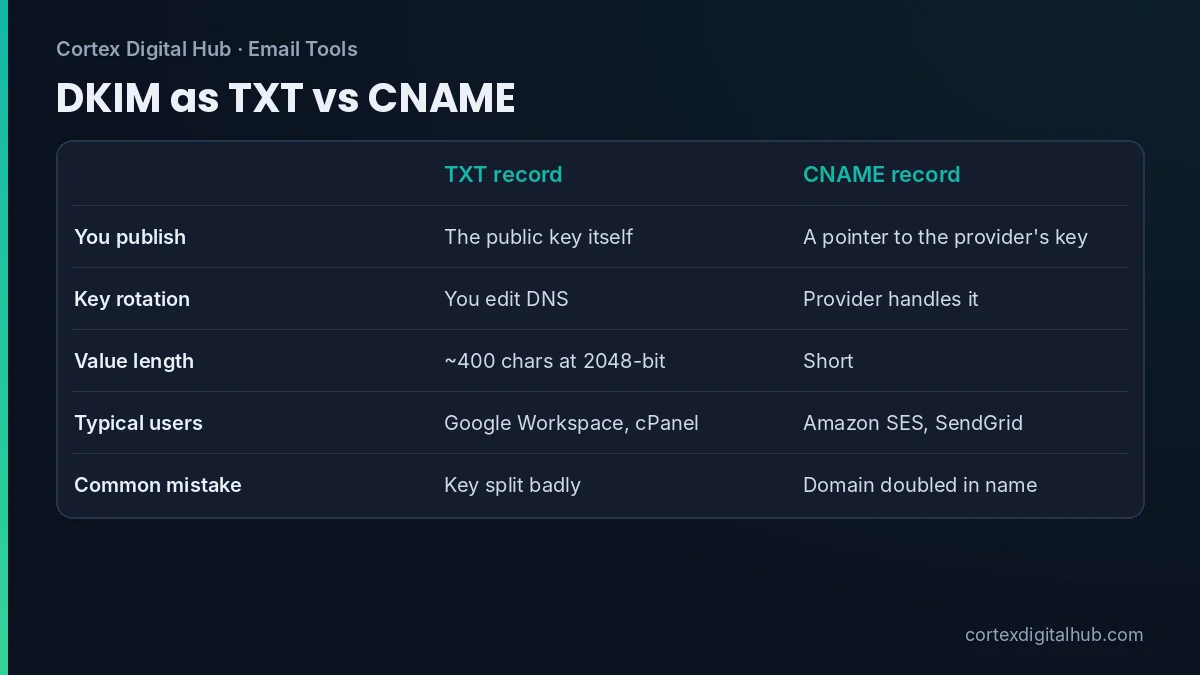 CNAME delegation lets the provider rotate keys; a TXT key is yours to rotate.
Use a 2048-bit DKIM key where you can
Key length is how hard the signature is to forge. 1024-bit keys still validate at Gmail, which requires at least 1024, but 2048-bit is the recommended length and the default in Google Workspace and Amazon SES as of 2026. 512-bit and 768-bit keys are treated as weak and may be ignored.
A 2048-bit public key is about 400 characters, longer than the 255-character limit for a single TXT string. Good DNS panels split it into quoted chunks for you. If yours rejects the value, paste it as two quoted strings side by side; receivers join them. Only fall back to 1024-bit if the panel truly cannot store it.
Easy DKIM in Amazon SES
When you verify a domain in Amazon SES with Easy DKIM, SES gives you three CNAME records:
abc123token._domainkey.yourdomain.com  CNAME  abc123token.dkim.amazonses.com
def456token._domainkey.yourdomain.com  CNAME  def456token.dkim.amazonses.com
ghi789token._domainkey.yourdomain.com  CNAME  ghi789token.dkim.amazonses.com
Add all three, wait for the identity to show DKIM as successful (often minutes, but SES allows up to 72 hours), and every message from that domain is signed with d=yourdomain.com using a 2048-bit key by default. Because they are CNAMEs, Amazon can manage the keys behind them without you touching DNS again.
The Amazon SES setup guide covers verification end to end. If you connect your SES account in Sending setup, it lists the three records for your domain and turns each one green once it resolves. Other services handle DKIM differently; the email providers comparison shows what each one asks for.
What breaks a DKIM signature
A signature covers the body and the headers listed in h=. Change any of them after signing and verification fails, even though the message looks the same to a reader. The usual culprits:
- Footers added on the way. Some corporate gateways and mailing lists append a disclaimer or "unsubscribe from this group" line, which changes the body hash.
- Link rewriting. Security gateways that rewrite links for click scanning can alter the body before final delivery. Most do this after checking DKIM, but not all.
- Subject tags. A list that adds
[Group]to the subject breaks the signature if the subject was signed, which it almost always is. - Encoding changes. An old relay that converts 8-bit text to another encoding can break a strict body hash.
c=relaxed/relaxedtolerates whitespace changes, not re-encoding. - Sending through two services. If your app sends to a relay that then re-signs, check the final headers to see which signature survived.
When DKIM fails with "body hash did not verify", the key is fine and something changed the message. When it says "no key for signature", the DNS record is missing or the selector is wrong.
Where SPF and DMARC come in
DKIM proves a domain signed the message. It does not say that domain is the one in the From line. That link is made by DMARC, which needs either SPF or DKIM to pass for a domain that matches your From address. Since DKIM survives forwarding, aligned DKIM is the one to get right first.
If you set up SPF already, the SPF record guide explains why it only covers the Return-Path domain. Missing or broken DKIM is one of the common reasons in why emails go to spam.
Set up and check DKIM today
- Find DKIM settings in every tool that sends as your domain and enable signing for your own domain.
- Publish each record exactly as given, without the domain doubled.
- Prefer 2048-bit keys.
- Send a test from the Email Composer to a Gmail address, open Show original and confirm
DKIM: PASSwith your domain. - Remove selectors for tools you no longer use.
Frequently asked questions
What does DKIM stand for?
DomainKeys Identified Mail. It is a standard (RFC 6376) that lets a sending domain sign each message with a private key, so receivers can verify the message came from that domain and was not changed on the way.
Is DKIM required to send email?
For anyone sending in volume, effectively yes. Since 2024 Gmail and Yahoo require bulk senders to have both SPF and DKIM, and DMARC needs at least one of them aligned with your From domain. DKIM is the one that survives forwarding.
What is a DKIM selector?
A label that tells receivers which public key to fetch. It sits in the s= tag of the signature, and the key lives at selector._domainkey.yourdomain.com. Different services use different selectors, so several keys can coexist on one domain.
Should I use a TXT or CNAME record for DKIM?
Use whatever your provider gives you. A TXT record holds the key itself. A CNAME points to a key the provider hosts, which lets them rotate keys without you editing DNS. Amazon SES Easy DKIM uses three CNAMEs.
Is a 1024-bit DKIM key still acceptable?
It still validates at Gmail, which accepts 1024-bit and above, but 2048-bit is the recommended length and the default for Google Workspace and Amazon SES. Use 1024 only if your DNS host truly cannot store a longer TXT value.
Why does DKIM pass but DMARC fail?
Usually because the signing domain in d= is your provider's domain, not yours. DMARC needs the DKIM domain to match the From domain. Set up DKIM for your own domain in the provider, so d= shows yourdomain.com.
How do I check if DKIM is working?
Send a message to a Gmail address, open it in a browser, choose Show original and look for DKIM: PASS with your domain. In the full headers, the Authentication-Results line should show dkim=pass header.d=yourdomain.com.