
Custom MAIL FROM: the bounce subdomain that makes SPF align
Amazon SES bounces your mail through its own amazonses.com domain by default, so SPF passes for Amazon, not for you. A custom MAIL FROM domain such as bounce.yourdomain.com fixes that with one MX and one TXT record.
· 5 min read · 536 views · by the Cortex Digital Hub team
Connect your Amazon SES account and add your domain; Sending setup shows the exact MX and SPF records for your bounce subdomain and region, with a live check. Send-only IAM key · region detected automatically
Get your MAIL FROM records → → Opens Sending setup · runs in your browser
A custom MAIL FROM domain is a subdomain of your own, such as bounce.yourdomain.com, that your sending service uses as the envelope sender instead of its own domain. In Amazon SES it needs two DNS records: an MX record pointing to feedback-smtp.<region>.amazonses.com with priority 10, and a TXT record v=spf1 include:amazonses.com ~all. Once SES verifies it, the Return-Path of every message shows your subdomain, SPF passes for your domain and, because bounce.yourdomain.com aligns with yourdomain.com, SPF now counts towards DMARC.
Without it, SES mail can still pass DMARC through DKIM. With it, you get two aligned checks instead of one.
Why the default MAIL FROM fails alignment
Every email carries two sender addresses. The From address is what your reader sees. The envelope sender (MAIL FROM, shown later as Return-Path:) is where bounces go, and it is the domain SPF checks.
By default SES sets the envelope sender to a subdomain of amazonses.com. A received message looks like this:
Return-Path: <[email protected]>
From: Asha Rao <[email protected]>
Authentication-Results: mx.google.com;
  spf=pass smtp.mailfrom=ap-south-1.amazonses.com;
  dkim=pass [email protected];
  dmarc=pass header.from=yourdomain.com
SPF says pass, but for Amazon. DMARC asks whether the SPF domain matches the From domain, and amazonses.com does not match yourdomain.com. DMARC passes here only because DKIM is signed for yourdomain.com. If you have not set up DKIM yet, read the DKIM guide first; it is the more important of the two. The DMARC guide explains alignment in more detail.
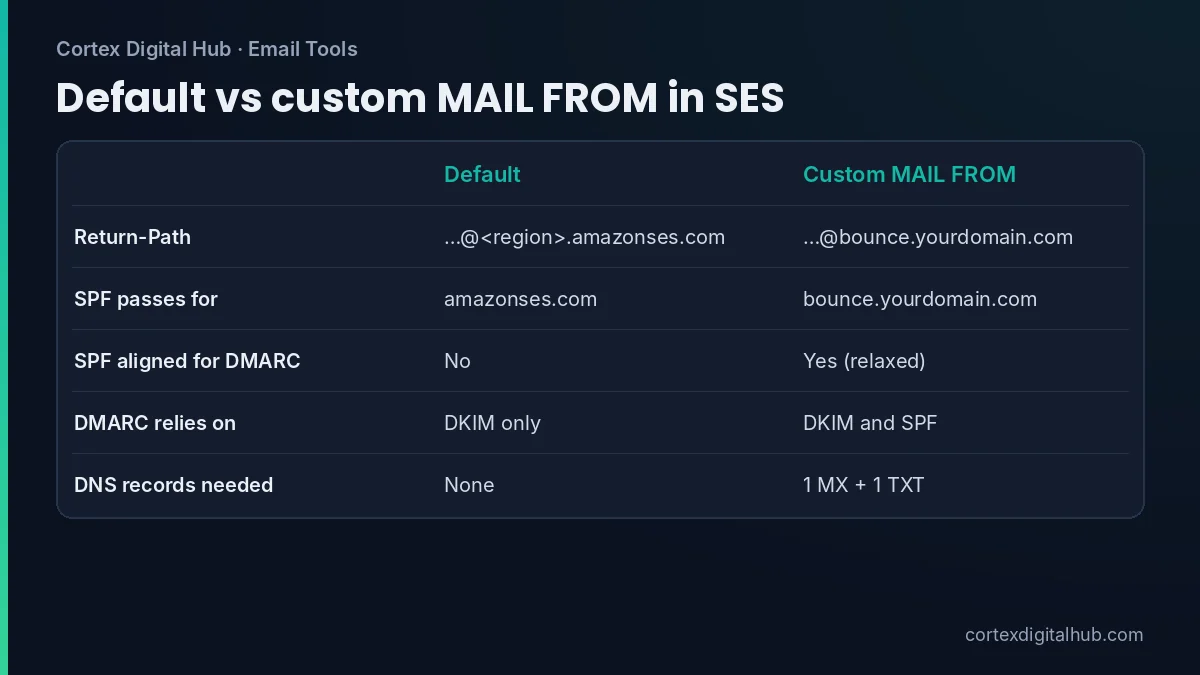 The default bounce domain passes SPF for Amazon; a custom one passes SPF for you.
Records for a custom MAIL FROM domain
For a sender in the Mumbai region (ap-south-1) using bounce.yourdomain.com:
| Name | Type | Value | Notes |
|---|---|---|---|
bounce |
MX | feedback-smtp.ap-south-1.amazonses.com |
Priority 10. Exactly one MX. |
bounce |
TXT | v=spf1 include:amazonses.com ~all |
SPF for the subdomain only |
Three rules from the SES documentation, as of 2026:
- The MAIL FROM domain must be a subdomain of the verified domain.
- It should not be a subdomain you send regular email from or receive email at.
- It must have exactly one MX record. Two MX records on the subdomain make the setup fail.
Use your own region in the MX value. If you are not sure which region your account sends from, the console URL shows it, or Sending setup detects it when you connect a send-only key.
This SPF record sits on the subdomain, so it does not touch your root SPF record or its 10-lookup budget. The SPF record guide shows how the root and bounce records sit side by side.
Setting up a custom MAIL FROM domain in SES
- Open Amazon SES in the region you send from and go to Identities.
- Select your verified domain and open the Custom MAIL FROM domain section.
- Choose Edit, tick Use a custom MAIL FROM domain and enter
bounce(SES shows the full name). - Leave Behavior on MX failure at Use default MAIL FROM domain.
- Save. SES shows the MX and TXT records to publish.
- Add both records at your DNS host. If the panel adds your domain automatically, enter only
bounceas the name. - Wait for the status to change from Pending to Successful.
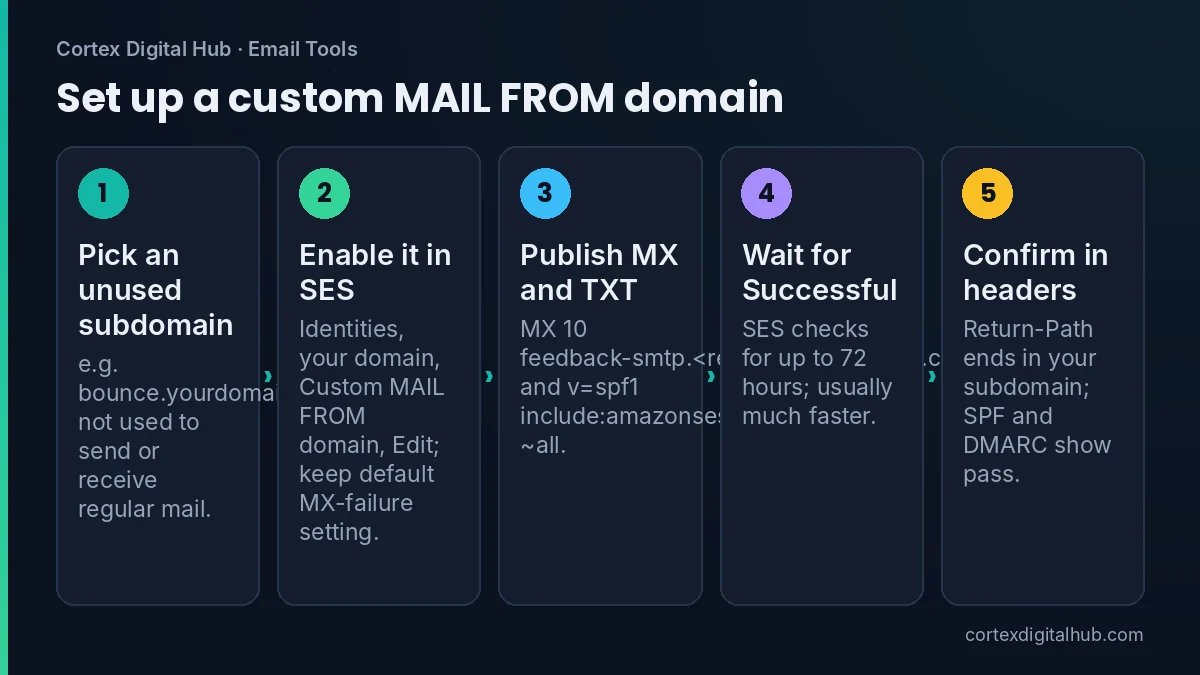 Two records on one unused subdomain, then wait for SES to confirm.
The full SES process, including DKIM and leaving the sandbox, is in the Amazon SES setup guide.
Behaviour on MX failure: which to choose
SES keeps checking your MX record after setup. If it goes missing, this setting decides what happens:
- Use default MAIL FROM domain. SES quietly falls back to
amazonses.com. Mail keeps flowing; SPF stops aligning; DMARC still passes if DKIM is aligned. - Reject message. SES refuses to send and returns a
MailFromDomainNotVerifiederror.
For most businesses the default is right: a deleted DNS record should not stop a site visit confirmation. Choose Reject only if your policy requires SPF alignment on every message and you monitor errors closely.
Do you need it if DKIM already passes?
Strictly, no. DMARC needs one aligned pass. But there are three reasons to do it anyway:
- A second safety net. If a forwarding service or a security gateway alters the message and breaks the DKIM signature, aligned SPF can still carry DMARC at the first hop.
- Your domain in the Return-Path. Receivers build reputation on the domains they see. Your own bounce domain keeps that reputation tied to you, which matters while you warm up a new sender.
- Bounces under your name. Bounce traffic flows through a subdomain you control, which is tidier when you audit sending later.
It takes ten minutes and costs nothing extra. Sending costs are separate and covered in Amazon SES pricing in rupees.
Common mistakes and how to spot them
Most failed MAIL FROM setups come down to a handful of errors:
| Symptom in SES | Likely cause | Fix |
|---|---|---|
| Pending for hours, then Failed | MX record on the root instead of bounce |
Move it to the subdomain |
| Failed straight away | Two MX records on the subdomain | Delete all but the SES one |
| Pending forever | Wrong region in the MX value | Use the region the identity lives in |
| Success, but SPF fails in headers | SPF TXT missing or mistyped on bounce |
Add v=spf1 include:amazonses.com ~all |
| DNS panel refuses the record | A CNAME already exists on bounce |
Pick another subdomain; CNAMEs cannot share a name |
Two more points catch people out. First, the subdomain must not already receive mail. If mail.yourdomain.com has MX records for your office mailboxes, choose bounce or mf instead. Second, the setting is per identity and per region. If you verified your domain in both Mumbai and another region, set it up in each one, with that region's MX value.
If you use a DNS panel that appends your domain automatically, the Name is just bounce. Typing bounce.yourdomain.com there creates bounce.yourdomain.com.yourdomain.com, and SES never finds the record.
Check it worked
Send a test to a Gmail address, open it in a browser and choose Show original. You want:
Return-Pathending in@bounce.yourdomain.comSPF: PASS, withsmtp.mailfrom=bounce.yourdomain.comin the full headersDKIM: PASSwithyourdomain.comDMARC: PASS
If Return-Path still shows amazonses.com, the MX record is missing or wrong, and SES is using the fallback. The Email Composer sends up to 15 free test emails a day to yourself through your connected provider, which is a quick way to run this check after every DNS change.
Today: pick an unused subdomain, add one MX and one TXT record for your region, turn the setting on in SES, and confirm the Return-Path in a test message.
Frequently asked questions
What is a MAIL FROM domain?
It is the domain in the envelope sender, also called the Return-Path or bounce address. Receiving servers send bounces there and run the SPF check against it. Readers usually never see it.
Why does SPF pass but not align when I use Amazon SES?
By default SES uses a subdomain of amazonses.com as the MAIL FROM, so SPF passes for Amazon's domain. DMARC needs the SPF domain to match your From domain, so it does not count. A custom MAIL FROM subdomain of your own domain fixes this.
Which subdomain should I use for a custom MAIL FROM domain?
Any unused subdomain of the domain you send from, such as bounce.yourdomain.com or mail.yourdomain.com. It must not be used to send or receive regular mail, and it must have exactly one MX record.
Do I need a custom MAIL FROM domain if DKIM already passes?
DMARC passes with aligned DKIM alone, so it is not strictly required. It adds a second aligned check, which helps if a signature ever breaks, and it puts your own domain in the Return-Path.
What does Behavior on MX failure mean in SES?
It decides what SES does if your MAIL FROM MX record disappears or is wrong. Use default MAIL FROM keeps sending through amazonses.com; Reject message stops sending with an error. Most senders keep the default.
How long does SES take to verify a custom MAIL FROM domain?
Often a few minutes once the MX record resolves. SES keeps checking for up to 72 hours while the status is Pending, then marks it Failed if the record is still missing.
Can I use the same bounce subdomain for SendGrid or Mailgun too?
Not usually. Each service needs its own MX target for bounces, and SES requires exactly one MX record on the subdomain. Give each sending service its own bounce subdomain.
Get your MAIL FROM records → →