
How to warm up a new sending domain without landing in spam
Warm up a new sending domain by starting with a few hundred emails a day to your most engaged contacts and roughly doubling every few days while bounces and complaints stay low. Expect two to four weeks to reach full volume.
· 5 min read · 779 views · by the Cortex Digital Hub team
Before day one, remove typos, duplicates, invalid and throwaway addresses so your first sends from the new domain bounce as little as possible. Free · runs in your browser · nothing uploaded
Clean your warm-up list → → Opens Email List Cleaner · runs in your browser
An email warm up is the process of building a sending reputation for a new domain or IP by starting small and raising volume step by step. Start with 50–200 emails a day to your most engaged contacts, roughly double every two to three days while bounces stay under 2% and complaints under 0.1%, and expect two to four weeks to reach a few thousand a day. There is no official schedule from Gmail, Yahoo or Microsoft. The ramp below is a cautious starting point that you adjust to what your results tell you.
Do you need an email warm up?
You need one when the receiving servers have no history for what they are seeing:
- A new domain, or a domain that has only ever sent staff email from Google Workspace.
- A new sending provider, for example moving from a CRM's built-in mailer to Amazon SES. Your domain has history, but the IPs and DKIM signatures are new.
- A new dedicated IP. This needs the slowest ramp of all, because a cold IP has zero history.
- After a long gap, say a month or more of silence.
You do not need one for low, steady volume such as 50 transactional emails a day; that is already a natural ramp.
Before day one: get the basics right
Warming a domain with broken authentication wastes the effort. Check all of these first.
- SPF, DKIM and DMARC published and passing, with DKIM signed for your own domain. Sending setup gives the exact records and checks them live; the Amazon SES setup guide covers SES specifically.
- A clean list. Run it through the Email List Cleaner to fix domain typos like gmial.com and remove duplicates and throwaway addresses.
- A visible unsubscribe link and, for marketing mail, one-click unsubscribe headers, as the Gmail and Yahoo bulk sender requirements ask.
- Google Postmaster Tools set up for the domain, so you can see Gmail's view once volume builds.
An email warm up schedule you can copy
This example targets 20,000 emails a day on a new domain using a provider's shared IPs. Treat each step as a ceiling, not a target.
| Days | Emails per day | Who gets them |
|---|---|---|
| 1–2 | 100 | Opened or clicked in the last 30 days |
| 3–4 | 250 | Same, plus enquiries from the last 2 weeks |
| 5–6 | 500 | Active in the last 60 days |
| 7–9 | 1,000 | Active in the last 60 days |
| 10–12 | 2,000 | Active in the last 90 days |
| 13–15 | 4,000 | Active in the last 90 days |
| 16–19 | 7,000 | Active in the last 180 days |
| 20–23 | 12,000 | Wider list, newest first |
| 24–28 | 20,000 | Full regular list |
For a smaller target, stop at your level and stay there. For a dedicated IP, stretch each stage by roughly half again. Amazon SES offers an automatic warm-up mode for dedicated IPs that spreads mail between the new IP and shared ones; check the current options in the SES console.
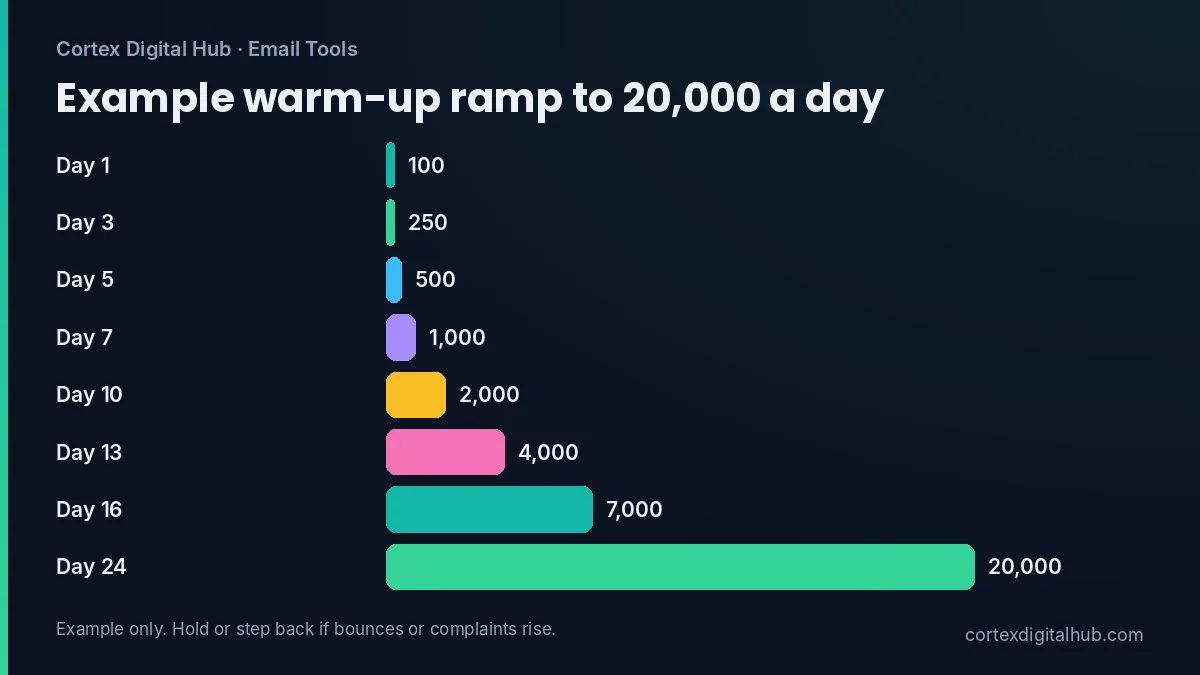 An example ramp. Hold or step back whenever the warning signals appear.
Who to send to first
The first fortnight decides your reputation, so fill it with people who will open, click and reply.
- Leads who enquired in the last week or two. A Pune developer warming a new domain might start with site-visit confirmations and brochure follow-ups to this month's enquiries.
- Existing customers and people who replied to you before.
- Contacts who opened or clicked in the last 30 days in your old system.
Keep the content wanted: a useful update, a short note from a real person, a reply-friendly question. Avoid your heaviest promotional campaign until week three. Mix of mailbox providers matters too; a list that is 90% Gmail will build Gmail reputation quickly but tell you little about Outlook.
Signals to watch, and when to pause
Check these after every send during warm-up.
| Signal | Healthy | Pause and investigate |
|---|---|---|
| Hard bounce rate | Under 1% | Over 2% |
| Spam complaint rate | Under 0.1% | 0.3% or more |
| Deferrals (4xx codes) | Rare | Rising at one provider |
| Gmail spam rate (Postmaster) | Under 0.1% | Over 0.1% and rising |
| Click rate | Steady | Falling sharply |
Open rates are a weak signal now that Apple Mail Privacy Protection pre-loads images and inflates opens. Clicks and replies are more honest. If a hard bounce or soft bounce pattern appears at one provider, slow only that provider's share if your platform allows it.
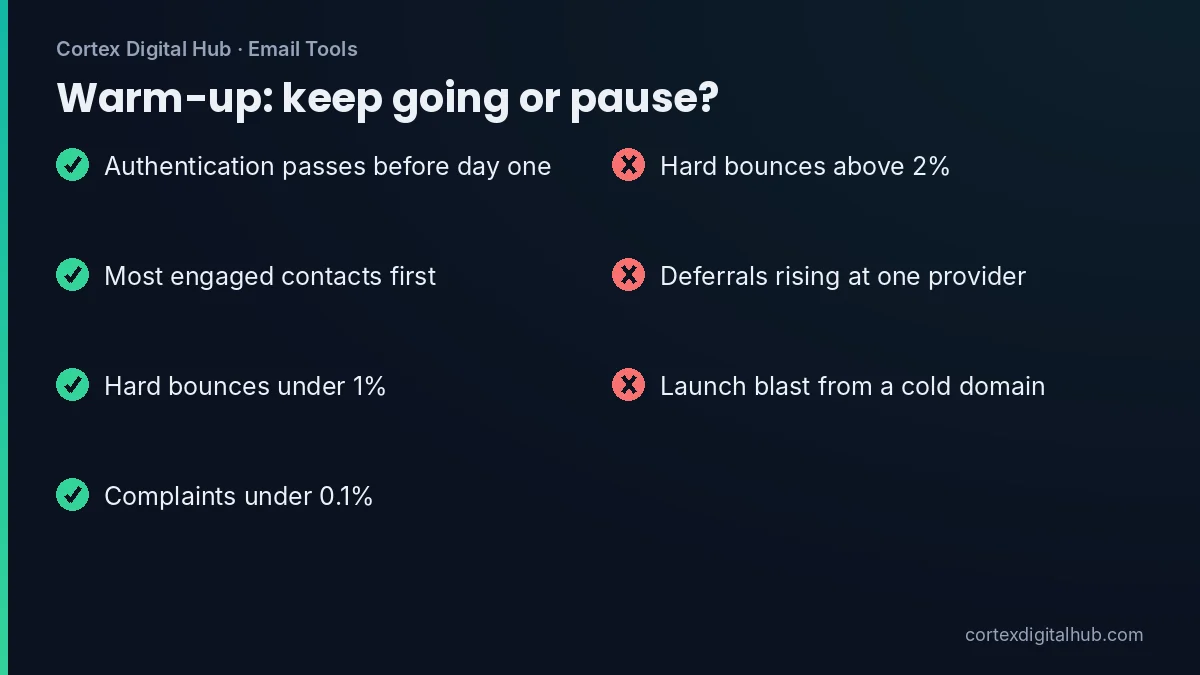 Any red item means hold volume for two or three days before ramping again.
A word on automated warm-up tools
Many tools promise to warm your domain by sending to a network of inboxes that automatically open, reply and mark you "not spam". It is tempting, but think it through. Those interactions do not come from your audience, mailbox providers actively look for artificial engagement, and the moment you switch to your real list the signals change. For cold outreach some teams accept that risk. For marketing to people who asked to hear from you, warming on real engaged contacts is slower and far more durable.
If you are not sure your list is clean enough to warm on at all, start with why emails go to spam and fix the higher-order problems first.
What a four-week warm-up costs
Warming up is cheap in money and expensive only in patience. Add up the example table and you send roughly 2,00,000 emails over 28 days. On Amazon SES at about $0.10–0.16 per 1,000 emails, depending on your account, that is around $20–32, or roughly ₹1,900–3,000 at ≈ ₹95 per dollar, as of 2026. Sending through your own provider with Cortex adds ₹1.50 per 1,000, about ₹300 for the whole ramp; the pricing page has the current rates.
Compare that with the cost of skipping it. A launch campaign from a cold domain that lands in spam loses the very enquiries the campaign was meant to produce, and repairing the domain afterwards takes longer than the warm-up would have. If your launch date is fixed, count back four weeks and start then.
Your warm-up routine, day by day
- Morning: check yesterday's bounces, complaints and deferrals.
- If all are healthy, send today's planned volume to the next segment.
- If one is amber, repeat yesterday's volume.
- If one is red, step back a stage and fix the cause.
- Once a week: read Postmaster Tools and compare clicks by provider.
- After four clean weeks at full volume, keep the rhythm steady. Sudden spikes, like a 10× launch day, can undo the work, so pre-warm before big campaigns.
Frequently asked questions
How long does an email warm up take?
For a new domain on a shared IP, plan on two to four weeks to reach a few thousand emails a day, and longer for tens of thousands. The pace depends on how your recipients react, not on the calendar.
Do I need to warm up if my provider uses shared IPs?
Yes, the domain still needs warming. A shared IP has its own history, but Gmail and others also judge your domain, and a new domain has none. The ramp can be a little faster than on a cold dedicated IP.
How many emails should I send on day one?
Around 50 to 200, to your most engaged contacts. People who enquired recently or opened your last emails are ideal. The goal is opens and replies, not reach.
Are automated warm-up tools safe?
Tools that trade fake opens and replies between networks of inboxes are risky. Mailbox providers try to detect artificial engagement, and the signals do not represent your real audience. Warming with real, engaged contacts is slower but safer.
What should I do if emails land in spam during warm-up?
Hold volume at the last level that worked, or step back one stage. Check authentication, bounce rate and complaints. Resume the ramp only after two or three days of clean results.
Should I warm up again after a break in sending?
If the domain has been silent for a month or more, yes, but faster. Start at about a quarter of your old daily volume and ramp over a week or so.
Can I warm up while sending a launch campaign?
Avoid it. A launch blast from a cold domain is the classic way to land in spam. If a launch is three weeks away, start warming today with your most engaged segment.