
Hard bounce vs soft bounce: what each code means and what to do
A hard bounce is a permanent failure, such as an address that does not exist, and you should stop mailing it at once. A soft bounce is temporary, such as a full mailbox, and is worth a few retries. Policy bounces are a third kind that point at your setup, not the address.
· 5 min read · 1.1K views · by the Cortex Digital Hub team
Drop your CSV in to fix domain typos and remove duplicate, invalid and throwaway addresses before they turn into hard bounces. Free · runs in your browser · nothing uploaded
Clean your list before sending → → Opens Email List Cleaner · runs in your browser
Hard bounce vs soft bounce comes down to permanence. A hard bounce means the email can never be delivered to that address, usually because the mailbox or domain does not exist, so you remove the address straight away. A soft bounce means delivery failed for now, because the mailbox is full, the server is busy or your mail was deferred, so the provider retries and you only remove the address if it keeps failing. There is also a third kind people miss: policy bounces, where the receiver rejects you because of your authentication or reputation. Those need a fix on your side, not a list clean-up.
Hard bounce vs soft bounce: the difference
| Hard bounce | Soft bounce | Policy bounce | |
|---|---|---|---|
| Meaning | Address or domain does not exist | Temporary problem at the receiver | Receiver refused your mail |
| Code starts with | 5 (e.g. 5.1.1) | 4 (e.g. 4.2.2) | 5.7.x or 4.7.x |
| Retry? | No | Yes, automatically | Only after fixing the cause |
| Action on the address | Suppress now | Suppress after 3–5 in a row | Keep; fix your setup |
| Hurts reputation? | Yes, if frequent | Rarely | It is a symptom of a problem |
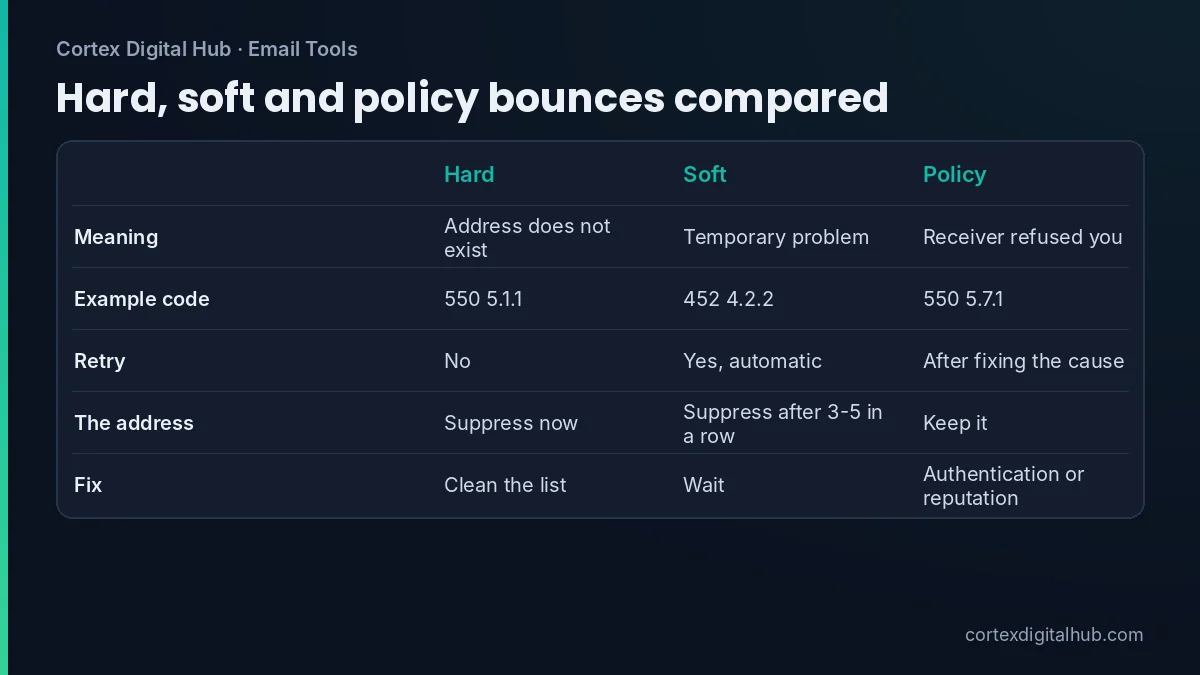 The first digit tells you permanence; the middle digit tells you whether the address or your mail is the problem.
How to read a bounce code
Bounce messages carry an enhanced status code in the form class.subject.detail. The first digit is the class: 2 is success, 4 is a temporary failure, 5 is permanent. The second digit tells you what the problem is about: 1 is the address, 2 the mailbox, 4 routing, 7 security and policy. Codes you will see most often:
| Code | Usual meaning | Type | What to do |
|---|---|---|---|
| 550 5.1.1 | Mailbox does not exist | Hard | Suppress; check for a typo |
| 5.1.2 / 5.4.4 | Domain does not exist or has no mail server | Hard | Suppress; likely typo (gmail.co, yahooo.com) |
| 452 4.2.2 | Mailbox full | Soft | Retry; suppress if repeated |
| 552 5.2.2 | Mailbox full, given up | Permanent code, soft cause | Treat like a repeated soft bounce |
| 421 4.7.0 / 4.7.28 | Deferred or rate-limited | Soft (policy) | Slow down; check reputation |
| 550 5.7.1 | Rejected by policy | Policy | Read the reason text |
| 550 5.7.26 | Gmail: failed authentication | Policy | Fix SPF, DKIM, DMARC |
| 550 5.7.515 | Outlook.com: authentication level not met | Policy | Fix SPF, DKIM, DMARC |
Servers phrase the text after the code differently, so always read the full line. "User unknown", "no such user" and "address rejected" all mean the address is gone.
Policy bounces are about you, not the recipient
When a 5.7.x code says "unauthenticated", "blocked" or "message rejected due to policy", the address is fine. Suppressing it would throw away a real lead. Instead:
- An authentication failure points to missing or misaligned SPF, DKIM or DMARC. Sending setup shows your records with live pass or fail checks.
- A reputation or blocklist message means you need to slow down and send only to engaged contacts for a while. The diagnosis order is in why emails go to spam.
- Many 5.7.x rejections at Gmail since late 2025 name a specific rule from the Gmail and Yahoo bulk sender requirements.
What to do with each bounce
Most sending services already split bounces for you. Amazon SES reports each one as Permanent or Transient, and keeps an account-level suppression list so you do not keep mailing dead addresses. Use that, then add your own rules on top:
- Hard bounce: add to your suppression list immediately and sync it back to your CRM or LMS, so the next import does not bring the address back. If you capture leads through an API, the LMS connection guide shows how contacts flow in.
- Soft bounce: let the provider retry. Count consecutive soft bounces per address across campaigns, and suppress after three to five.
- Policy bounce: leave the address alone. Fix the cause, then resend to the affected segment after a few days.
- Bounce with a typo: if the domain is clearly wrong (rediffmal.com, gmail.con), correct it in the source record or ask the lead to confirm by WhatsApp or phone.
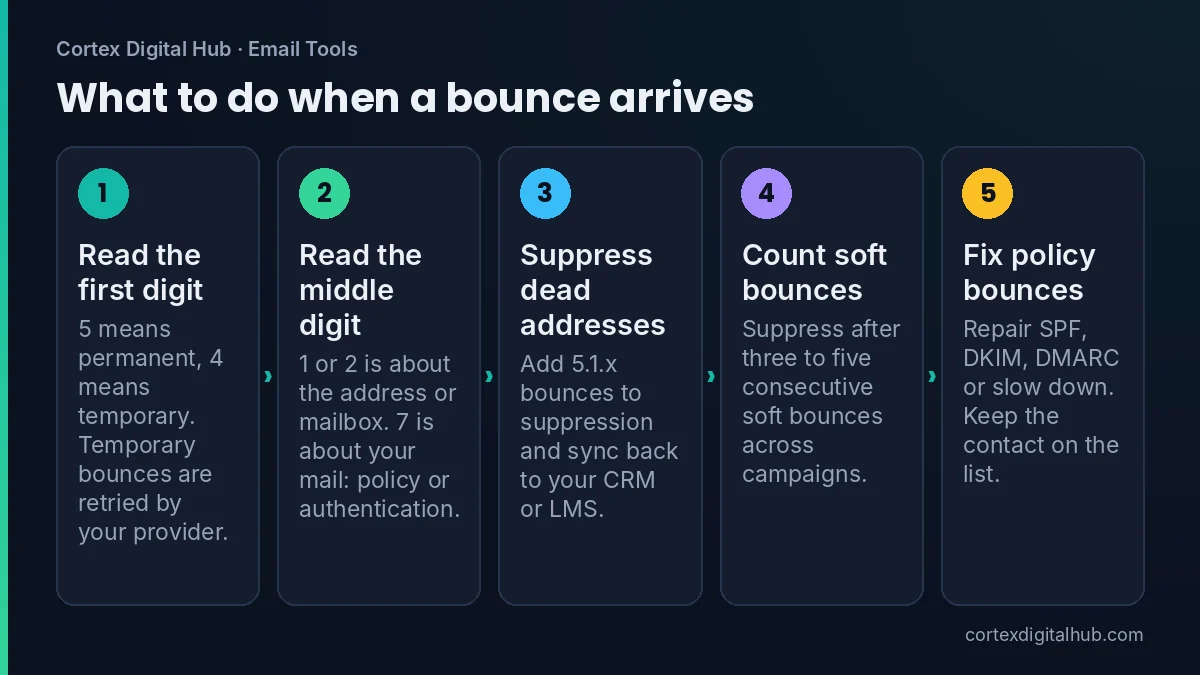 Sort by first digit, then by the middle digit, then act.
What bounce rate is acceptable?
A healthy list mailed regularly sees hard bounces well under 1%. Keep every campaign under 2%. Above that, stop and clean before the next send.
Providers enforce their own limits. As of 2026, Amazon SES asks you to keep your bounce rate below 5% and may pause your ability to send if it goes above 10%; see the reputation metrics page in the SES console for your current figure. Other services publish similar thresholds in their acceptable use policies, which are listed in the email providers comparison.
Measure bounce rate per campaign and per source, not only across the whole account. An account-wide 1.5% can hide one imported segment bouncing at 8%, and that segment is what you need to fix. The numbers are also worse than they look on a big send. A 20,000-email campaign at 4% means 800 hard bounces arriving within minutes, which is exactly the pattern that makes a mailbox provider treat you as a spammer.
How to prevent hard bounces before you send
Most hard bounces come from three sources: typos at capture, old data and bought or shared lists. Fix each at the root.
- Clean before every import. The Email List Cleaner corrects common domain typos, removes duplicates, invalid formats and throwaway domains, and gives you a second file listing each address's status and reason. It runs in your browser and does not upload the list. It does not ping mailboxes, so a few bounces will still appear when you send.
- Re-check old segments. A list of 2023 enquiries from a property expo will bounce far more than last month's website leads. Send it in small batches first.
- Confirm at capture. Double opt-in or a simple "check your email" step on the form catches typos while the person is still there.
- Never buy lists. They bounce, they hit spam traps and they generate complaints. The steps for a full clean are in how to clean an email list.
A decision rule you can use today
- First digit 5, second digit 1: the address is dead. Suppress it.
- First digit 4: wait. Suppress only after three to five campaigns in a row.
- Second digit 7: it is about you. Fix authentication or reputation, and keep the contact.
- Campaign hard bounce rate over 2%: pause, clean the list, then resume with your most recent contacts.
Frequently asked questions
What is the difference between a hard bounce and a soft bounce?
A hard bounce is permanent: the address or domain does not exist, so the email will never be delivered. A soft bounce is temporary: the mailbox is full, the server is busy or the message was deferred, so a later attempt may work.
Should I delete soft bounce addresses?
Not after one. Let your provider retry, and suppress the address only if it soft-bounces on three to five campaigns in a row. A mailbox that is full for weeks is almost always abandoned.
What is a good bounce rate for email campaigns?
Aim for hard bounces under 2% of each send, and under 1% on a list you mail regularly. Amazon SES, for example, asks you to stay under 5% overall and may pause sending above 10%, as of 2026.
What does 550 5.1.1 mean?
It means the receiving server says the mailbox does not exist. It is a hard bounce. Remove the address and check whether it was a typo, such as gmial.com, that you can fix at the point of capture.
Is 5.7.1 a hard bounce?
Technically it is a permanent failure, but it is a policy rejection rather than a bad address. The receiver blocked the message because of authentication, reputation or content. Read the text after the code, fix the cause, and do not suppress good contacts because of it.
Do bounces affect deliverability?
Yes. A high hard bounce rate tells mailbox providers you do not maintain your list, which lowers your sender reputation and can push even valid recipients' mail into spam. Your sending provider may also pause your account.
Can a list cleaner prevent all bounces?
No. A browser-based cleaner catches typos, duplicates, invalid formats and throwaway domains, but it cannot confirm that a mailbox exists. Some bounces only show up when you send, so always suppress them afterwards.
Why do I get bounces from addresses that worked last month?
People leave jobs, close accounts and let inboxes fill up. Company addresses decay fastest. A list you have not mailed for six months or more will bounce noticeably more than a fresh one, so re-check older segments before a large send.
Clean your list before sending → →