
gmail.co, gmial.com and other email typos that silently lose leads
A gmail.co typo looks like a valid address, so your form accepts it and your follow-up never arrives. Here are the typo domains Indian lead forms collect most, how to fix them in an existing list, and how to stop them at the form.
· 5 min read · 800 views · by the Cortex Digital Hub team
Upload your lead CSV and the cleaner corrects gmial.com, gmail.co, .con, rediffmal.com and similar typos in place, keeping every other column. Free · runs in your browser · nothing uploaded
Fix typo domains → → Opens Email List Cleaner · runs in your browser
A gmail.co typo is one of the quietest ways to lose a lead. The address looks fine, your form accepts it, your CRM stores it, and the welcome email or brochure you send never reaches the person, because gmail.co is not Gmail. The fix has two parts: correct typo domains like gmail.co, gmial.com and rediffmal.com in the list you already have, and add a check at the form so new ones stop coming in. The free Email List Cleaner does the first part in your browser and keeps every column of your file.
Why the gmail.co typo is so common
Most Indian leads are typed on a phone, often in a hurry, often in a form inside Instagram or Facebook. Three things go wrong:
- The last letter drops. gmail.com becomes gmail.co or gmail.cm because the thumb lifts early.
- Letters swap. gmail becomes gmial, gamil or gmal.
- Autocorrect helps badly. .com becomes .con, and yahoo.co.in becomes yahoo.in or yahoo.co.
None of these break basic validation. A form that only checks for an @ and a dot will happily accept [email protected]. The lead counts in your report and goes into your nurture flow, and nothing tells you it is dead until a bounce report arrives, if anyone reads it.
The typo domains Indian lists collect most
| Typed | Meant | How sure is the fix? |
|---|---|---|
| gmail.co, gmail.cm, gmail.con | gmail.com | Very sure |
| gmial.com, gmal.com, gamil.com, gmaill.com | gmail.com | Very sure |
| yaho.com, yahooo.com, yahoo.con | yahoo.com | Very sure |
| yahoo.in, yahoo.co | yahoo.co.in or yahoo.com | Check with the person |
| rediffmal.com, redifmail.com, rediffmail.co | rediffmail.com | Very sure |
| hotmial.com, hotmai.com, outlok.com | hotmail.com, outlook.com | Very sure |
| gmail.com.com, gmail..com | gmail.com | Very sure |
The middle row is the honest exception. yahoo.in could be a typo for either of two real Yahoo domains, so a cleaner should flag it rather than guess. Everything else has only one sensible meaning.
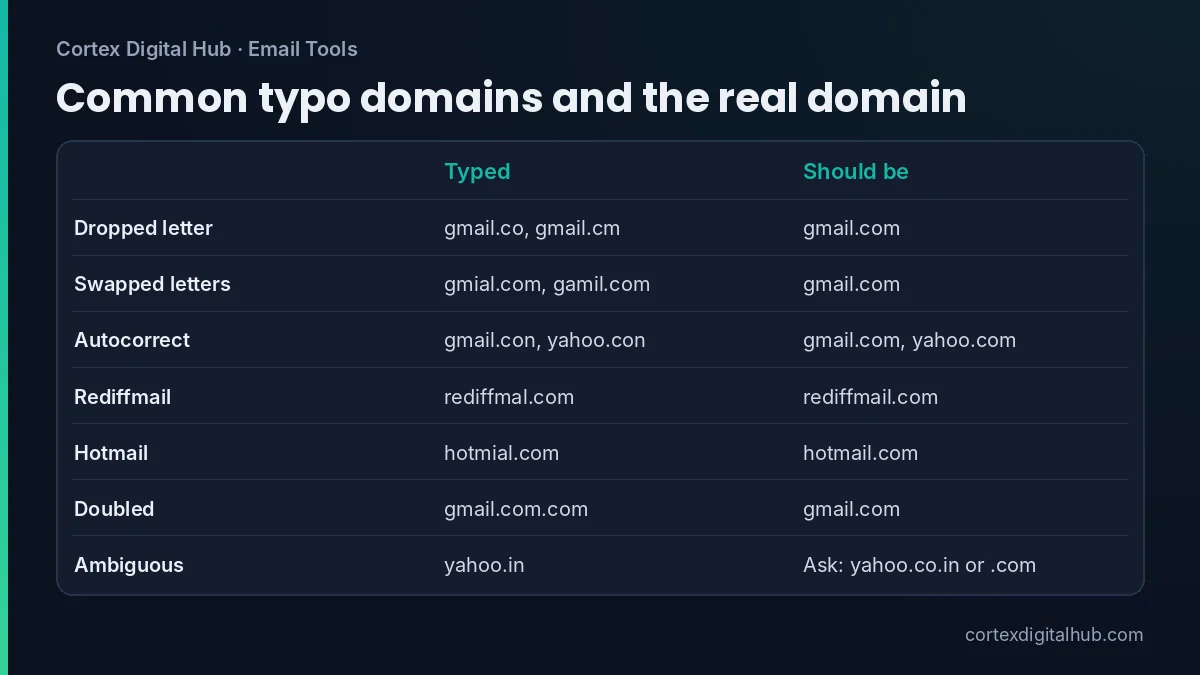 Most typos map to exactly one real domain, so correcting is safer than deleting.
What a typo domain costs you
The obvious cost is the lead. A Hyderabad developer paying several hundred rupees per lead on Meta loses that money every time a hot enquiry's brochure goes nowhere. If 3 in every 100 leads carry a typo, and that is a guess you should check against your own data, a campaign generating 2,000 leads a month quietly loses about 60.
The second cost is reputation. Many typo domains do not exist and return a hard bounce, which counts against you; see hard bounce vs soft bounce for what each code means. Some typo domains do exist and accept mail, either parked or run deliberately to catch careless senders. Those never bounce. You keep mailing them, and they quietly mark you as a sender who does not confirm addresses. That pushes more of your mail toward spam, which is one of the causes in why emails go to spam.
Fixing typos in a list you already have
Do this before every campaign to an older list, and as part of the wider routine in how to clean an email list.
- Export the full list as CSV with every column.
- Run it through the Email List Cleaner. It corrects known typo domains, then removes the duplicates that appear once the typos are fixed (the same person who typed gmial.com once and gmail.com once).
- Open the second download, which lists each changed address with the reason, for example "typo fixed: rediffmal.com → rediffmail.com".
- Review flagged rows you could not auto-fix, such as yahoo.in, and confirm them on the next sales call.
- Import the clean file back into your CRM so the correction sticks.
The free cleaning checks spelling and domains, not whether a mailbox exists (the optional paid mailbox check covers that). A corrected address can still bounce if the name part is wrong, so watch the first send closely.
Stopping the gmail.co typo at the form
Fixing lists forever is a chore. Fix the source.
On your own website form, add a did-you-mean hint. When someone types [email protected], show "Did you mean [email protected]?" under the field and let them tap to accept. Do not auto-correct silently; some people really do use unusual domains. Also block the obvious invalid patterns: spaces, two @ signs, a trailing dot.
On Meta and Google lead forms, you cannot add custom validation, and many leads arrive pre-filled from the account's profile, which helps. For typed entries, fix the problem downstream: send an instant welcome email the moment the lead lands. If it hard bounces, flag the lead so the caller confirms the address on the first call. The connect your LMS guide shows how to trigger that email within a minute of the lead arriving.
On the phone, train callers to read the email back letter by letter, with the domain. "That's g-m-a-i-l dot com?" takes three seconds.
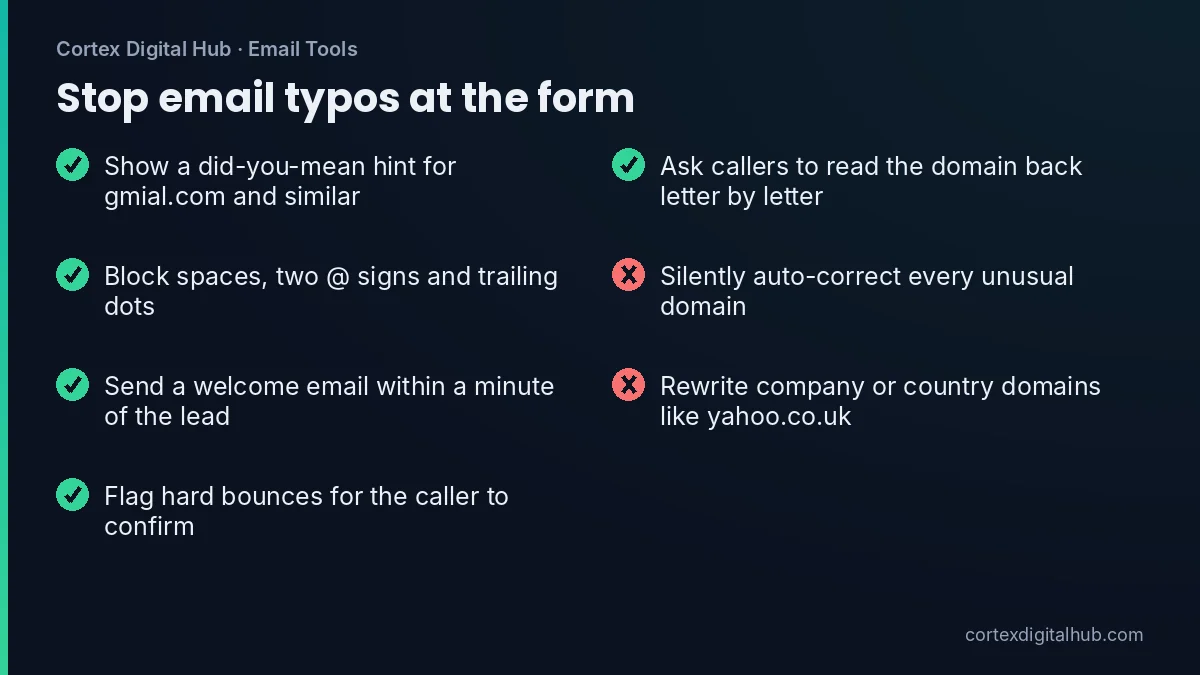 Catch typos where they start; the list stays clean without monthly fixes.
Typos a cleaner should not touch
Some things look like mistakes and are not. Leave these alone:
- Dots and plus signs in Gmail addresses. [email protected] and [email protected] reach the same inbox, and [email protected] is a deliberate filter. Removing them can break the person's own sorting rules.
- Company domains. If a buyer typed [email protected] instead of yourcompany.com, only they know which is right. A cleaner can flag an unusual company domain but should never rewrite it.
- Country domains. yahoo.co.uk, hotmail.co.uk and yahoo.co.in are all real. NRI buyers use them, and "correcting" them to .com sends the email to a stranger or nowhere.
The rule is simple: auto-fix only when the typo has one obvious meaning on a big consumer provider. Everything else gets flagged for a human.
Typos and the bulk sender rules
If you send 5,000 or more emails a day to Gmail, the Gmail and Yahoo bulk sender rules apply, and a messy list makes them harder to meet. Bounces and spam-trap hits do not appear in the spam complaint rate directly, but they feed the same reputation that decides whether your mail reaches the inbox. For a sector like property, where one lead can be worth lakhs, a clean address is part of real estate email marketing done properly.
A five-minute routine
- Run every new lead export through the cleaner before it enters a nurture flow.
- Send the first email within minutes, from the Email Composer or your LMS, and treat its bounce as the real check.
- Add a did-you-mean hint to every form you control.
- Ask callers to confirm the domain, not just the name.
- Once a month, look at which source produced the most typos and fix that form first.
Frequently asked questions
Is gmail.co a real email domain?
gmail.co is not Google's mail service. Gmail addresses end in gmail.com, or googlemail.com in a few older cases. An address ending in gmail.co will either bounce or, worse, reach a server that has nothing to do with the person who filled your form.
Should I correct a typo domain or delete the address?
Correct it when the fix is unambiguous, such as gmial.com to gmail.com. The person and the lead are real. Delete only when you cannot tell what was meant, for example a domain that could be two different providers.
Can typo domains be spam traps?
They can. Some typo domains are registered and monitored to catch senders who never confirm addresses. Mailing them repeatedly hurts your reputation even though nothing visibly bounces.
Why does my form accept gmail.co?
Because it is a valid address format. Basic validation only checks for text, an @ and a dot. A did-you-mean check that compares the domain with common providers is what catches it.
How do I stop email typos on a Google Form or Meta lead form?
You cannot add a did-you-mean hint inside those forms, so fix it downstream. Send a welcome email within a minute of the lead arriving; a bounce tells your caller to confirm the address on the first call.
What are the most common Indian email typos?
On Indian forms the frequent ones are gmial.com, gmal.com, gmail.co, gmail.con, gamil.com, yaho.com, yahoo.co.in typed as yahoo.in, rediffmal.com and hotmial.com. Phone keyboards that autocorrect or drop letters cause most of them.
Does fixing typos guarantee the email will be delivered?
No. It fixes the domain, not the mailbox. If someone typed their name wrong as well, the corrected address can still bounce. Treat the first send as your real check and suppress any hard bounce.