
Last minute Diwali video: 10 ideas you can still make today
It is Dhanteras, Diwali is two days away and you have made nothing. Here are 10 quick video ideas, each with the photo you need, the ready idea to open and where to post it, plus a cheap draft to test first.
· 6 min read · 1.2K views · by the Cortex Digital Hub team
Every idea opens the studio with the prompt already written. Add one photo, check the credits on the Generate button and press Generate. Free account · 1 credit = ₹0.50 · no watermark
Pick an idea → → Opens Diwali video ideas · runs in your browser
It is Dhanteras. The family group already holds forty forwarded greetings, the same gold diyas, the same fireworks over a city nobody in the group lives in, a few with somebody else's family smiling in them. You meant to make something of your own. Diwali is two days away.
A last minute Diwali video is still possible, and it does not need a shoot. It needs one photo already in your phone and about ten minutes of your time. The studio does the rest in two to four minutes a clip. Below are ten ideas, each with the photo it needs, the ready idea to open and where it works best.
Diwali (Lakshmi Puja) falls on 8 November, with Bhai Dooj on 10 November; dates vary a little by region and panchang.
Before you start: five minutes of setup
- One photo, chosen. Sharp, faces fully visible, ideally taken in warm evening or indoor light. Scroll back to last year if you have to.
- The right shape. The video takes the shape of your photo. For Status and Reels, crop it to 9:16 first in the free Image Resizer.
- A free account and credits. 1 credit is ₹0.50. A 5-second clip on the default model takes 170 credits (₹85); a quick 6-second draft takes 48 credits (₹24).
- The caption, written. Names, the greeting, and for a shop the offer and your number. These go in the message, not in the video, because video models still misspell words.
10 last minute Diwali video ideas, with the photo each needs
Each link opens the idea on the Diwali video ideas page or straight in the studio, with the prompt already filled in. Add your photo and press Generate.
| # | Idea | Photo you need | Post it on |
|---|---|---|---|
| 1 | Diyas light up around the family | Everyone on the sofa, faces visible | The family group |
| 2 | Lamp-lit portrait for Maa | One parent or grandparent, close up | Sent to them directly |
| 3 | Fireworks behind the home | Your house or building at dusk | WhatsApp Status |
| 4 | Couple under glowing lanterns | The two of you, faces to camera | Instagram Reel or Status |
| 5 | Rangoli blooms at their feet | Someone standing behind the rangoli | Status on Diwali evening |
| 6 | Gold coins and kalash catch the light | The puja corner, or the family by it | Family group tonight |
| 7 | Siblings, together again | Brother and sister together | Sent on Bhai Dooj |
| 8 | Jewellery counter for Dhanteras | Your display, lit | Status and Instagram, today |
| 9 | Sweet shop counter in lamp light | The counter, sweets in front | Status, Instagram, customer groups |
| 10 | Your product among diyas | One product on a plain table | Instagram and your catalogue |
A few notes on the personal ones. Idea 2 is the one that tends to land hardest: a parent's face in warm lamp light, blinking and smiling, sent to the person living away from home, or from them. Idea 5 works best when the person stands at the edge of the rangoli; for a rangoli on its own, see our post on turning a rangoli photo into video. Idea 7 is for Bhai Dooj, two days after Diwali, so make it now and keep it; our Bhai Dooj post has more ways to do it.
Three for shops, on the busiest days of the year
Ideas 8, 9 and 10 are for a jeweller, a sweet shop, a saree store, a bakery or anyone with a counter and a product. Today is Dhanteras, the day people buy gold, so idea 8 is the one to post as early in the day as you can: a photo of your own display, lamps lighting up along it, the jewellery catching warm light. Customers see your shop, not a stock image every other jeweller also posted.
For a sweet shop, idea 9 lights diyas along your own counter and sways the garlands at your own entrance. For a single product, a box of kaju katli, a silk saree folded on a table, a gift hamper, idea 10 sets it among diyas with a slow orbit.
Three rules keep a shop clip from looking like everyone else's:
- Use your photo of your place. The counter, the board, the people who work there, as they are.
- Keep the offer in the caption. The discount, the dates and the phone number are always spelled right there.
- Send it to your list too. The free Email Composer turns a 1080 x 1350 offer creative into a ready email with call and WhatsApp buttons.
There is more on this in the post on a Diwali offer video for your shop.
The quick draft: test an idea for ₹24
When you are not sure the photo will work, do not spend ₹85 finding out. Switch the model to the quick draft in the studio's model list and generate a 6-second test for 48 credits (₹24). If faces hold and the motion looks right, switch back to the default model and make the final, 170 credits (₹85) for 5 seconds. Two drafts and one final come to ₹133; ten finals straight away would be ₹850.
The draft is rougher and does not take a last-frame image, so use it to judge the idea, not to send. The Generate button always shows the exact total first, and credits come back automatically if a clip fails.
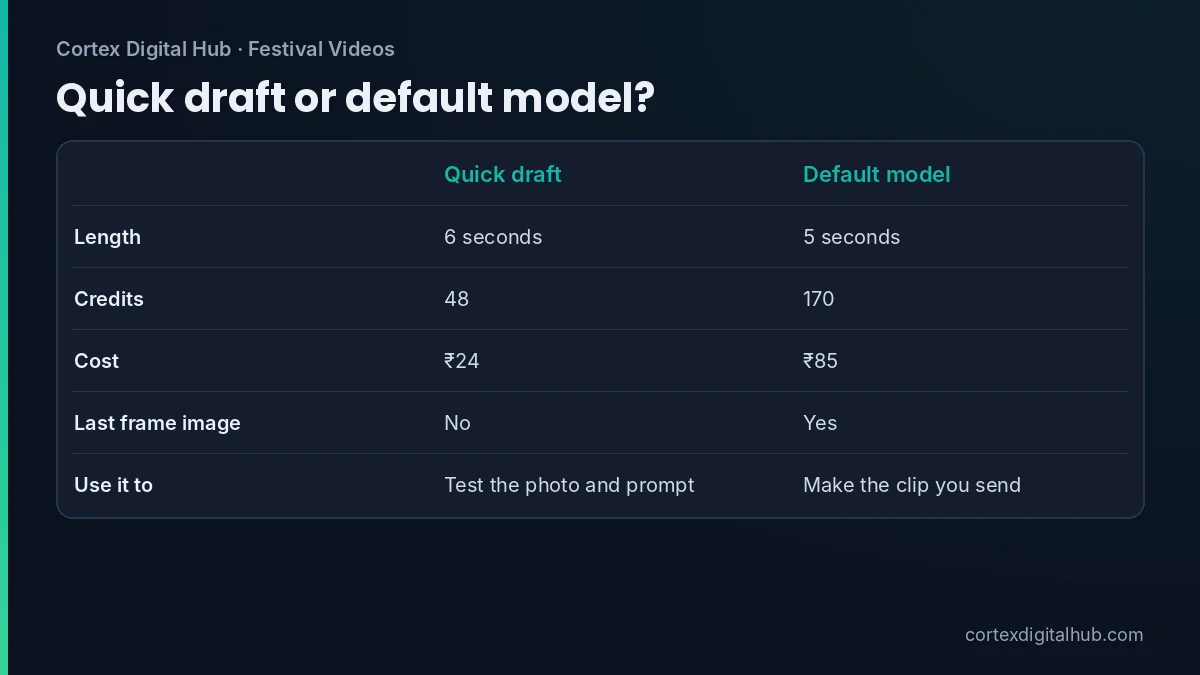 Test on the draft, send the default-model clip.
Make them all today, send each on its day
Finished clips wait under Your videos for 7 days, so the order can be simple:
- Today, Dhanteras: idea 8 for the shop as soon as you can, idea 6 for the family this evening.
- Tomorrow: make the Diwali ones, ideas 1 to 5, 9 and 10, and download them.
- Diwali morning: send idea 2 first, then the family group, then Status.
- Bhai Dooj: idea 7, with a line in the caption only your sibling will understand.
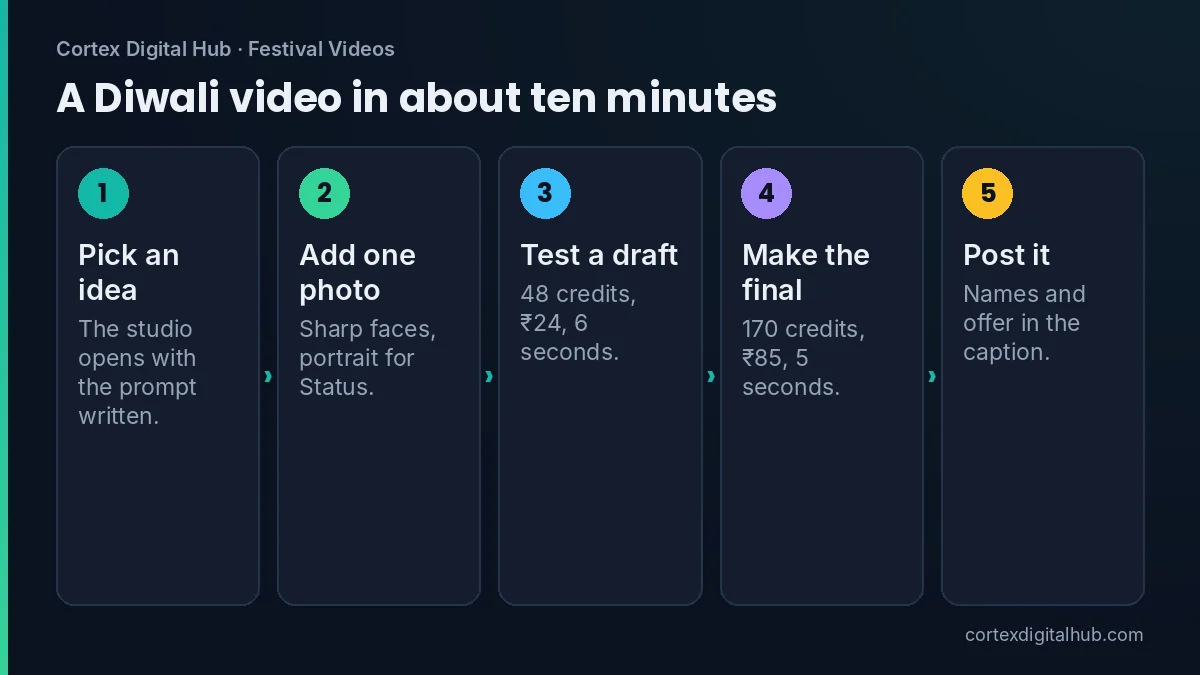 About ten minutes of your time per clip, most of it choosing the photo.
Prompts to copy
Paste one into the studio after adding your photo, and change any detail: the colours, the music, who is in it.
Keep the face exactly as in the photo, natural and unchanged. Warm lamp light rises slowly on the face, a row of diyas flickers in the soft-focus foreground, a few marigold petals float past, the person blinks and smiles gently, very slow push in, calm sitar music.
Keep the faces and the setting exactly as in the photo. A brass kalash and a small stack of gold coins in the foreground catch warm light, diyas flicker around them, the camera rises slowly to the smiling family, soft bells.
Keep the shop and any people exactly as in the photo. Diyas along the counter light up one by one, marigold garlands sway at the entrance, the sweets glisten in warm light, slow push in, cheerful festive music.
Sending it so it plays
The clip is a standard MP4 that plays on WhatsApp and Instagram. The default model makes sound with the picture: bells, sitar, distant crackers. To use your own song, turn sound off before generating and add the track in Instagram or Status. If WhatsApp says the file is too large, the free Video Compressor shrinks it on your own phone. Our post on the Diwali WhatsApp Status video covers the Status side in full.
Two days is enough. One photo, one idea, sent with a line in your own words, says more than the fortieth forward.
Watch the video
A Diwali video for two, and a rangoli that blooms · 0:21 · Watch on YouTube
Frequently asked questions
Can I still make a Diwali video today?
Yes. With a photo already in your phone, it takes about ten minutes of your time: open a ready idea, add the photo, check the credits and generate. The clip itself is usually ready in two to four minutes.
What is the cheapest way to try an idea?
Use the quick draft: 48 credits (₹24) for a 6-second clip. If the photo works, make the final on the default model, which takes 170 credits (₹85) for 5 seconds. The Generate button shows the exact total before you start.
Do I have to send the video the moment it is ready?
No. Finished clips wait under Your videos for 7 days, so you can make them all on Dhanteras and download each one on the day you want to send it.
Which photo works best for a quick Diwali video?
A sharp photo with faces fully visible, taken in warm evening or indoor light. Two to six people work better than a crowd. For Status and Reels, use a portrait photo or crop it to 9:16 first.
Can the video show my shop's offer or phone number?
Keep them out of the video. Video models still misspell longer words and numbers. Put the offer, the dates and your number in the caption, where they are always right, and let the clip carry the festive feeling.
Can I make one for Bhai Dooj too?
Yes. The Bhai Dooj ideas are on the same Diwali page: siblings hugging, a tilak, a small gift. Make it now with a photo of the two of you and send it on the day.
What if the clip comes out wrong?
Credits are returned automatically if a clip fails. If it finishes but a face or detail drifts, generate again with a slower camera or a shorter clip, or try a sharper photo.