
Voice over script tips for explainer videos that sound natural
How to write a voice over script for an explainer video: a five-part structure, writing for the ear, numbers and short forms, timing to the visuals, and testing it with a free AI voice before you record or publish.
· 5 min read · 1.2K views · by the Cortex Digital Hub team
Paste your draft, pick a voice and listen. Any line that trips the voice will trip a viewer too. Free · no sign-up · nothing uploaded
Hear your script read aloud → → Opens AI Voice Over & Clone · runs in your browser
A voice over script for an explainer video is not an essay read aloud. It is a set of short spoken lines, each matched to what is on screen, written so a listener understands it the first and only time they hear it. Most explainers that feel slow or confusing have a good idea and a script written for reading. This guide shows how to write for the ear, and how to test your draft in a couple of minutes with a free AI voice in AI Voice Over & Clone.
Picture it: you have made a 60-second video for your coaching app, the visuals look clean, and you paste in the paragraph from your website. The voice reads it perfectly and it still sounds wrong. That is a script problem, not a voice problem.
A five-part voice over script structure
Most short explainers fit this shape:
- The problem. One sentence the viewer recognises. "Your students ask the same doubt five times a week."
- The promise. What changes. "Now they can find the answer in the app, in their own language."
- How it works. Three short steps, in order.
- One proof. A real, checkable fact: a feature, a price, a guarantee. Never an invented statistic.
- The next step. One action, said once, clearly. "Download it free from the link below."
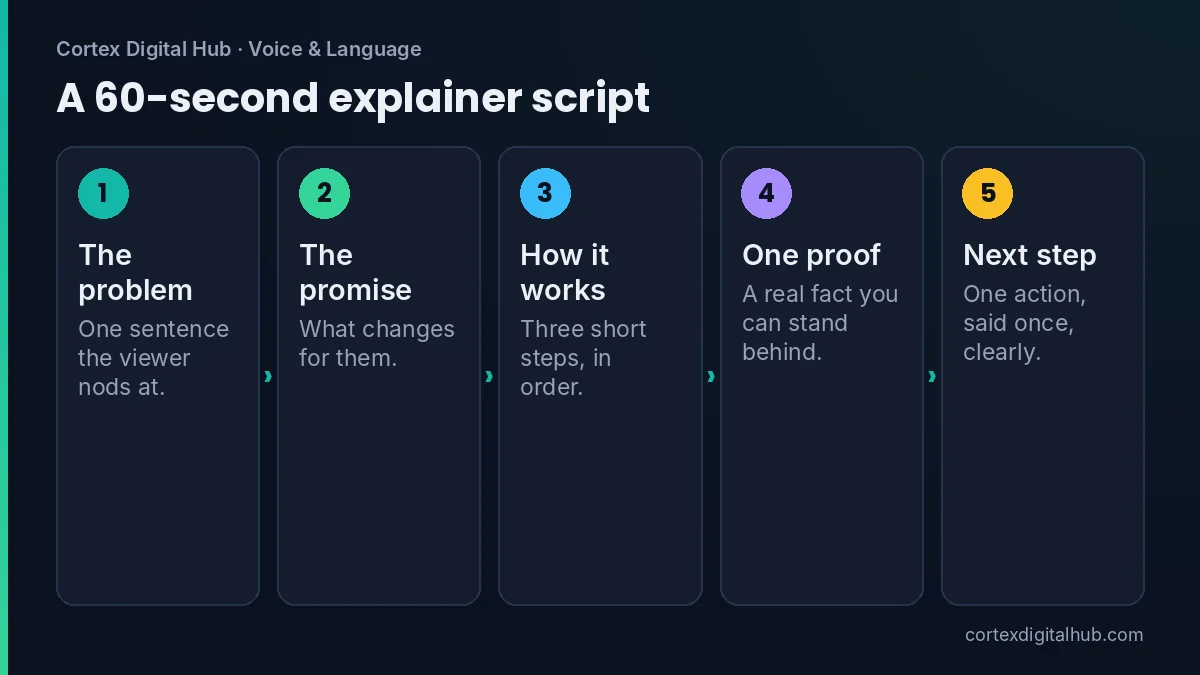 Five parts, one idea each. If a part needs two ideas, it probably needs two scenes.
For more on planning the visuals around this, see AI explainer video for small business.
Write for the ear, not the eye
Readers can glance back. Listeners cannot. So:
- One idea per sentence. If a sentence has three commas, split it.
- Use plain words. "Use" beats "utilise"; "about" beats "approximately".
- Put the key word last. "Your report is ready in one tap" lands better than "In one tap, the report generation process completes".
- Say "you". An explainer is a conversation with one person.
- Cut brackets and asides. A listener cannot hear brackets. Give the aside its own sentence or remove it.
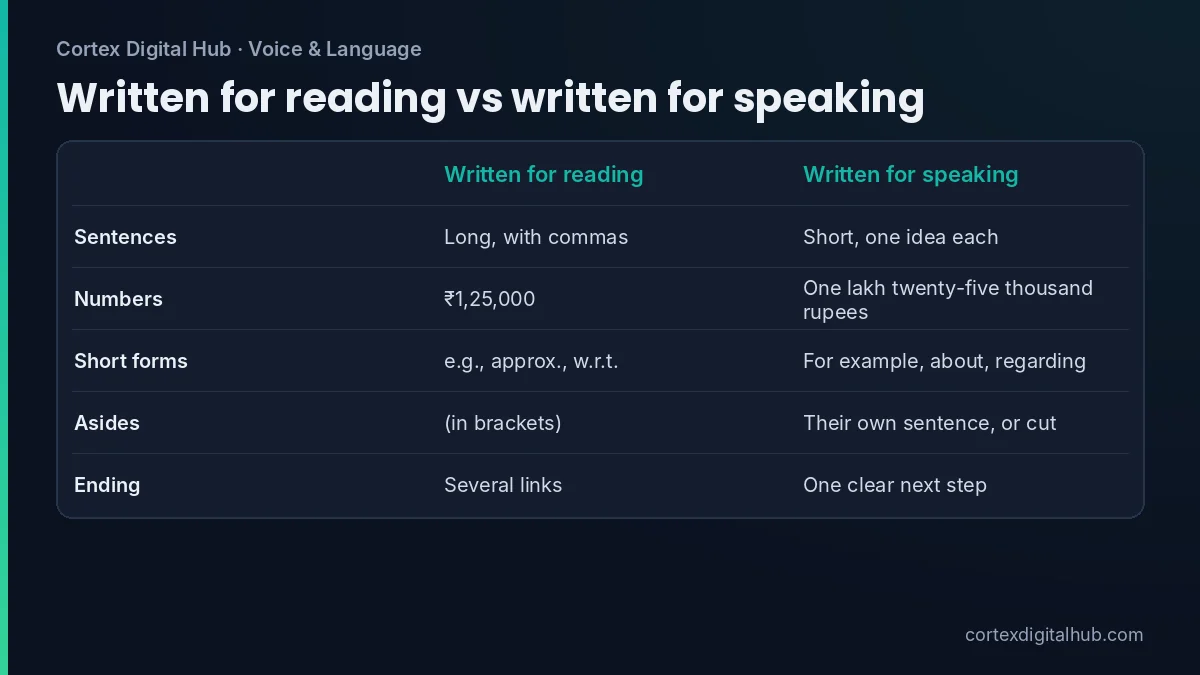 The same message, rewritten so the ear can follow it.
Numbers, short forms and names
Voices read what you type. Help them:
| Instead of | Write |
|---|---|
| ₹1,25,000 | one lakh twenty-five thousand rupees |
| 24/7 | any time, day or night |
| e.g. | for example |
| approx. | about |
| 3–5 days | three to five days |
| CDH | Cortex Digital Hub |
Brand names and Indian names can be read oddly. Generate a take, listen, and if a name sounds wrong, spell it the way it is said. For a Hindi script, write names and English words in Devanagari; the tool itself suggests this.
Time the script to the visuals
Write the script against the video, not separately. A simple two-column plan works: shot on the left, line on the right. If a scene lasts four seconds, its line should be short enough to finish inside it.
The tool helps here. Generate the full script, and each take shows its length in the takes list. If a 60-second video gets a 75-second take, cut whole sentences. Do not try to fix it by making the voice rush.
Use [pause] where the viewer needs a moment: after the problem, before the steps, before the call to action. Each sentence already gets a short natural gap, so you only need [pause] for bigger beats. The post on making a free AI voice over from a script covers the basics of the tool.
Test the draft with an AI voice
Reading your own script silently hides its problems. Hearing it reveals them. A quick test:
- Paste the draft into AI Voice Over & Clone.
- Pick a voice close to the one you will use. There are 19, with Indian, American and British accents among them.
- Generate and listen with your eyes closed.
- Mark every line where you lost the thread or the voice stumbled.
- Rewrite those lines and generate again.
You can keep the AI take as the final voice over, or use it as a guide for a human voice artist. If you got feedback on a call or a voice note, Voice to Text gives you the comments in writing so you can work through them one by one.
Language and voice choices
The tool speaks 20 languages, including English and Hindi. It does not speak Telugu, Tamil, Kannada, Marathi or Bengali yet, so for those audiences use a native speaker or English with local subtitles. Our post on Hindi voice over for YouTube Shorts has more on Hindi scripts.
Match the voice to the job. A calm narration voice suits a product walkthrough; a brighter voice suits a social ad. For languages other than English, an Expressiveness slider runs from Calm to Dramatic. Most explainers sound best on Natural.
Common script mistakes to avoid
A few problems turn up again and again in explainer scripts:
- Starting with the company. "Founded in 2015, we are a leading..." loses viewers. Start with their problem.
- Listing every feature. Pick the three that matter most for this video. The rest can go on the website.
- Describing the screen. "Here you can see the dashboard" adds nothing the viewer cannot see. Say what the dashboard lets them do.
- Claims you cannot back. Skip "best in India" or made-up numbers. One real fact is stronger.
- Two calls to action. "Download the app, follow us and call us" means none of them happen. Choose one.
- Jargon. If your customer would not say the word, do not put it in the script.
Read your draft once with these in mind before you generate the first take.
Finishing the video
Download the take as a WAV and lay it under the visuals in your editor. Add subtitles, since many people watch with the sound off; our guide to making SRT subtitles from a video shows how. Trim dead air at the start or end with Trim Video. If you need visuals as well, the AI Video Generator can make short scenes from a prompt or a photo.
Key takeaways
- Structure: problem, promise, three steps, one real proof, one next step.
- Write for the ear: short sentences, plain words, no brackets.
- Write numbers, short forms and names the way they should be spoken.
- Time each line to its shot, and cut sentences rather than rushing the voice.
- Test the draft with an AI voice; fix every line that stumbles.
Frequently asked questions
How long should a voice over script be for a 60-second explainer?
Shorter than you think. Write it, generate it with an AI voice and check the length of the take. If it runs over, cut whole sentences rather than speeding up the voice.
What is the best structure for an explainer voice over script?
Problem, promise, how it works in three steps, one proof point, and one clear next step. It keeps the viewer oriented and fits most short explainers.
Should I write numbers as digits or words?
Write them the way you want them spoken. ₹1,25,000 is clearer as 'one lakh twenty-five thousand rupees', and 24/7 is clearer as 'any time, day or night'.
How do I test my script before recording?
Paste it into AI Voice Over & Clone and listen to it read aloud. Lines that sound stiff, too long or confusing stand out at once, and you can fix the text and generate again.
Can I make the explainer in Hindi?
Yes. Hindi is one of the 20 languages. Write the script in Devanagari, including English words and brand names, so they sound natural. Telugu, Tamil, Kannada, Marathi and Bengali are not covered yet.
How do I add pauses between sections?
Type [pause] where you want a beat of silence, such as between the problem and the steps. Each new sentence also gets a short natural gap.
Should the script describe what is on screen?
No. Let the visuals show and the voice explain why it matters. Saying 'here you can see a button' wastes time; saying 'one tap and the report is ready' adds meaning.
Hear your script read aloud → →