
3D floor plans for property marketing teams and agencies
A campaign needs the same plan in five sizes and one voice: the e-brochure spread, the website unit page, the WhatsApp card, the Instagram story, the hoarding insert. Cortex gives marketing teams and their agencies a render they control end to end, with a saved style for the project and credit-free exports for every channel.
One render, every channel, one visual language
Render in the project style, then produce the brochure, web, story and WhatsApp versions in the Studio for free. Repeat for the whole typology with the saved style.
First render free · saved styles keep a campaign consistent · nothing is stored
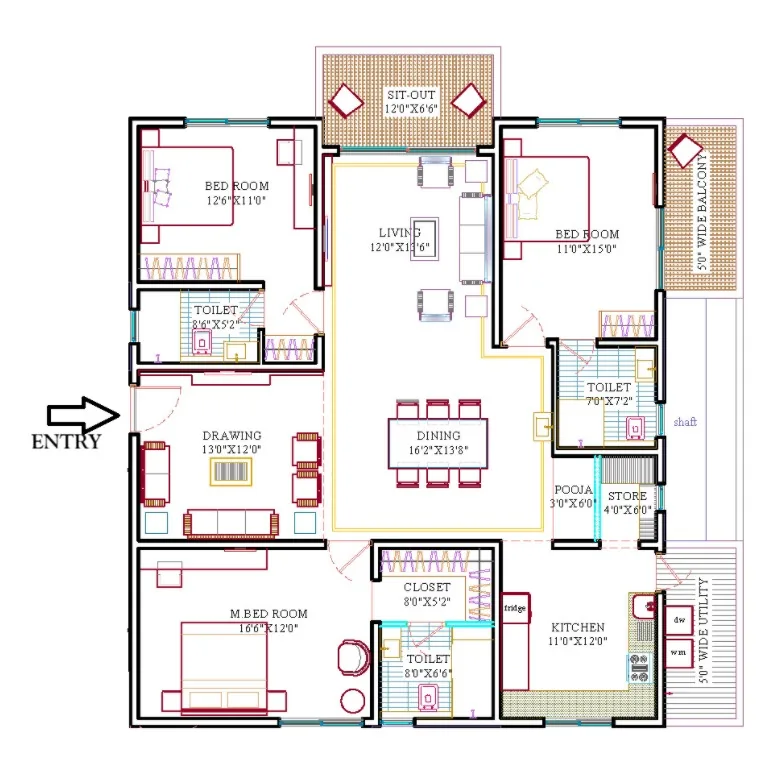
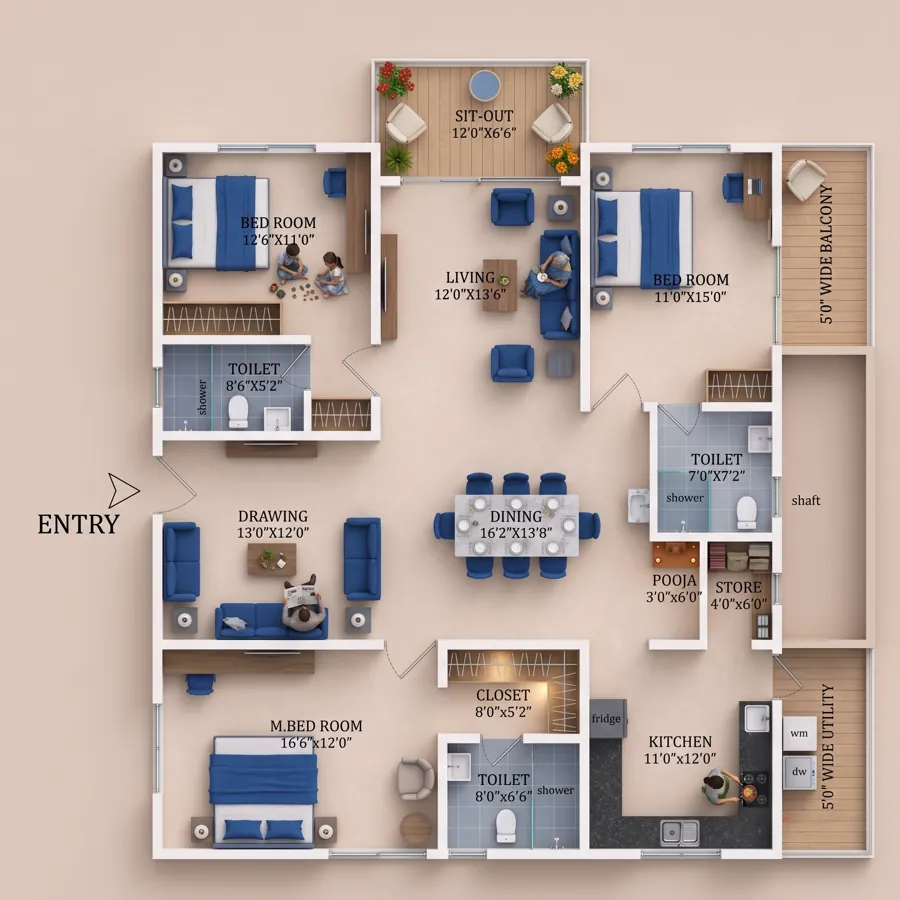
Built inside a marketing team
Cortex started in the marketing department of a Hyderabad developer, where the recurring problem was not the hero render but everything after it: a revised plan on launch week, a channel partner asking for the plan on WhatsApp, a social post that needed the unit in a 9:16 frame, an agency that could not match last quarter's brochure style. The tool is shaped around those moments.
Every render keeps the plan's geometry and printed sizes, so compliance checks are simple: the image agrees with the drawing and the area statement. Styles are saved per project, so a new agency or a new team member produces the same look as the last one.
Campaign workflow
How a marketing team usually runs it:
- Project style. Render the flagship unit, tune floors, walls, palette and background to the brand, add a reference image if the brochure already has a look, and save it as a style.
- Typology pass. Apply the style to every unit plan. One minute each; re-render only the units that change.
- Channel exports. From each finished render, free in the Studio: brochure version at 4K, web at 2K, WhatsApp at 1K, title block on or off.
- Social and video. Crop and caption in the photo editor, size for stories with the resizer, and cut the walkthrough to WhatsApp length with the trim tool. All free, all in the browser.
- Hand-off to partners. Channel partners get the 1K card with the project title already on it.
Agencies: a predictable line item
A ₹499 pack is 1,100 credits, about 44 renders at 2K, enough for a mid-size launch's full typology with revisions. Because restyles and exports are free, the cost does not grow with the number of channels. Plans that arrive as sketches or scans go through Floor Plan Redraw first, five free a day, and come out in the project's drawing style with the labels copied exactly.
How it works
- Upload the plan. Brochure page, architect drawing or a flat photo of a print. JPG, PNG or WebP up to 25 MB.
- Pick a look. Style preset, accent colour, floors, walls, background and shadows, or drop in a reference photo of an interior you like.
- Render. Lumen takes 30 to 60 seconds; Atlas gives the finest detail. Room names and sizes come through from your plan.
- Finish free. Recolour, swap the background, add a title in the Studio and download at full resolution. Your first render costs nothing.
The AI changes the presentation, not your architecture
Most generative tools produce a beautiful picture of a different house. Cortex reads your drawing first and renders on top of it, so the result is the plan you sent, furnished and lit, and the 2D ⇄ 3D slider lines up.
What you upload is what gets rendered. Only the look changes.
- Orientation and framing
- Room identity and names
- Walls, with thickness
- Doors and door swings
- Windows and openings
- Balconies and sit-outs
- Shafts, ducts and utility
- Furniture positions
- Printed dimensions
- Entry position
Consistent campaign
Saved styles mean the brochure, the site and the partner's WhatsApp card share one look, whoever produced them.
Every channel from one render
4K for print, 2K for web, 1K for WhatsApp, with or without a title: free exports from the Studio.
Compliant by construction
The render is drawn on the plan, so it agrees with the drawing and the area statement without a review round.
Frequently asked questions
Can several people on the team use the same style?
Styles are saved in the browser on the device that created them. For a team, note the settings and reference image once; applying them takes under a minute on any account.
Can we get a square, a 4:5 and a 9:16 from the same render?
Yes. Download the render and crop in the free photo editor; the top-down composition crops cleanly. For a composition built for 9:16 from the start, ask the AI after the render.
How is this different from briefing our visualiser?
A studio render is still the right choice for the hero image. For the typology, revisions and channel variants, a render in a minute with free exports is faster and far cheaper, and the layout cannot drift.
What does it cost?
Every new account gets 25 free credits, which is one Lumen 2K render. After that 1 credit is ₹0.50: a 2K Lumen render is 25 credits (₹12.50), 4K is 55, and the premium Atlas engine is 60 credits (₹30). Restyling a finished render in the Studio is free.
Can I use the renders commercially?
Yes. Images made from your own plans are yours to use in brochures, listings, hoardings, websites and presentations.
Start a project render → Free to start · opens 2D to 3D Floor Plan
Related
More free tools
- 2D to 3D Floor PlanPhoto-real 3D render from any 2D plan. First render free
- Floor Plan RedrawRedraw a sketch, photo or old brochure plan in a clean, consistent drawing style. Free.
- Image CompressorShrink JPG, PNG, WebP and more without visible loss
- PDF to JPGEvery page as a JPG or PNG image
- Video CompressorSmaller MP4s that still look sharp