
Double opt-in vs single opt-in for Indian lead forms
Single opt-in gives you more contacts; double opt-in gives you contacts that are real and provably willing. Here is when each one suits an Indian lead form, a confirmation email that gets clicked, and what to store as proof.
· 5 min read · 749 views · by the Cortex Digital Hub team
Make a short confirmation email with one clear button, a compliant footer and your saved brand, then send yourself a test. Free · up to 15 test emails a day to yourself
Build a confirmation email → → Opens Email Composer · runs in your browser
Double opt in (usually written double opt-in) means a person fills in your form, gets a confirmation email, and only joins your marketing list after clicking the link in it. Single opt-in adds them the moment they press Submit. For most Indian lead forms the practical answer is a split: reply at once to the enquiry they made, and ask for a confirmation click before you add them to newsletters, launch alerts or a long drip. You lose some contacts, but the ones you keep are real, reachable and provably willing.
What single and double opt-in actually do
With single opt-in, the form is the only check. If someone types [email protected], a bot fills your form, or a rival pastes a stranger's address, that address goes straight into your list. You find out later, through bounces and spam complaints.
With double opt-in, the form creates a pending contact. Your system sends one email with a confirm button. Only a click moves the contact to "subscribed". An address that is mistyped, fake or owned by someone who never asked simply never confirms.
There is also a middle option often called confirmed opt-in: you send a welcome email straight away and add the contact, but you watch for bounces and silence and remove those quickly. It is better than nothing, but it still sends marketing mail to people who did not prove they wanted it.
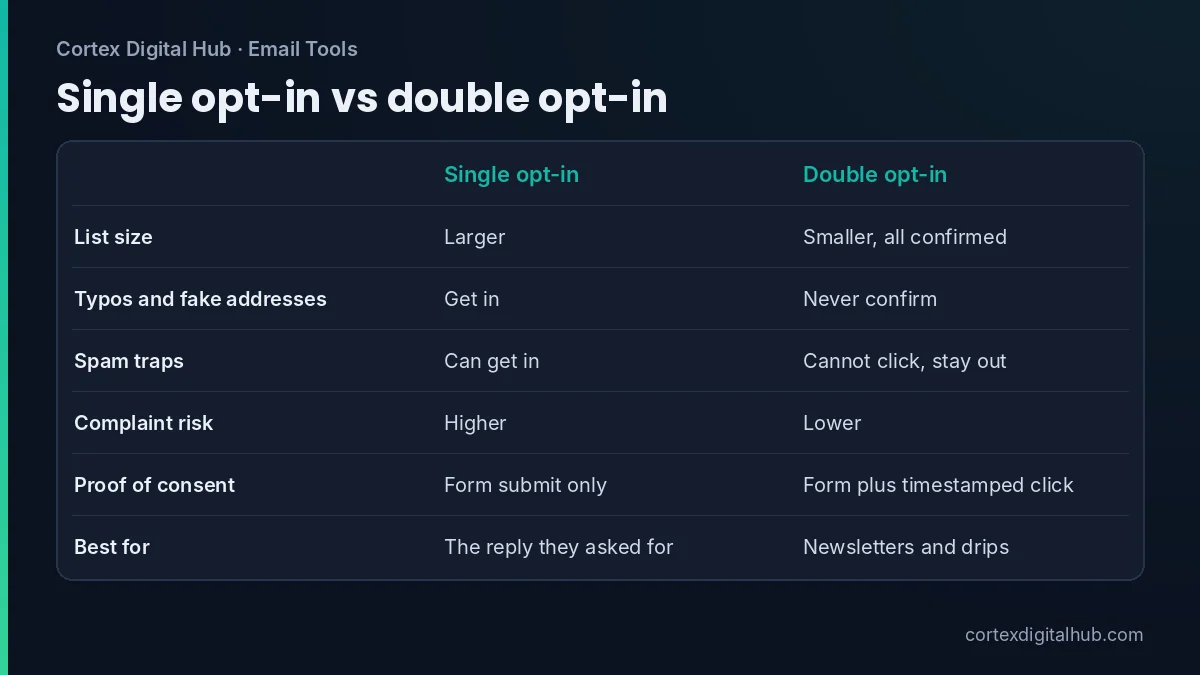 Single opt-in wins on volume; double opt-in wins on almost everything you care about later.
The real trade-off with double opt in
The cost is easy to see: some people never click. How many depends on where they came from and how fast the email arrives. Website sign-ups from people who came looking for you confirm far more often than leads from a social media ad they tapped on a whim. Measure your own numbers for a few weeks before you decide.
The benefits are slower but larger:
- Fewer hard bounces. Typos such as
gmail.coorrediffmal.comnever join the list. Our post on email domain typos shows how common these are on mobile forms. - Fewer complaints. People who confirmed rarely press "Report spam". Gmail and Yahoo expect a spam rate under 0.3%, as covered in the Gmail and Yahoo bulk sender requirements.
- No spam traps from bad sources. A trap address cannot click a link, so it never gets in.
- Proof of consent. You have a timestamped click from the address itself.
A list of 8,000 confirmed contacts can easily earn more clicks than 12,000 unconfirmed ones, because the extra 4,000 can drag down inbox placement for everybody else on the list.
When double opt-in is worth it
Use the confirmation step when any of these is true:
- The contact is joining a newsletter, offers list or drip that will run for months.
- The source is cold or incentivised: contests, free downloads, social ads, event QR codes.
- You see bot or junk sign-ups in your form data.
- You are warming up a new domain and cannot afford bounces. See email warm-up.
- You may need to show consent later to a provider, a partner or a regulator.
When single opt-in is fine
Single opt-in is reasonable when the person asked for one specific thing and you send exactly that: a brochure, a price sheet, a site visit confirmation or an order receipt. Delaying that reply behind a confirm button annoys a buyer who is ready to talk.
The rule that keeps you safe is simple: the enquiry reply is not a subscription. Send the welcome email for new leads immediately, and put a clear "Yes, send me project updates" button inside it. Only a click on that button adds them to marketing.
A confirmation email people actually click
Keep it short, plain and fast. Most failed confirmations come from emails that arrive late, land in spam or look like a promotion.
Subject: Confirm your email for Green Acres updates Preheader: One click and you are on the list. Ignore this if it was not you.
Hi Asha, You asked for updates on Green Acres, Kokapet. Please confirm this is your email address. [Yes, send me updates] If you did not ask for this, ignore this email and we will not write again. Green Acres Sales Team, 4th Floor, Example Towers, Hyderabad 500032
Practical points:
- Send within a minute. A confirmation that arrives an hour later is half forgotten.
- One button, no banners, no other links. The Email Composer can build this with a real button and a compliant footer, and you can test it to your own inbox.
- Make the link expire after a few days, and let it work only once.
- Send it from a domain with SPF, DKIM and DMARC in place, or it may land where nobody looks. Our guide on why emails go to spam covers the basics.
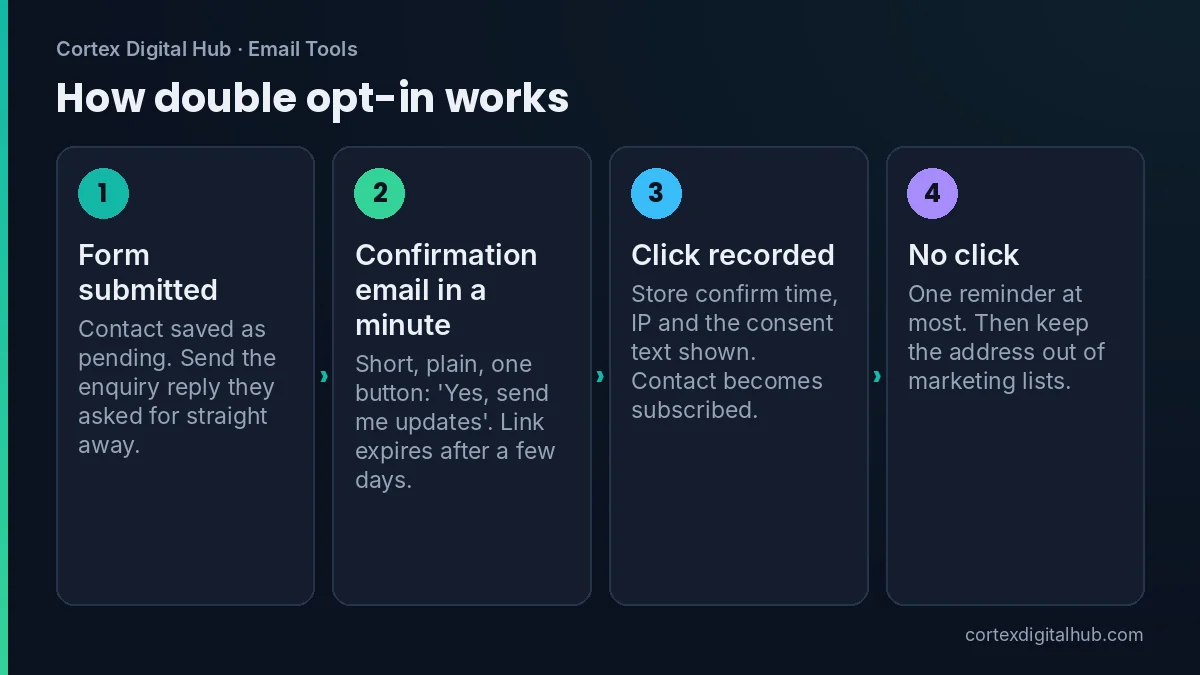 The contact stays pending until the click; no click, no marketing email.
Consent proof: what to store
India's DPDP Act 2023 asks for consent that is free, specific, informed and given by a clear action, and it puts the job of proving notice and consent on the business. The DPDP Rules were notified in November 2025, with most obligations phasing in over roughly 12 to 18 months, so check the current status on the MeitY website. This is general information, not legal advice.
Store one record per consent event:
| Field | Example |
|---|---|
| Email address | [email protected] |
| Form and page | Green Acres enquiry, /green-acres/ |
| Checkbox text shown | "Send me project updates by email" |
| Submitted at | 2026-11-18 10:42:07 IST |
| Confirmed at | 2026-11-18 10:43:55 IST |
| IP and user agent | 203.0.113.24, Chrome on Android |
| Source | Meta lead ad, campaign "GA-Diwali" |
Keep the exact wording you showed, not just "yes". If the text changes, store a version number.
What to do today
- Split your form's actions: one instant reply for the enquiry, one confirmation step for marketing.
- Before switching, run your existing list through the free Email List Cleaner to fix typos and drop throwaway addresses; see how to clean an email list.
- Build the confirmation email, keep it to one button, and test it to Gmail and Outlook.
- Record submit time, confirm time and the consent text for every new contact.
- Check your confirmation rate by source after four weeks. Fix the slow or spam-foldered email before blaming the leads.
Frequently asked questions
What is double opt in?
It is a sign-up method where the person submits a form and then clicks a link in a confirmation email before you add them to your marketing list. The click proves the address works and that its owner wanted your emails.
Is double opt-in required by law in India?
The DPDP Act 2023 does not name double opt-in. It asks for clear, specific consent and puts the burden of proving consent on the business. A confirmation click is one strong way to show that. This is general information, not legal advice.
How many people never confirm a double opt-in email?
It varies a lot with the source and how quickly the email arrives. Warm website sign-ups confirm far more often than ad leads. Measure your own rate for a month before deciding, and look at confirmations per source, not the overall average.
Should I use double opt-in for real estate or admission enquiries?
Not for the reply they asked for. Someone who asked for a price sheet should get it at once. Use the confirmation step before adding them to newsletters, launch alerts or long drips.
What if the confirmation email lands in spam?
Then people cannot confirm, and your rate drops for reasons that have nothing to do with interest. Set up SPF, DKIM and DMARC on your sending domain first, keep the email short and plain, and test it to Gmail and Outlook inboxes.
Can I send reminders to people who did not confirm?
One reminder after a day or two is reasonable. After that, stop and keep the address out of your marketing list. Repeated reminders to people who never confirmed look like the unwanted mail you were trying to avoid.
Does double opt-in improve deliverability?
Usually, yes. It keeps typos, fake addresses and spam traps out of your list, so fewer bounces and complaints reach mailbox providers. The effect builds slowly because it changes who you send to every month.
Build a confirmation email → →